




Enterprise KM Chatbot
Enterprise KM Chatbot is an enterprise AI chatbot for finding and summarising knowledge from your organisation's reports, manuals and SOPs (standard operating procedures). It retrieves documents before answering, identifies the sources in its answers and can be installed on your organisation's server (On-Premise).
Explore Usage and Details
- Answers from your own documents, retrieving relevant material before responding
- Answers identify source documents, such as a report's Tag No. (equipment ID), so users can open and check the originals
- Can be installed on your organisation's server (On-Premise) with an internally hosted LLM (large language model)
See Additional Features
- Supports questions and answers in Thai
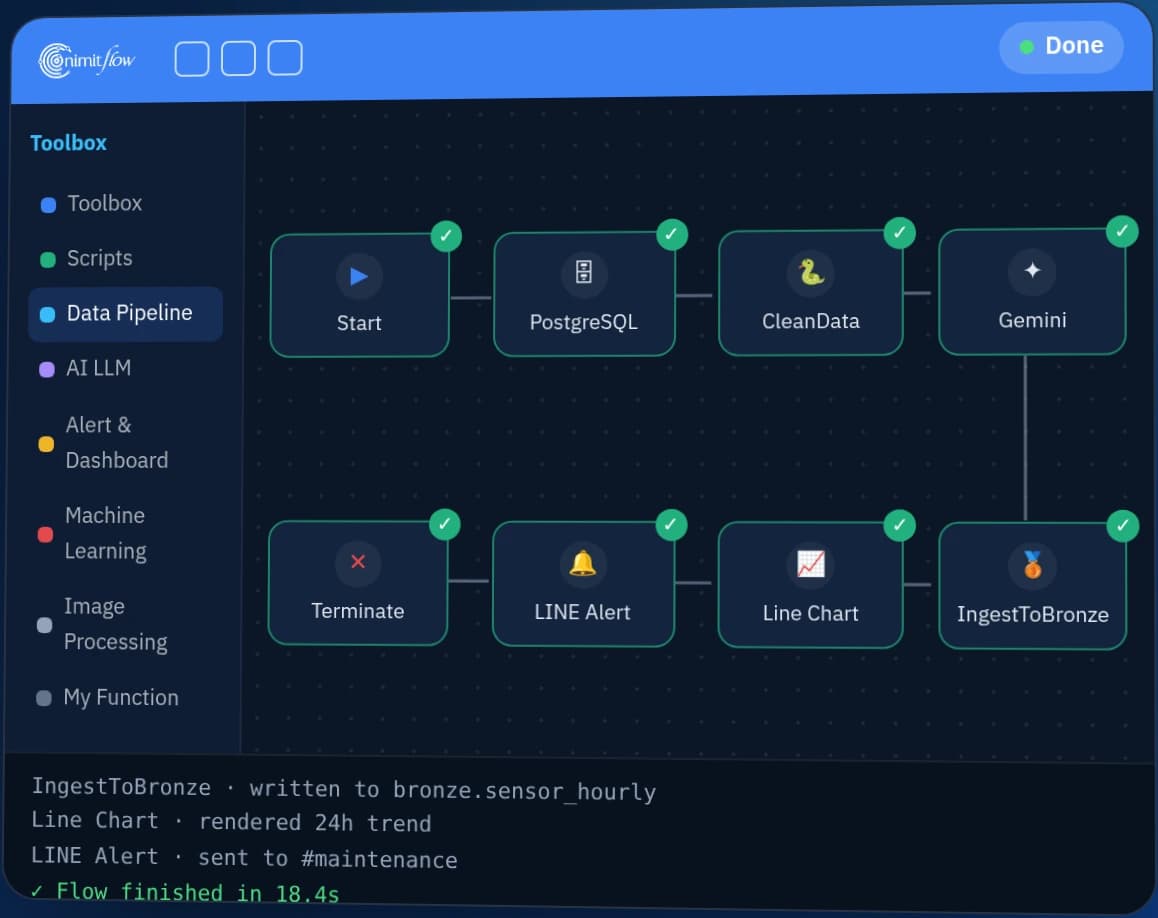
- Built on nimitFlow, with options to combine digital report forms, Excel exports and dashboards
- Delivered in 2026 for refinery maintenance work
Is it suitable for your work?
Who is it suitable for?
A team of knowledge workers and engineers who need to find answers from many organizational manuals and documents
Prepare information before talking
Document types, sample questions and data access requirements
Summary
- Enterprise KM Chatbot is Inspektion's enterprise AI chatbot that answers questions from internal documents, such as maintenance reports, machine manuals and SOPs. Users can ask in Thai.
- Enterprise KM Chatbot combines RAG (retrieving relevant documents before answering) with an LLM (large language model) and identifies source documents in its answers, allowing users to open and verify the originals.
- In 2026, Inspektion delivered an AI valve maintenance history search system for refinery maintenance work involving around 2,000 PDF reports.
- Enterprise KM Chatbot is built on nimitFlow and can be installed on your organisation's server (On-Premise).
- Enterprise KM Chatbot has no published price. Pricing depends on document volume and format, user count and scope. You can start with a prototype (POC) using a small document set.
Who is Enterprise KM Chatbot for, and what problems does it solve?
Enterprise KM Chatbot suits maintenance teams, engineers and knowledge management teams searching large collections of reports, machine manuals and SOPs. Type a question in everyday language; the system retrieves relevant documents and answers with source references, so you do not need to open files one by one.
Knowledge used in factories and power plants is often scattered across maintenance reports, manuals and SOP files, with some held by senior engineers. Teams may need to open many files to answer a single question. Enterprise KM Chatbot organises these documents into a knowledge base that can be searched by asking questions.
Enterprise KM Chatbot users
- Maintenance teams and engineers who regularly search equipment history by Tag No. or consult manuals
- Knowledge Management teams responsible for organisational standards documents
- Maintenance contractors who need to submit well-organised reports to factory owners
- Organisations with a policy of keeping documents on their own servers
| Common Problems | How Enterprise KM Chatbot helps |
|---|---|
| Searching maintenance history and machine manuals across multiple files | Type a question and receive an answer identifying relevant reports or manuals, helping you find repair information faster |
| Engineering knowledge held by staff approaching retirement | Preserve knowledge from expert reports and documents in a digital repository that the next generation can search |
| Large numbers of standards documents and SOPs make specific topics hard to find | Ask directly about the topic you need without opening each document's table of contents |
How does Enterprise KM Chatbot work, and how can answers be checked?
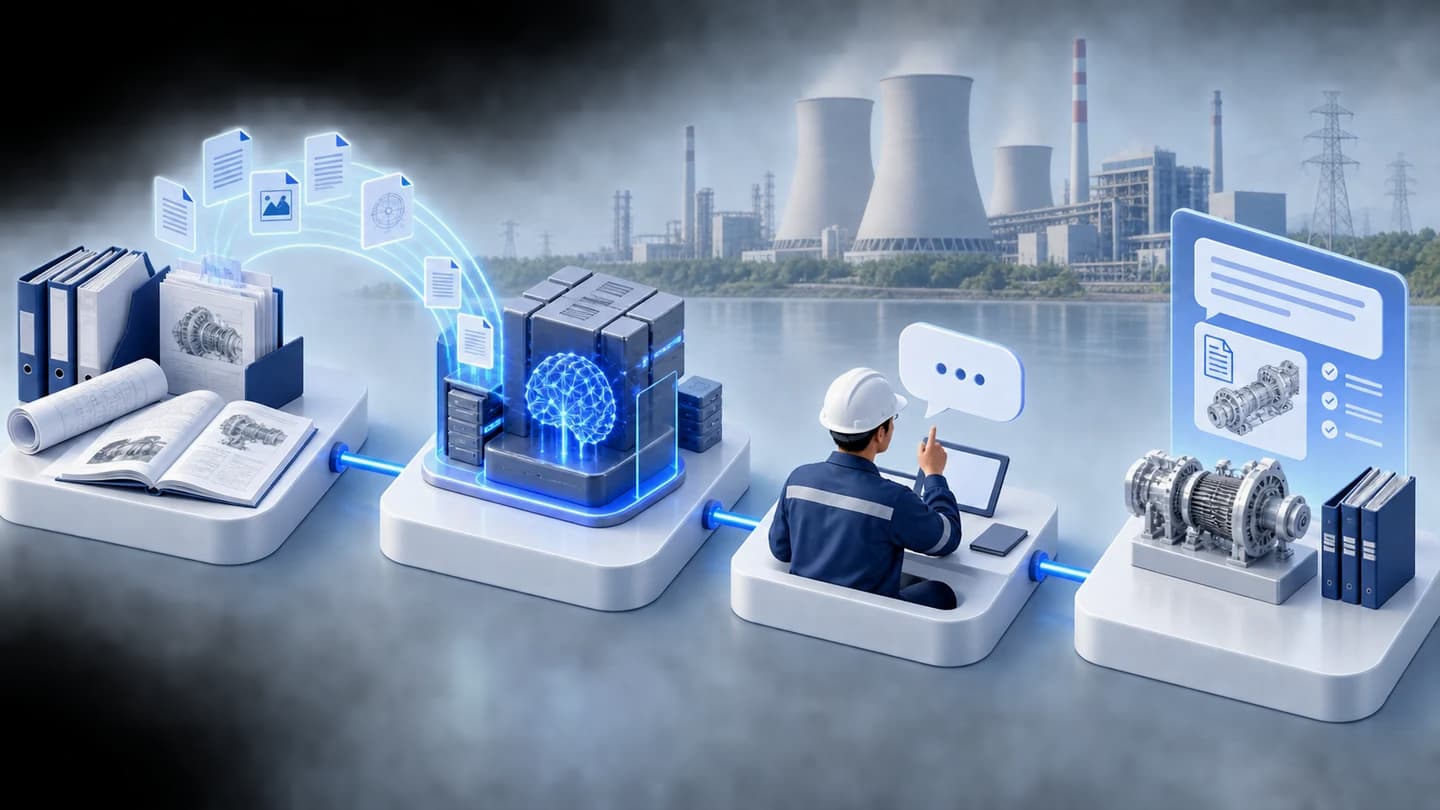
Enterprise KM Chatbot works in 4 stages: collect documents, structure and index them, ask through chat, then verify and improve. Answers identify the documents used, allowing users to check the originals before acting on them.
- 1
Collect documents
Import existing maintenance reports, manuals and internal documents, including existing PDFs and new data entered through digital forms on nimitFlow.
- 2
Structure and index documents
The system processes and indexes documents to make them searchable. For reports using a common form, it structures the data by field, such as equipment Tag No.
- 3
Ask through chat
Type a question in everyday language on the website. The system retrieves relevant documents, then the LLM composes an answer identifying the documents used. Conversation history is saved for later review.
- 4
Verify and improve
Users open the documents cited in an answer to verify it before use. After delivery, we improve the system based on user feedback, subject to the quotation's terms.
What is an LLM?
An LLM (Large Language Model) generates text by predicting what comes next from the input it receives. It can therefore produce fluent answers that are incorrect. Enterprise KM Chatbot does not rely solely on the model's general knowledge to answer.
What is RAG?
RAG (Retrieval-Augmented Generation) first retrieves organisational documents relevant to the question, then lets the LLM compose an answer from the retrieved content. Answers can therefore be grounded in actual documents and identify their sources.
How do we verify answers?
- Answers identify source documents, such as a report's Tag No. Users should open and review those reports before using an answer to make decisions.
- Questions involving counts across the entire collection need to be designed to use structured database data. We therefore agree on question types with you at the start; see “What we learned” for the reasons.
- Before delivery, we test answers against questions your team actually asks.
- We do not publish a universal accuracy figure because answer quality depends on each organisation's documents and questions.
What can Enterprise KM Chatbot do?
Enterprise KM Chatbot combines document-based Q&A, digital report forms, Excel exports and dashboards in one system on nimitFlow. Supporting features are designed around each organisation's documents.
- Natural-language Q&A — supports Thai documents and questions
- Source references — answers identify the reports used, such as by Tag No.
- Browser-based chat — includes search and conversation history
- Digital report forms — enter new reports and attach images; submitted reports enter the knowledge base
- Excel export — export reports as Excel files for further use or sharing
- Dashboard — groups reports by production unit
Where are documents and questions stored?
Enterprise KM Chatbot can be installed on your organisation's server (On-Premise) and use an internally hosted LLM (Local LLM). Together, these allow documents and questions to remain within your organisation's network. If you choose an external LLM service, we explain which text will be sent outside before you decide.
Server specifications depend on document volume, user count and the chosen LLM. We assess these before quoting. If you want all AI processing to run internally, we can supply and install an AI server system.
Which tasks suit Enterprise KM Chatbot, and which do not?
Enterprise KM Chatbot suits finding and summarising content in consistently formatted documents, such as inspection and repair reports using the same form. It is not suitable for making decisions from answers without checking the source documents, because LLMs can be wrong. Answer quality depends on the completeness and consistency of the imported documents.
| Job | Suitable for Enterprise KM Chatbot? | Reasons or things to do |
|---|---|---|
| Search repair history across many reports using the same form | Suitable | Organise reports by equipment Tag No. and ask questions. This is the type of work we have already delivered. |
| Find topics in machine manuals or SOPs | Suitable after testing with actual documents | Our delivered case used inspection and repair reports, so we test your sample manuals or SOPs first. |
| Documents with inconsistent headings and units | Usable, but data must be organised first | Reports with the same form and units are easier to structure and support more relevant answers. |
| Count or aggregate figures across the collection, such as “How many reports are there for this brand?” | Additional design required | Must be designed to answer from structured database data, not RAG alone |
| Image descriptions (captions) | Must be defined at the start | Agree before starting whether the system should read this text. |
| Search documents that must remain within the organisation's network | Suitable | Deploy On-Premise and use an internally hosted LLM |
| Use answers to make decisions without opening source documents | Not suitable | LLMs can be wrong. Users should open and review the documents identified in the answer first. |
| A ready-made chatbot that can be downloaded and used immediately | Not suitable | The system must be configured for each organisation's documents and questions. |
Scope agreed after reviewing documents
Supporting features, including report forms, Excel exports and dashboards, are designed around each organisation's documents. We confirm the actual scope after reviewing your samples.
Where have we used Enterprise KM Chatbot, and what did we learn?
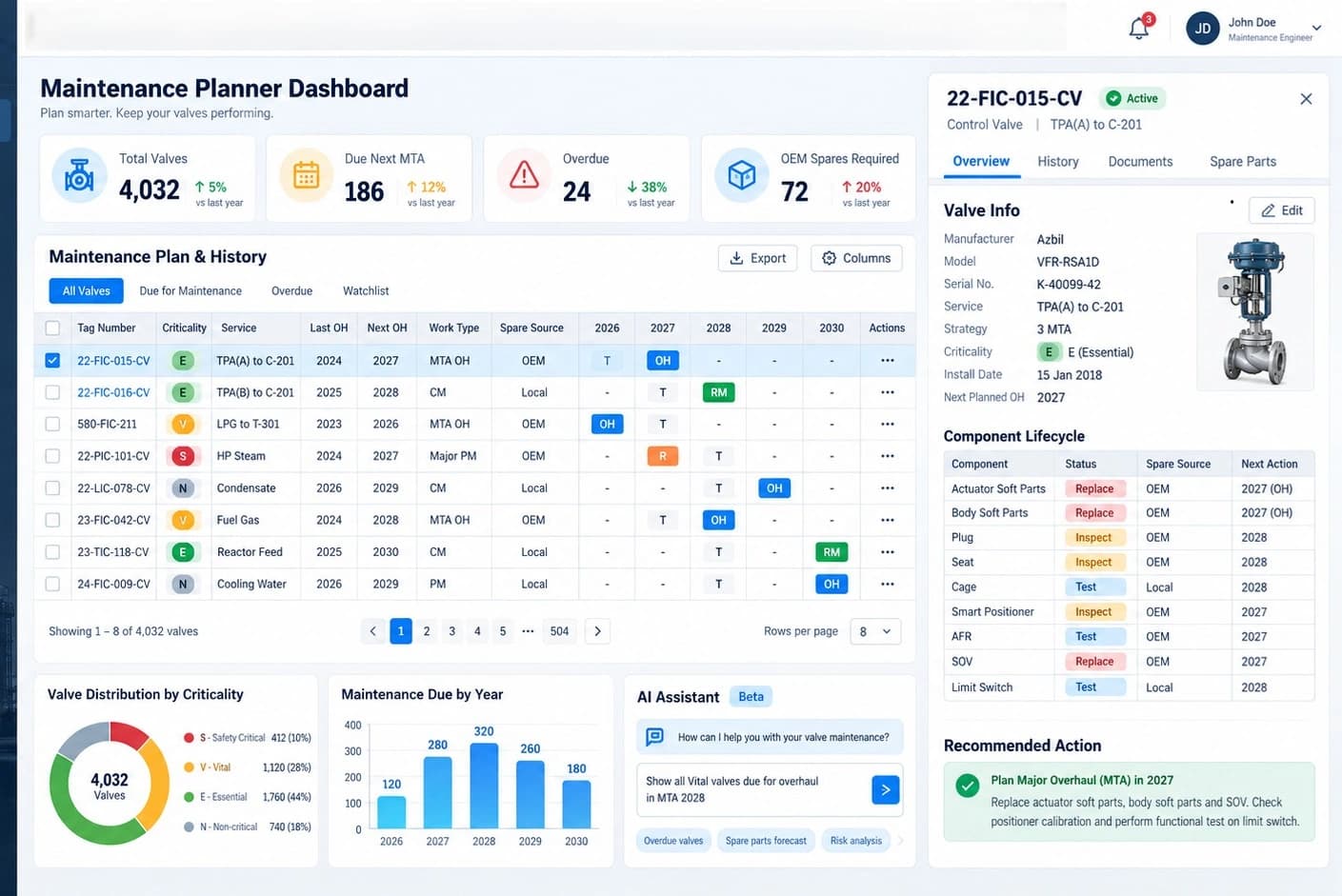
We developed an AI Knowledge Management system on nimitFlow for refinery control valve maintenance in the energy industry and delivered it in 2026. The inspection and repair history was held in around 2,000 PDF reports organised by Tag No. (each valve's identifier). The system includes digital report forms, Excel report exports, a dashboard grouping reports by production unit, and Enterprise KM Chatbot combining an LLM with RAG.
The project began as a demonstration prototype (POC) and was then developed into an operational system. The client signed a Job Completion Certificate. The AI assistant is designed to answer questions such as “What has been replaced on this valve?” and identify the Tag No. of relevant reports so users can open the actual reports.
Read full case
What we learned
RAG retrieves only a subset of the most relevant documents, so it suits questions answered by a few documents. Collection-wide counts, such as “How many reports are there for this brand?”, must therefore be designed to use structured database data. Letting the LLM count by itself can produce incorrect figures.
Reports using the same forms, headings and units are easier to structure and help AI answer more precisely. On-site users need to review specialist terms and form headings so they match the reports their team uses.
What does it mean to you?
Your project therefore starts with actual document samples and frequently asked questions from your team. We distinguish document-content questions from numerical questions at the outset, then test answers against that list before delivery. You can begin with a prototype (POC) and a small document set, then expand to all documents.
Technical specifications
| Type | AI assistant software for Q&A using organisational documents (Knowledge Management) |
|---|---|
| Usage | Accessible via web browser |
| Language | Supports Thai documents and questions |
| Knowledge sources | Maintenance reports, manuals, SOPs, internal documents (such as PDFs) and data entered through digital forms |
| Answering method | RAG retrieves relevant documents first, then the LLM composes an answer identifying its sources |
| Underlying platform | nimitFlow |
| Installation Format | Can run on your organisation's server (On-Premise) |
| Deliverables | Installed system, project documentation and user manual |
The LLM, supported document volume and minimum server specifications are defined for each project. The product documentation does not yet specify universal figures.
Architecture and Connectivity
KNOWLEDGE → ANSWERS
From scattered documents to answers with sources
nimitFlow connects document preparation, search and language models so your team can ask for the information they need and check the original documents.
 Enterprise KM Chatbot
- 01DOCUMENTS
Import documents
PDF reports, manuals, SOPs and digital form data
Source documents - 02NIMITFLOW
Organise data for search
Structure and index data, connecting workflow steps in nimitFlow
Knowledge base - 03RAG + LLM
Retrieve before composing
RAG retrieves relevant documents, then the LLM uses that information to compose an answer
Answers based on retrieved information - 04ANSWER + SOURCE
Ask and check the source
Ask in chat and open the cited documents to check before using the answer
Answers with document references
RAG = retrieves information to support an answer · LLM = a language model that helps compose it
Example question flow · Concept illustration
Answers depend on document content and testing for each project
TECHNOLOGY STACK
A connected technology stack
See each system's role, from source data to the user interface
nimitFlow
Manage forms, workflows and data connections across the system
- Forms
- Workflow
- Dashboard
Documents + search index
Structure data to retrieve relevant documents and export reports to Excel
- Index
- Excel
RAG + language model
Connect retrieved information to an internal LLM or an external service, according to your data policy
- RAG
- Local LLM
- External LLM
Server + web browser
Can be installed on your organisation's server; users ask questions and view answers in a web browser
- On-Premise
- AI Server
- Web UI
Choose the language model, search tools and server specifications according to each project's document volume, user count and data policy
Connectable system
- nimitFlow — the platform for building the system, forms, workflows and dashboards
- An internally hosted LLM (Local LLM) or external LLM service, according to the agreed data policy and scope
- Export reports as Excel files with a table-of-contents sheet
System Requirements
- Users access through web browser
- Can be installed on your organisation's server (On-Premise). Server specifications depend on document volume, user count and the chosen LLM; the team assesses them before quoting.
- If you want all AI processing to run internally, Inspektion can supply and install an AI server system.
- Source documents in file formats such as PDF, or data entered through digital forms
Licensing Models
Price quote based on project scope
No published price. Pricing depends on document volume and format, user count and functionality scope. Request a quotation from the team.
- Start with a prototype (POC), a small document set and your team's frequently asked questions before expanding to an operational system.
- Delivered as an installed system with project documentation and a user manual
Industries Used
- Energy — refinery maintenance (control valve inspection and repair history search)
How do I get started with Enterprise KM Chatbot?
Get started with Enterprise KM Chatbot in 3 steps: book a demonstration, send sample documents for assessment, then begin with a prototype (POC) and a small document set. There is no ready-made package to download because the system must be configured for each organisation's documents and questions.
What to prepare
- Types of documents to import and actual document samples
- Examples of questions your team frequently asks
- Data access requirements — who can see which documents
- Your organisation's data policy — whether deployment must use your own server and an internal LLM
- Estimated number of users
Frequently Asked Questions
Do data and documents leave the organisation?
They do not need to if the system is installed on your organisation's server (On-Premise) and uses an internally hosted LLM. With both, documents and questions remain within your organisation's network. If you choose an external LLM service, we explain which text will be sent out before you decide.
Does it support Thai?
Yes. Enterprise KM Chatbot can import Thai documents and handle questions and answers in Thai.
Can AI give wrong answers, and how are answers verified?
Yes. An LLM generates text by predicting what comes next, so it may produce a fluent but incorrect answer. The system therefore retrieves relevant documents before answering (RAG) and identifies its sources, which users can open to verify. Collection-wide counts must be designed to use structured database data because letting the LLM count can produce incorrect figures. We test against your actual questions before delivery.
Can it use existing PDF documents?
Yes. The refinery maintenance case started with existing PDF reports, first organising their data into a common structure. New reports are entered through digital forms on nimitFlow.
How long does it take to get started?
Timing depends on your organisation's document volume and formats. We estimate the plan after reviewing samples and discussing your initial requirements. We recommend starting with a prototype (POC) and a small document set.
How much does Enterprise KM Chatbot cost?
Enterprise KM Chatbot has no published price. Pricing depends on document volume and format, user count and functionality scope. We provide a quotation after reviewing your document samples and requirements.