




Predictive Analytics
Analyse sensor, machine or IT data through Nimitflow, from ingestion and storage to FFT signal analysis and Machine Learning model development for your organisation’s needs. Connect results to dashboards, reports and alerts so your team can monitor trends and plan work.
Explore Usage and Details
- Forecast anomalies and trends from historical and ongoing data using Machine Learning
- Test models with both historical data (Back-test) and real-time data before use
- Deploy on your organisation’s servers (On-Premise), separately from existing systems
See Additional Features
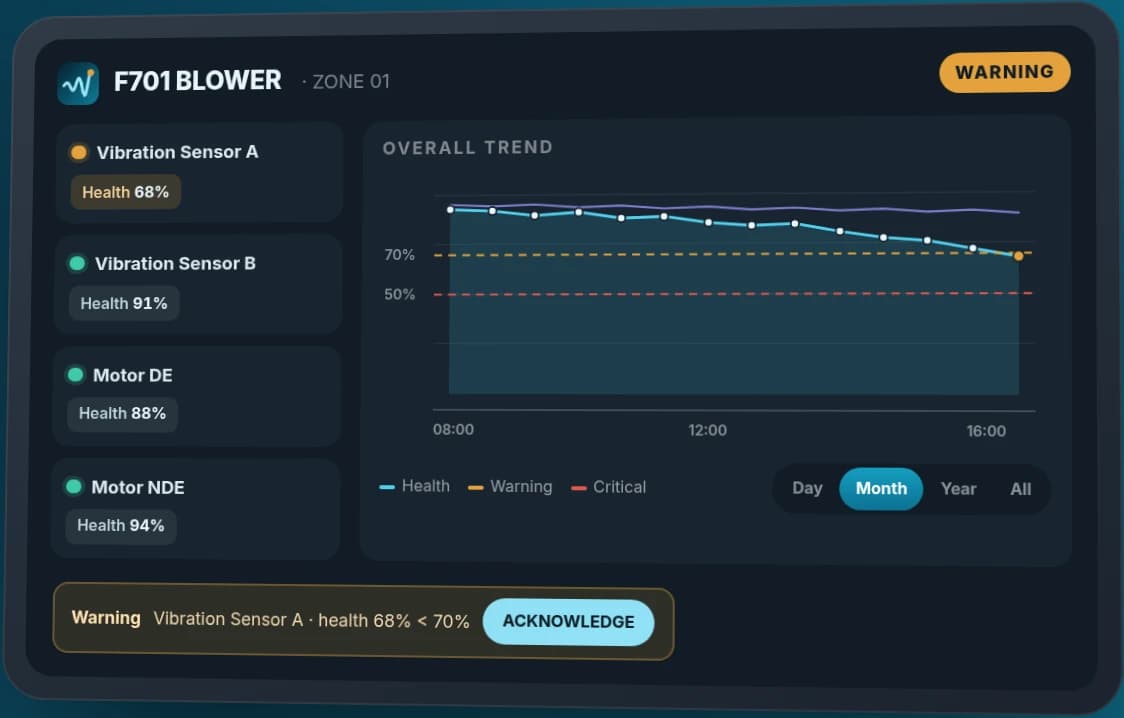
- Charts compare actual and forecast values, with alerts via email or your organisation’s existing channels
- Retrain models when data or system behaviour changes
- Every project starts with a data readiness assessment
Is it suitable for your work?
Who is it suitable for?
Data analysis teams, production departments, and maintenance teams with historical data and a need for trend forecasting
Prepare information before talking
Forecasting objectives, historical data samples and preferred evaluation methods
Summary
- Predictive Analytics is forecasting software for which Inspektion develops Machine Learning models using each organisation’s data to identify anomalies and trends before problems occur, then displays charts and alerts to support your team’s decisions.
- Inspektion developed and installed a Machine Learning system to forecast transaction response-time anomalies 5 and 10 minutes ahead for a client in Thailand’s financial industry, on the client’s own servers, and prepared project closure documentation in 2022.
- A related factory project is a mould shot-counting and maintenance reminder system delivered by Inspektion to an automotive parts manufacturer in Thailand and Cambodia in 2021–2022. It uses threshold alerts and is not yet a forecasting model.
- Every project begins by assessing data readiness, because forecasting accuracy depends on data completeness and models must be retrained when the data changes.
- Choose the system for the task: use InCBM to monitor machine condition directly from vibration sensors, Predictive Analytics to forecast from multiple data sources, and start with Data Lakehouse (a system that unifies data from multiple sources for analysis) if your data is scattered across systems.
From sensor data to charts and alerts
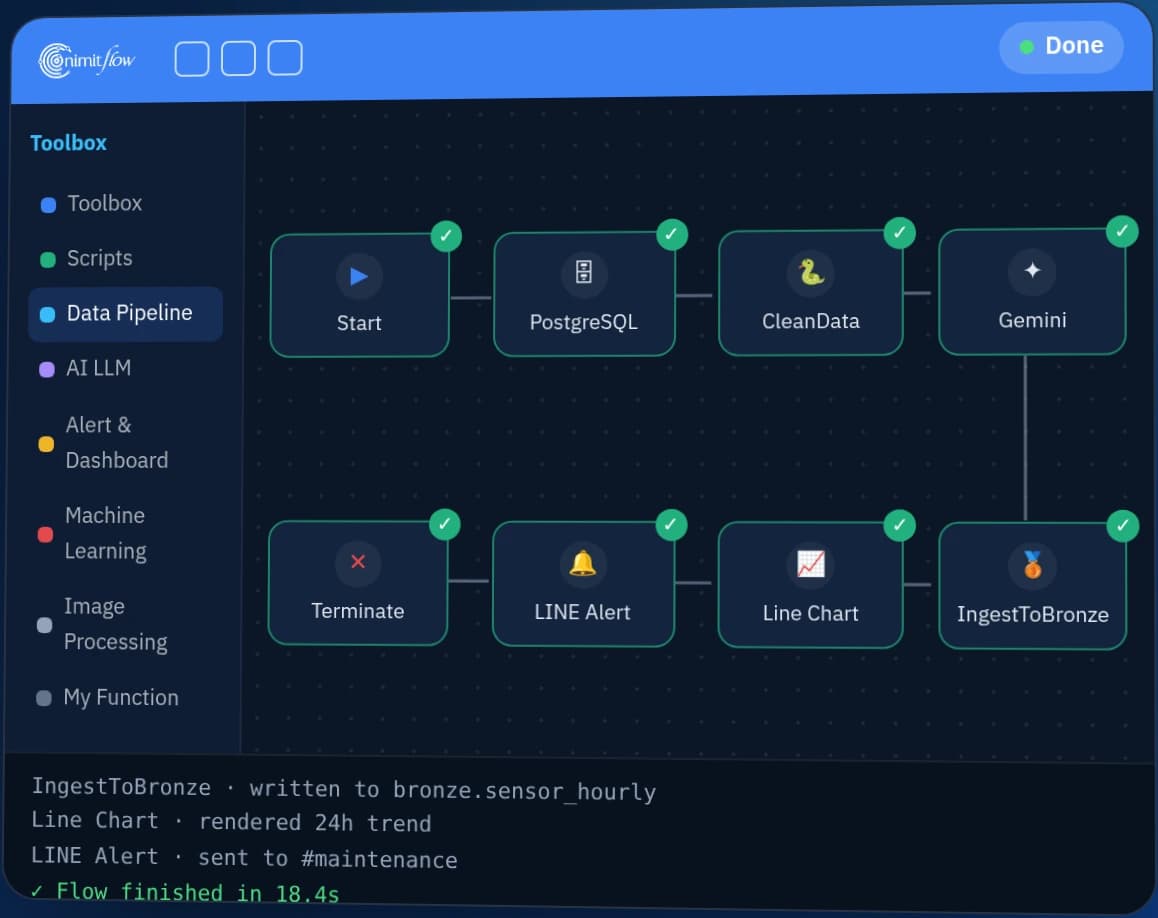
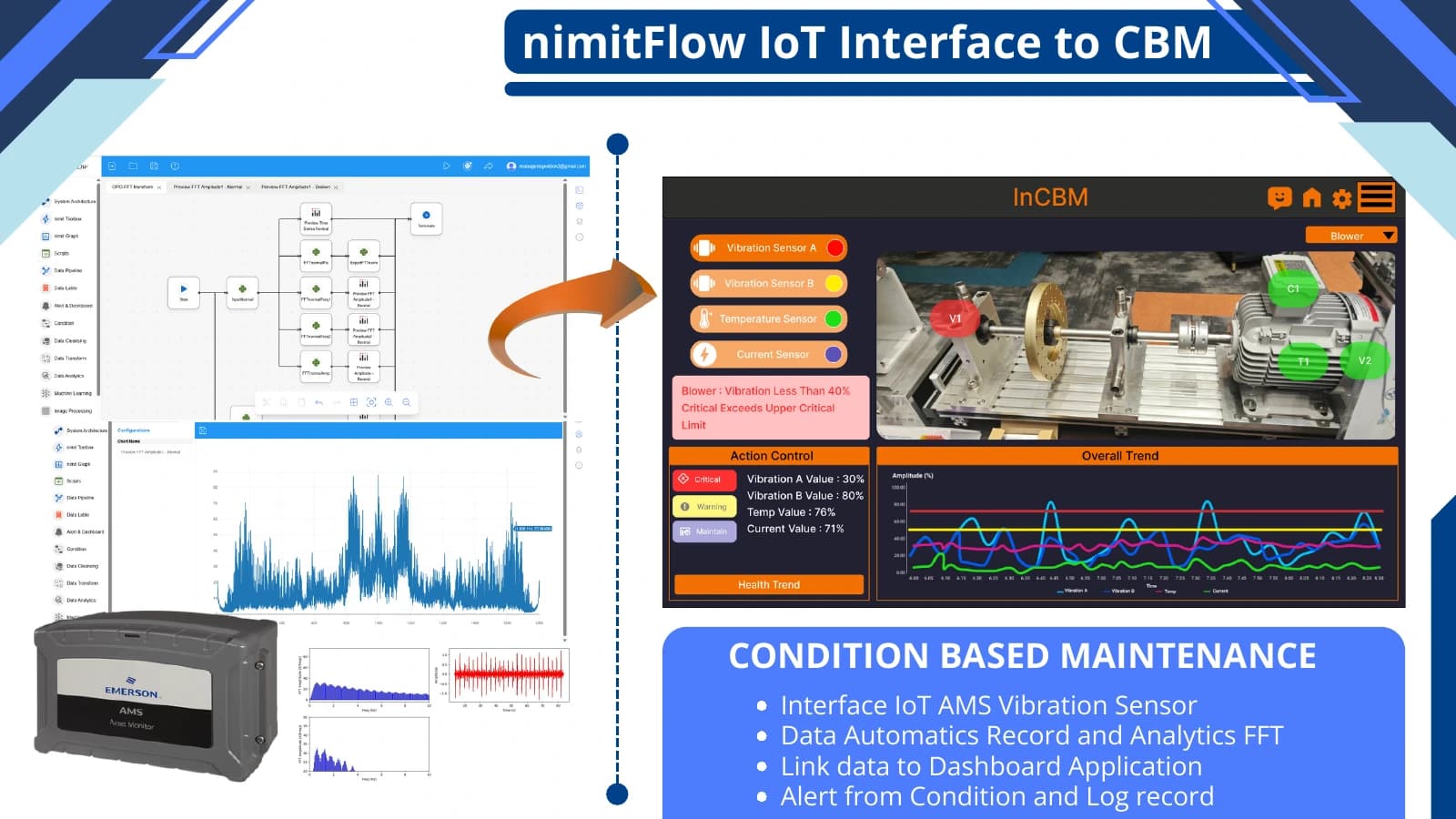
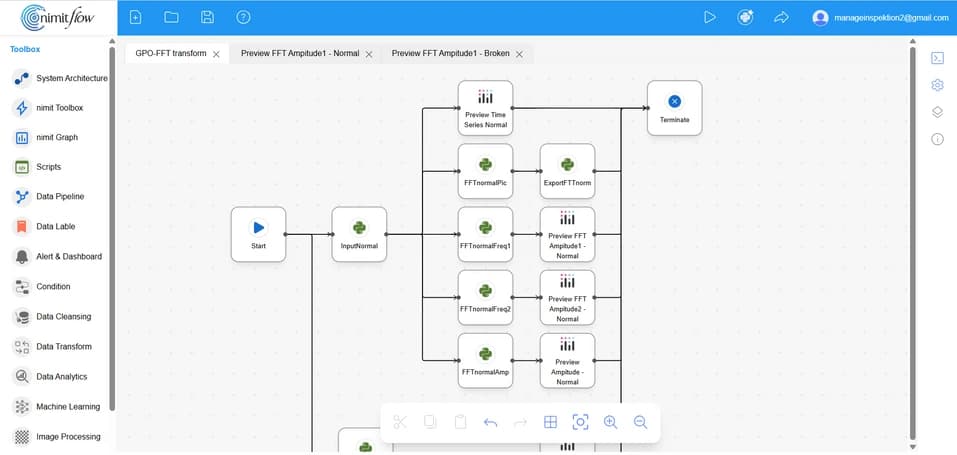
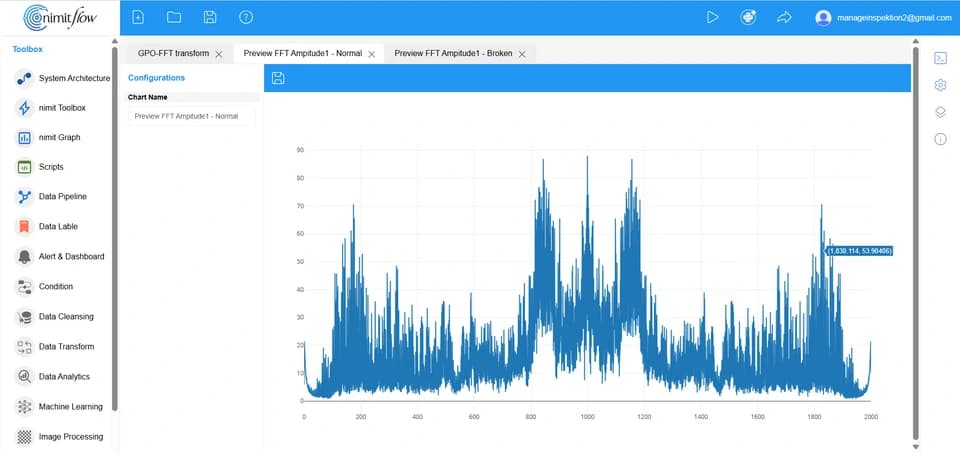
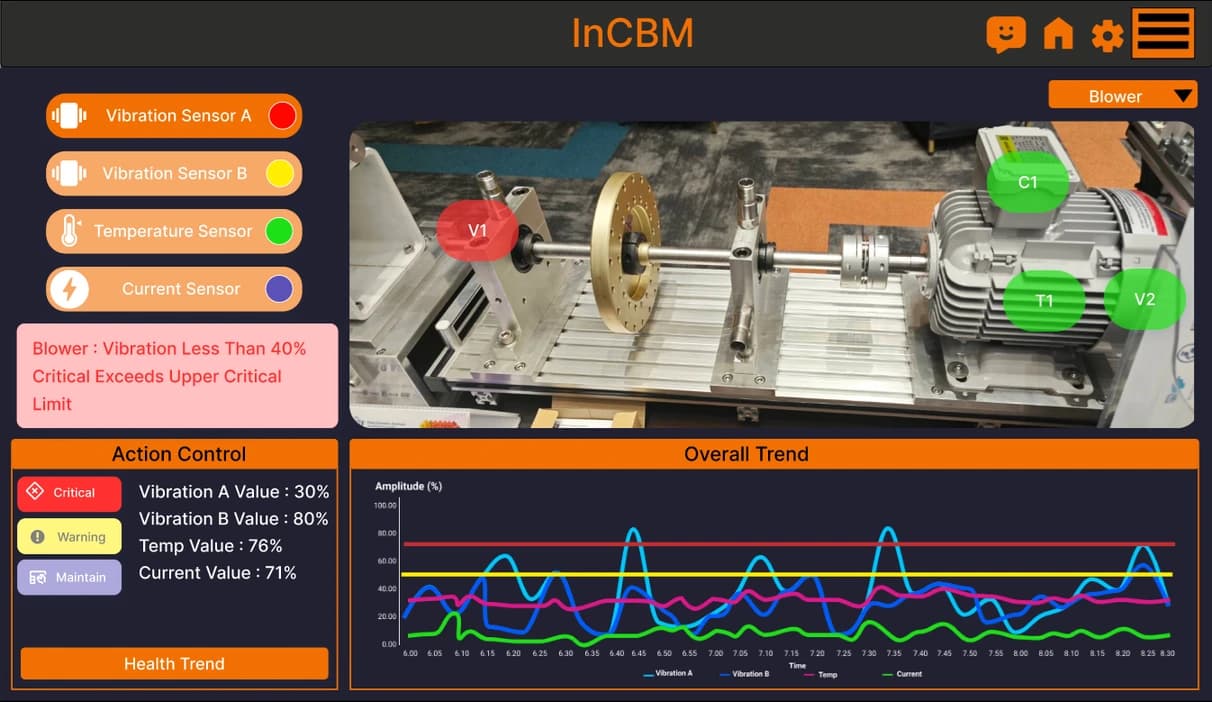
The example in the Nimitflow documentation shows data ingestion from AMS vibration measurement equipment, followed by recording and FFT analysis (separating signals by frequency), then forwarding to the InCBM dashboard to view charts, trends and alert history.
- 1
Ingest and store data
Connect sensors or data sources to a Workflow in Nimitflow to continuously record data and history
- 2
Analyse signals and develop models
Use FFT to inspect a signal’s frequency components and prepare data to train Machine Learning models for the forecasting objective, testing results before deployment
- 3
Visualise results and share them with the team
Connect results to dashboards such as InCBM or Grafana, with alert conditions, event logs and reports as specified in the system scope
Choose the analysis method that fits the task
FFT and threshold alerts support signal analysis and condition monitoring. Machine Learning forecasting requires data to train and validate models. This example illustrates system integration, not evidence of model accuracy.
Who is Predictive Analytics for, and what problems does it address?
Predictive Analytics suits teams that already have historical machine, production-process or IT data and want warning signs before problems occur. Machine Learning learns patterns from existing data and forecasts future values. When a forecast meets a configured threshold, the system alerts the team to investigate.
Many organisations discover problems only after a machine stops or defects occur, or maintain equipment on a fixed schedule without considering its actual condition. Early signals often already exist in recorded data. Predictive Analytics analyses that data continuously, leaving your team to decide how to respond.
What Predictive Analytics can do
- Predictive Maintenance — analyse machine data, such as injection moulding shot counts, to provide advance notice of preventive maintenance schedules
- Forecast quality trends — monitor trends in continuous production-process data to adjust the process before defects occur
- Anomaly Detection — forecast future values and display charts comparing actual and forecast values
- Alerts — notify the relevant team via email or existing organisational channels when analysed values meet criteria requiring action
| Common Problems | How Predictive Analytics helps |
|---|---|
| Problems become visible only after they occur | Forecast values ahead of time, giving the team time to investigate beforehand |
| Time-based maintenance without considering actual usage | Start with alerts based on actual shot counts, then use accumulated data for forecasting |
| Data exists, but nobody monitors it continuously | Continuous analysis with dashboard charts comparing actual and forecast values |
| Data cannot be exported outside the organization | Installed on your organisation’s servers (On-Premise) |
How does forecasting differ from threshold alerts?
A threshold alert triggers when a current value reaches a set number, such as a shot count reaching the maintenance interval. Forecasting uses a model to predict future values from patterns in historical data, then alerts before actual values become abnormal. If there is not enough accumulated data yet, start with threshold alerts.
How Predictive Analytics works
Predictive Analytics follows 5 steps: assess data, prepare data, train and test models, deploy with alerts, and maintain models after deployment. The first step defines the project scope, because available data determines how far ahead forecasting is possible.
- 1
Explore and assess data readiness
We review your forecasting objectives, historical data samples and preferred evaluation methods to assess whether there is enough data for forecasting.
- 2
Prepare and clean data
Extract data from source systems, remove erroneous or missing values, then format it for model training
- 3
Train and test models
Train a time-series forecasting model (time-series data is ordered by time), then test it with historical data (Back-test) and real-time data before use
- 4
Deploy and enable alerts
Deploy on your organisation’s servers, display actual-versus-forecast charts on a dashboard, and send alerts when values meet configured thresholds
- 5
Maintain and retrain models
Review data and forecasting charts periodically, and retrain models when data or system behaviour changes
The system only displays results and sends alerts. It does not stop machines or change operating settings automatically. When an alert arrives, your team decides whether to inspect, repair or adjust the process.
Which tasks suit Predictive Analytics, and which do not?
Predictive Analytics suits tasks with continuous historical data, a clear forecasting objective and an accountable person to respond to alerts. It does not suit tasks with no recorded data or expectations that the system will decide for the team. In those cases, start by collecting data or using threshold alerts.
| Job | Is it suitable for Predictive Analytics? | Reasons or things to do |
|---|---|---|
| Forecast anomalies from continuously recorded time-based data, such as transaction or system-operation data | Suitable | This matches the financial-industry transaction system case, which uses a time-series forecasting model |
| Data cannot be exported outside the organization | Suitable | Deploy on your organisation’s servers, separately from existing systems |
| Schedule mould maintenance based on shot counts | Start with threshold alerts | If the machine already saves shot data in files, shot counting and maintenance reminders can work without a model |
| Use models to forecast quality or maintenance trends on production lines | Possible; no delivered case yet | Delivered factory projects use threshold alerts. We first assess your actual data during discovery. |
| Data is scattered across multiple systems | Possible once the data is consolidated | Structure the data with Data Lakehouse first, so the model receives complete and consistent data |
| Monitor motor condition using vibration sensors | Use InCBM | InCBM summarises health readings for each sensor and lets you set Warning/Critical thresholds |
| No historical data yet, or records are on paper | Not suitable yet | Start collecting data continuously, then reassess readiness |
| Expect the system to stop machines or release work automatically | Not suitable | The system displays results and sends alerts; your team makes the decisions |
| Need an accuracy figure before starting the project | Discuss requirements first | Accuracy depends on your data. We agree on evaluation methods during discovery, then measure it through Back-test and Real-time testing. |
InCBM
- Monitor machine condition directly from vibration sensors
- Summarise health readings per sensor and set your own Warning/Critical thresholds
- Download the Android app to try it
Predictive Analytics
- Forecast from multiple sources, including machines, production processes and IT systems
- Train models using each organisation’s data and objectives
- Pricing depends on data and process scope
Summary: The systems can work together — choose based on whether you need to monitor machine condition or forecast from multiple data sources
Our data forecasting experience and lessons learned
We have worked on 2 related types of project. The first was a Machine Learning system forecasting transaction anomalies in Thailand’s financial industry in 2021–2023. The second was a mould shot-counting system with threshold-based maintenance reminders for the automotive parts industry in Thailand and Cambodia in 2021–2022. The first uses a forecasting model; the second uses counting and thresholds, not a forecasting model.
Forecasting transaction anomalies · Financial industry · Thailand · 2021–2023
In 2021–2023, we developed and installed a Machine Learning system for a client operating payment transaction systems in Thailand’s financial industry. An LSTM model (a neural network for time-ordered data) forecasts transaction response-time anomalies 5 and 10 minutes ahead. It runs on the client’s Production and Development servers, separately from the transaction processing systems.
The system includes model retraining, backup and recovery, and Grafana charts comparing actual and forecast values. We prepared project closure documentation in 2022, followed by contractual maintenance. In 2023, we trialled retraining with 3 additional algorithms — CNN-LSTM, Random Forest and XGBoost — to compare accuracy at each forecast horizon.
Mould shot counting and maintenance reminders · Automotive parts · Thailand and Cambodia · 2021–2022
We delivered a web app with 5 sections for counting injection mould shots to an automotive parts manufacturer in Thailand in 2021, and installed it at its Cambodian production site in 2022. It consolidates shot counts from files generated by 2 machine brands per mould, displays OK / Warning / PM status and sends email alerts for up to 5 conditions per mould. This is threshold-based alerting; continuously collected shot data provides a starting point for maintenance forecasting.
Read full case
What we learned
- Data collection and transformation took significant time early in the transaction forecasting project, so access to historical data must be ready at the start.
- Accuracy depends on data completeness and continuity. Evaluation methods and forecast horizons must be agreed beforehand, for both historical and real-time testing.
- Models need ongoing care after deployment. After project closure, we trialled retraining with other algorithms to compare accuracy and recommended considering server hardware data as additional inputs.
- Use data already recorded by machines before adding sensors, and verify readings against the machines’ report files before using them. In the shot-counting project, the system’s counts matched the machines’ report files in project closure testing.
What does it mean to you?
Before quoting, we request your forecasting objectives and real data samples to check completeness, continuity and the time period covered. If data is insufficient, start with collection and threshold alerts. Post-installation support, such as forecast review and retraining schedules, should be defined in the scope from the outset.
Technical specifications
| Type | Predictive analytics software with models developed and adapted to each organisation’s data |
|---|---|
| Capabilities | Predictive maintenance · Quality trends · Anomaly detection |
| Techniques used in actual projects | Machine Learning with LSTM time-series forecasting · Comparative trials with CNN-LSTM, Random Forest and XGBoost |
| Model testing | Historical data (Back-test) and real-time data |
| Installation | On your organisation’s servers (On-premise) |
| Visualisation | Charts comparing actual and forecast values, such as a Grafana Dashboard |
| Notifications | Email or your organisation’s existing channels |
Technical details come from the company’s actual projects. Models and tools for each project are selected using real data during the design phase.
Architecture and Connectivity
Connectable system
- Your organisation’s Data Lakehouse — a structured data source
- Grafana Dashboard — charts comparing actual and forecast values
- Email or your organisation’s existing notification channels
System Requirements
- Historical data from the machines, processes or systems to be forecast — the required volume is assessed using real data during discovery
- Your organisation’s servers for model training and execution (On-premise) — specifications are set according to data volume during design
- Data Lakehouse is not required beforehand if the data is already ready to use
Licensing Models
Price quote based on project scope
Pricing depends on the scope of data and processes to be forecast. Contact our team for a quotation.
- The team assesses data readiness during discovery before proposing scope and pricing
- Post-handover support, such as data checks, forecast chart reviews and model retraining, is agreed in the scope of work
Industries Used
- Finance — forecasting anomalies in payment transaction systems
Workflow and screen examples from Nimitflow documentation
How to get started
Send us your forecasting objectives and data samples. We assess data readiness during discovery, then propose the scope of work and a quotation.
What to prepare
- Forecasting objectives — what you want to know in advance, such as maintenance schedules, quality trends or system anomalies
- Historical data samples and the systems or files that currently store the data
- Preferred evaluation methods and forecast horizon
- The person responsible for responding to alerts and your organisation’s existing notification channels
Frequently Asked Questions
How much historical data is needed before forecasting can begin?
There is no minimum that applies to every task. The amount depends on the data, process and desired forecast horizon. We assess readiness from actual data samples during discovery, before the project starts.
Do we need Data Lakehouse first?
Not always. If your organisation already has ready-to-use data, you can start immediately. If data is scattered across systems, we recommend structuring it with Data Lakehouse first so the model receives complete and consistent data.
Does data have to leave the organisation?
No. Predictive Analytics can run on your organisation’s servers. In the transaction forecasting project for a client in Thailand’s financial industry, the system runs on the client’s own Production and Development servers, separately from transaction processing, with backup and recovery. Each project’s deployment setup is defined during design.
Will the model remain accurate when data changes?
Not always. When data or system behaviour changes, models need retraining because accuracy depends on data completeness. The transaction forecasting system includes retraining, and after project closure we trialled other algorithms to compare accuracy. We recommend ongoing training and considering relevant additional input data.
How does Predictive Analytics differ from InCBM?
InCBM monitors machine condition directly from vibration sensor data (Condition-Based Monitoring) and alerts at thresholds you configure. Predictive Analytics forecasts from multiple data sources, covering quality and maintenance, with models trained on each organisation’s data. Both systems can be used together.
How much does Predictive Analytics cost?
Pricing depends on the scope of data and processes to be forecast. We first assess data readiness during discovery, then propose the scope and quotation. Post-installation support is agreed in the scope of work.