




InCBM
InCBM is an Android mobile and tablet app for maintenance teams that translates vibration and temperature sensor values into individual sensor health scores and alerts when values exceed your set thresholds.
Explore Usage and Details
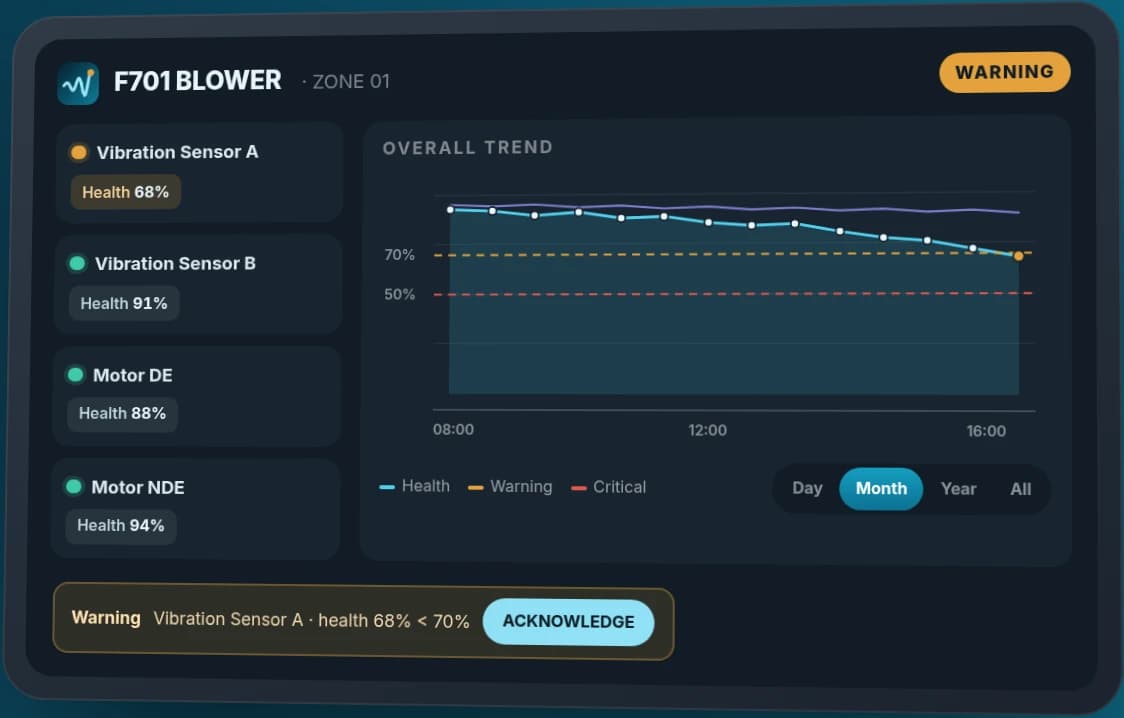
- Each sensor's health score is displayed as a percentage, allowing direct comparison of which points are lower.
- Set Normal / Warning / Critical thresholds (Normal / Watch / Critical) for each sensor individually.
- Overall Trend and Health Trend graphs support viewing historical data
See Additional Features
- Acknowledge alerts and they remain in history.
- Create your own plant layout by zones, machines, and sensors.
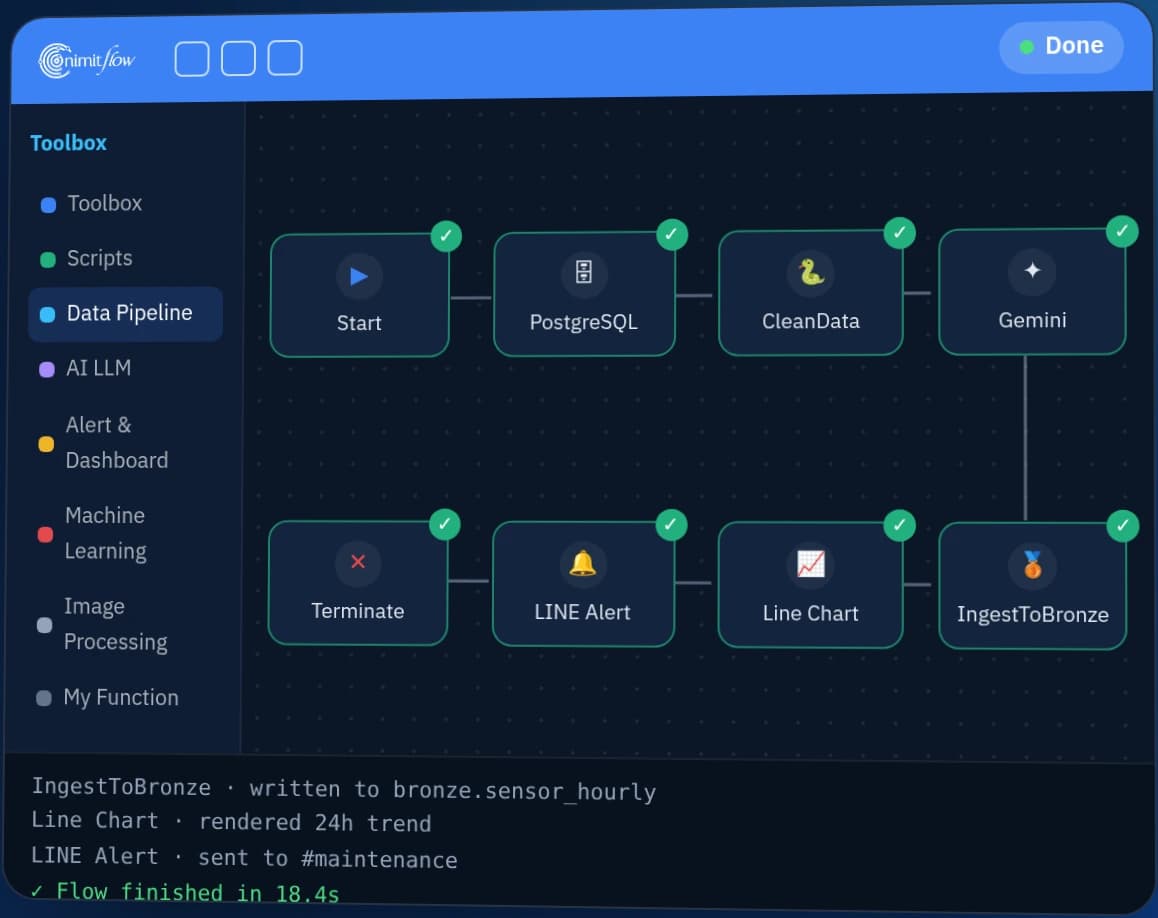
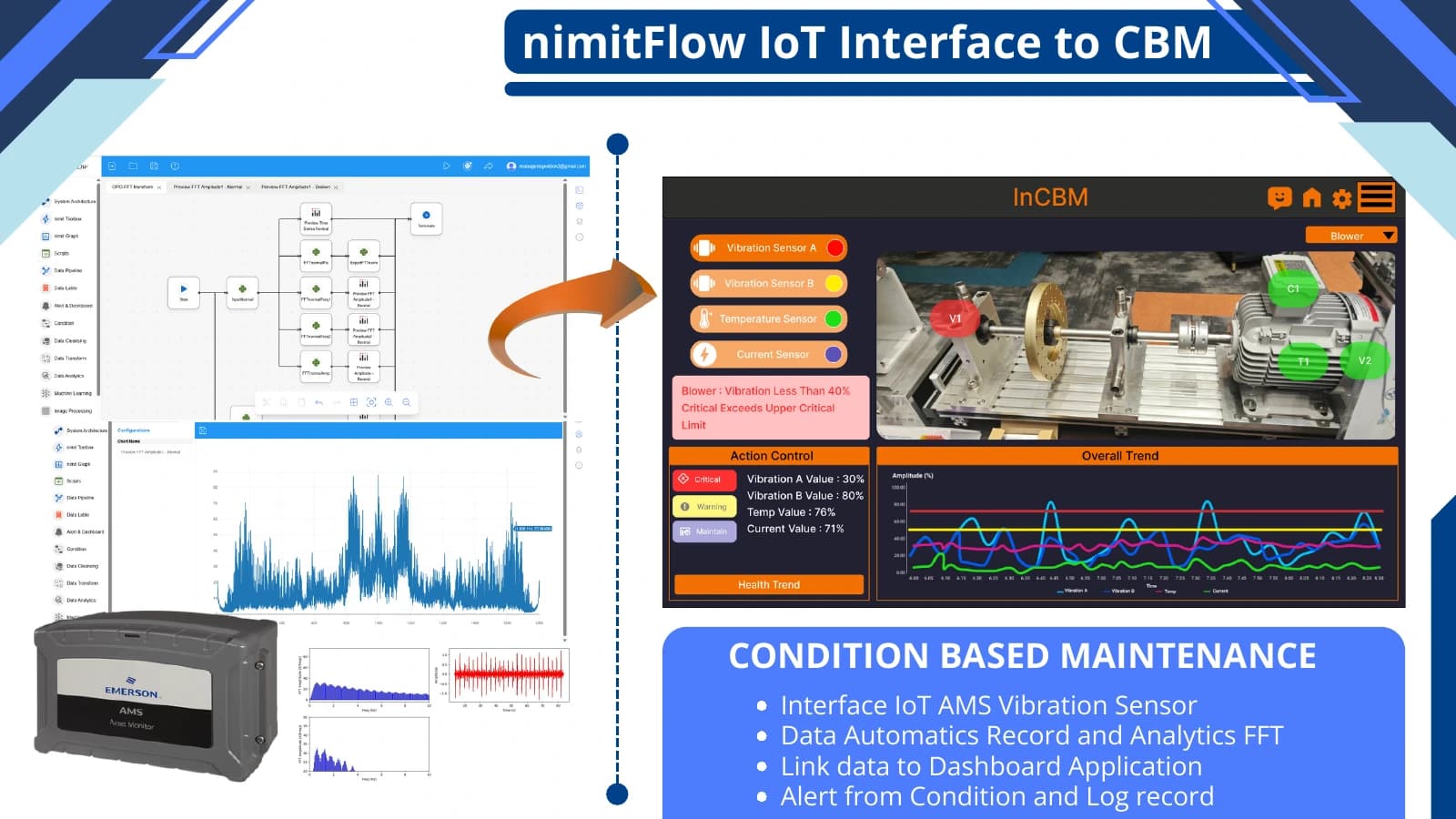
- Receive sensor data through nimitFlow workflow (data receiving and sending process).
Is it suitable for your work?
Who is it suitable for?
Maintenance teams and machinery engineers who already collect sensor signals from machines and want to plan inspections before a machine stops
Prepare information before talking
List of machines, signals collected, and maintenance history available.
Summary
- InCBM is an Android app by Inspektion for monitoring machine health from vibration values on the DE/NDE side (drive/non-drive side of the motor), acceleration (g), and motor temperature. These values are sent to the app via the nimitFlow workflow without manual data entry.
- InCBM displays each sensor’s health as a percentage and assigns 3 status levels: Normal, Warning, and Critical, based on the thresholds you set for each sensor
- InCBM logs time, source, level, and message of every alert. When you acknowledge (Acknowledge) an item, it closes but remains in history.
- During B.E. 2568–2569, we developed a tablet app extending InCBM for a food and beverage factory through a partner. The app reads 76 Tag (data points) from 3 sets of vibration measurement boxes. Client acceptance of this project is still in progress
- InCBM works on Android mobile phones or tablets running Android 6.0 or higher. Download the installation file from incbm.nimitflow.com. For actual factory use and customization work, contact the team to request a quotation.
What is InCBM and who is it for?
InCBM is an Android app for maintenance teams that need to monitor multiple motors, pumps, and blowers without walking from unit to unit. The app receives vibration and temperature values from sensors attached to the machines, summarizes sensor health values, and alerts when values exceed your set thresholds.
Motors, pumps, and blowers often send signals before they fail, such as gradually increasing vibration or becoming hotter than usual. If teams only check these values during routine inspections or wait for monthly reports, they usually find out when the machine has already stopped working. InCBM collects sensor data as a history for each machine, allowing teams to see which machines are starting to malfunction and plan inspections before significant damage occurs.
What is Condition-Based Monitoring?
Condition-Based Monitoring (CBM) is the monitoring of the actual condition of machinery using measurable values from the equipment, such as vibration and temperature, to indicate when the equipment needs maintenance. Instead of repairing based solely on time intervals, CBM uses real-time data to determine when maintenance is necessary.
| Common Problems | How does InCBM help? |
|---|---|
| Check vibration values only during periodic inspections | Collect data from sensors through nimitFlow and store it as a history for each machine |
| Raw sensor data is difficult to read | Display sensor health values in percentage units |
| Find out that the machine is abnormal after it stops | Health Trend graph shows when the value started to decrease |
| Do not know which alert has been handled | Every notification has an Acknowledge button and is stored in history |
What does InCBM do?
InCBM integrates sensor health values, alert thresholds, trend graphs, notification history, and plant layout into a single app. Maintenance teams can see which machines need attention first.
- Home-screen overview — shows the number of machines at Critical, Warning, and Normal levels, along with the latest data update time
- Sensor-level health values — each sensor point has its own health value as a percentage, allowing comparison to determine which points are lower.
- Historical trend graph — Overall Trend and Health Trend plot values over time, showing when values started to decrease.
- Set your own alert thresholds for each sensor — the Condition Alarm page allows you to define what percentage is Normal, what range is Warning, and what is considered Critical.
- Acknowledged notifications — Every time a value goes out of threshold, the system records the time, source, level, and message. When Acknowledge is pressed, the item closes but remains in history.
- Create your own plant layout — create areas or zones, add machines, link sensors to machines, and edit or delete at any level. Data for each account is separate.
What is Sensor Health (Health)?
Sensor health is the evaluation result from InCBM's analysis model, displayed as a percentage per sensor and stored alongside measured values. The lower the value, the more concerning the health status. Alert levels depend on the thresholds you set.
Daily dashboard
| Screen | What is it used for? |
|---|---|
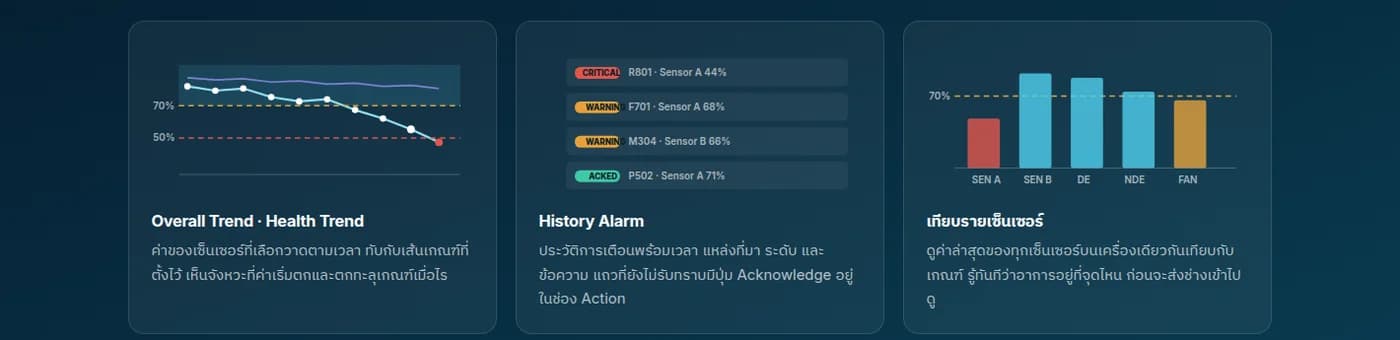
| Overall Trend · Health Trend | The value of the selected sensor plotted over time, overlaid with the set threshold line. See when the value starts to decrease and goes out of bounds. |
| History Alarm | Alert history with timestamp, source, level, and message. Unacknowledged rows have an Acknowledge button in the Action column. |
| Compare per sensor | Latest values of all sensors on the same machine compared to thresholds. Used to find where the problem is before sending a technician to check. |
How does InCBM work?
InCBM works in 4 steps: sign up, map your factory, set thresholds for each sensor, and monitor with acknowledge alerts. Sensor values are sent to the app via the nimitFlow workflow, so you don’t need to key in numbers yourself.
- 1
Sign up
Sign up with your factory email, confirm with an OTP code (one-time password) sent to your email, and start using immediately. If you forget your password, reset it through the same email.
- 2
Map your factory
Create areas or zones according to the actual site, place machines in each zone, and link sensors to the machines with named points.
- 3
Set thresholds for each sensor
Define what percentage and above is normal, which range triggers a warning, and below what level is critical. Adjustments can be made at any time and take effect immediately.
- 4
Monitor and acknowledge
View an overview from the homepage, open sensor graphs when abnormal values are detected, and press Acknowledge once resolved. All history is still available for review.
InCBM does not come with sensors. Machines must have vibration or temperature sensors and a nimitFlow workflow that sends data to the app. If the factory does not have sensors, we assess the site and suggest ways to collect data.
Used in conjunction with InCBM
Which applications suit InCBM, and which do not?
InCBM is suitable for machines with rotating parts, such as motors, pumps, and blowers, that have vibration or temperature sensors and require maintenance teams to see status on mobile devices or tablets. The table below summarizes suitable jobs, jobs that require additional preparation, and unsuitable jobs.
| Job | Suitable for InCBM? | Reasons or things to do |
|---|---|---|
| Motors, pumps, or blowers that already have vibration or temperature sensors attached | Suitable | Send data to the app through the nimitFlow workflow |
| Machines that do not yet have sensors | Must install sensors first | We evaluate the installation point and data collection method before |
| Factories that already have vibration measurement boxes or systems | In some cases, it's customization work | Compatibility depends on how the existing equipment outputs data. We inspect the equipment before providing a quotation |
| Data must be on the factory network | Available in customization work | Install backend system on factory premises server (On-Premise) |
| Install app for the entire factory | OK | Install via MDM (Enterprise Mobile Device Management System) together with the team |
| The system orders the machine to stop itself when abnormal values occur | Not suitable | InCBM alerts on the app, the repair and maintenance team decides whether to stop the machine or perform repairs |
| Analyze quality data and maintenance from multiple sources | Use with Predictive Analytics | InCBM monitors the machine directly from sensors, while predictive analysis uses broader data |
Predictive Analysis
What kind of projects have we extended InCBM to and what have we learned?
Between B.E. 2568-2569, we developed a tablet app extension for InCBM for a food and beverage factory through partners. The factory had already installed vibration measurement boxes at motors, pumps, and blowers, but the measured values were separated into 3 boxes. The app reads 76 Tags (data points) from these boxes via Modbus (industrial device communication standard) and receives data from 5 additional machines via Gateway (sensor signal collector)
The backend for this project runs on a server inside the factory. The app includes a zoned factory layout, status colors for each machine, trend graphs, per-sensor threshold settings, and an alert history with acknowledgement buttons. We have installed the app on 2 factory tablets and delivered the user manual. Client acceptance is still in progress
Read full case
What we learned
Connecting with existing measurement devices depends on how the device sends data out. In this project, the app reads values and event (incident) lists from the measurement box, but cannot read analysis (analysis) messages and cannot send thresholds back to the box because the box does not support APIs (program connection interfaces). Thresholds set in the app are therefore used only within the app itself.
Plant layout, equipment list, and actual equipment images with sensor positions are the main information on the screen. Information and equipment obtained from the user side directly affect the project timeline.
What does it mean to you?
If your factory already has vibration monitoring boxes or systems, we start by checking which data output channels the devices use and what values they can read or write before designing the interface. If there are no sensors yet, we assess installation points and data collection methods first. You can prepare equipment lists, zones, and sensor positions from the beginning to avoid having to modify the plant layout later.
Technical specifications
| Version / Category | InCBM App for Android · Condition-Based Monitoring Equipment Surveillance Software |
|---|---|
| Installation Format | APK file (Android app installer: InCBM-release.apk) download directly from incbm.nimitflow.com |
| Support | Android 6.0 and above |
| Sensor Data | Vibration side DE/NDE, acceleration (g), motor temperature |
| Health value | Percentage per sensor, stores evaluation from analysis model paired with measured values |
| Warning level | Normal / Warning / Critical, set threshold individually for each sensor |
| Factory layout | Area or zone → machine → sensor, editable at all levels |
| User account | Sign up via email, verify with OTP code, separate account data |
| Data connection | Receive values through workflow nimitFlow, link nimitFlow account from within app |
Latest app version and file size changes, see current numbers at download page incbm.nimitflow.com · DE/NDE refers to Drive End and Non-Drive End of the motor
Architecture and Connectivity
MODERN FACTORY / CONDITION MONITORING
From machinery to an overall health overview in InCBM
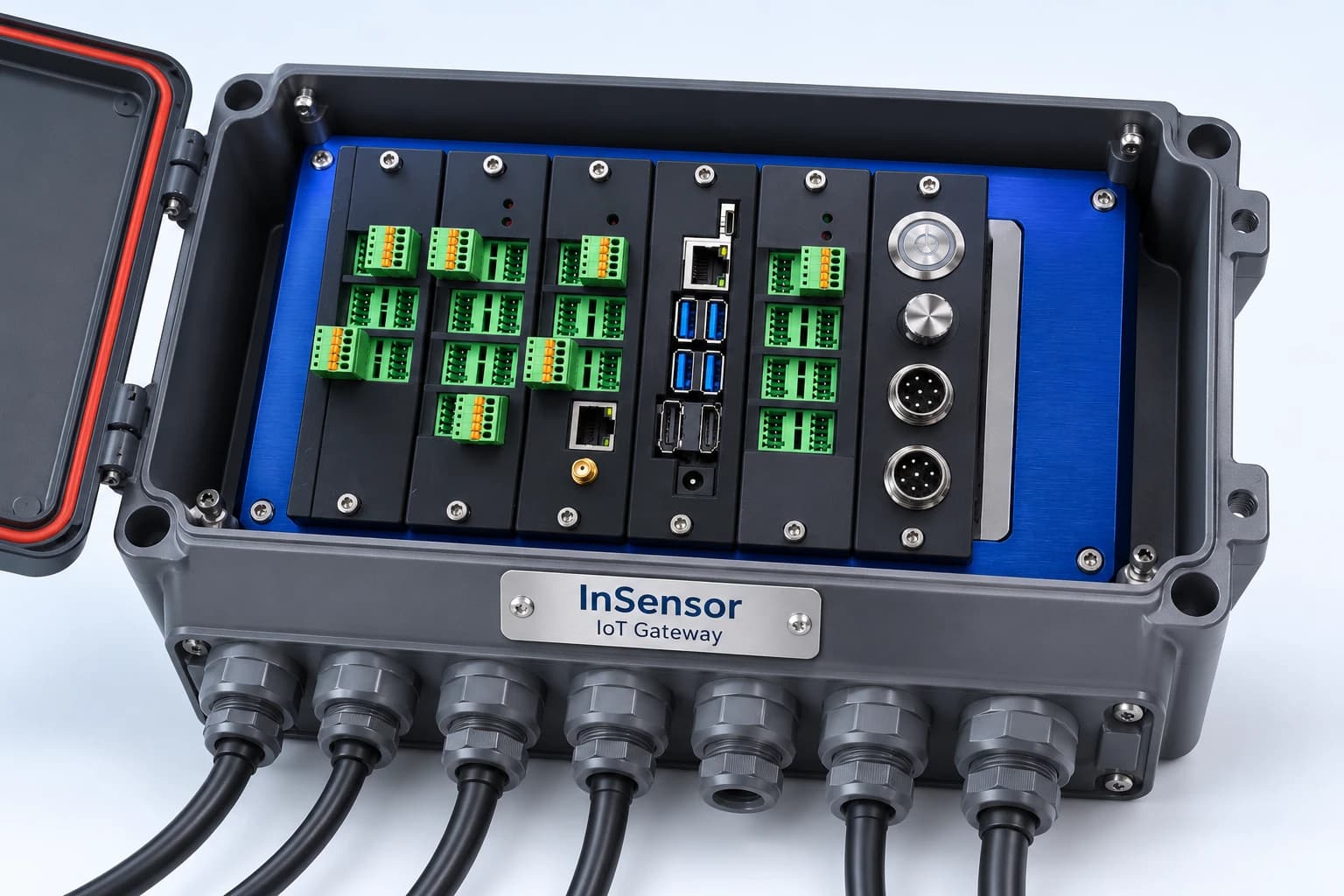
Sensors on machines send data to the InSensor box, then connect through nimitFlow to InCBM for the maintenance team to track machine status on mobile or Android tablet.
- 01Measure on-site condition
Machinery and sensors
Monitor vibration and temperature at the measurement point of motors, pumps, or blowers
- 02Receive sensor data
InSensor
IoT Gateway box receives data from sensors on machines to pass it on to the system
- 03Connect data to app
nimitFlow
Workflow sends data from the site, connects measured values to InCBM
04 / Display results on mobile and Android tablets
InCBM - See machine status on a single screen
- Health value per sensor
- Backward trend graph
- Alerts based on set criteria
- View and review alert history
Send data from app back to nimitFlow for report generation
Illustration of system connection guidelines and InSensor illustration must select sensor type, interface, and Gateway settings that match the actual machinery by the evaluation team before installation
Connectable system
- InSensor — IoT Gateway
- nimitFlow
- Vibration DE/NDE, acceleration (g), and motor temperature sensors
- Vibration measurement box (Modbus) — custom installation
System Requirements
- Android mobile or tablet 6.0 and above
- Install from APK file: Allow 'Install unknown apps' permission for the browser used to download
- A functional email address for account registration and receiving OTP code
- Vibration or temperature sensors on machinery and nimitFlow workflow sending data to app — team helps evaluate on-site
- Install throughout the factory: Through MDM system (Enterprise mobile device management system) together with the team
- Custom installation for the factory: Install backend system on factory premises server (On-Premise)
Usage Examples
Visit incbm.nimitflow.com to view sample screens, then download the app to try it out.Licensing Models
Price quote based on project scope
Download the InCBM app directly from incbm.nimitflow.com. Sign up with an email address and start using it immediately. For actual factory conditions and pricing, request a quotation from the team.
- Immediate access after signing up: Plant layout, sensor health values, threshold alerts, trend graphs, and alert history.
- Install for the entire plant through MDM — contact the team.
- Customization to connect with existing vibration measurement systems or install on internal factory servers — estimate based on project scope.
Industries Used
- Food and beverage — monitor motor, pump, and blower vibrations
Screenshots
Getting Started
Download the InCBM app from incbm.nimitflow.com, install it directly from the APK file, sign up with an email address, verify with OTP, and start laying out the plant map immediately. If you need to install it for the whole plant through MDM (Mobile Device Management system) or connect it with the existing vibration measurement system at your factory, contact the team for site assessment and quotation request.
What to prepare
- List of machines and zones you want to monitor, such as motors, pumps, blowers
- Positions where sensors are already installed or points where you want to install more
- Vibration monitoring system or box that your factory currently uses (if any)
- Warning criteria that your maintenance team currently uses (if any)
Frequently Asked Questions
What is InCBM?
InCBM is an Android app for monitoring machine condition (Condition-Based Monitoring). The app receives vibration data from both DE/NDE sides, acceleration (g), and motor temperature through the nimitFlow workflow. It displays sensor health as a percentage and categorizes it into 3 levels (Normal, Warning, Critical) based on your own criteria, and alerts when it reaches the Warning or Critical level.
How does InCBM differ from Predictive Analytics?
InCBM monitors machine condition directly from sensor data (Condition-Based Monitoring). On the other hand, Predictive Analytics involves predictive analysis using data from multiple sources, including quality and maintenance aspects. Both can be used together.
Do I need InSensor or sensors before using InCBM?
You need sensors on the machines, but they don't have to be InSensor. InCBM receives vibration data, acceleration, and temperature through the nimitFlow workflow and records the history of that machine. If the factory doesn't yet have sensors or a data collection system, we assess the site first and propose a data collection method.
Can it be used with the vibration monitoring system that the factory already has?
In some cases, it can be done as a customization job, depending on the channels through which the old equipment can send data out. Between B.E. 2568-2569, we extended InCBM to read values from the vibration measurement box in food and beverage factories via Modbus and installed the backend system on an internal server at the factory. This project has been installed and has client acceptance testing in progress. In this project, the criteria set in the app are used internally only because the box does not have an API to return values. We will inspect the equipment you have before providing a quotation.
Can I set up alarm thresholds myself?
Yes, the Condition Alarm page allows you to set what percentage and above is Normal, which range is Warning, and below what level is Critical. You can set these for each sensor individually. InCBM sends alerts on the app, but does not order machines to stop or go into maintenance mode. The repair and maintenance team decides whether to stop the machine or perform maintenance.
What is the price of InCBM and can I try it before purchasing?
InCBM does not have a published price. Contact our team to request a quotation. You can download the app from incbm.nimitflow.com, sign up with your email, verify the OTP, and try to map the factory layout first. For actual usage in the factory, installation through MDM, and customization work, we assess the price based on the scope of the work.