




01
Sequential
Follow the correct sequence
Verify hand movement according to the specified steps, including timing each step and the entire cycle
MODERN FACTORY / EDGE AI VISION
AI camera for assembly stations with hands, verifies work sequence, times each step, and collects data for review through web browser
Camera price · Pricing for accessories and installation offered separately
Edge AIProcess at the workstation
Cycle TimeSee step time and cycle time
Video + CSVStore results for further analysis
THREE MODES / ONE WORKSTATION
Select mode that matches job characteristics, then test camera angles, lighting, and movement at the actual station
Sequential
Verify hand movement according to the specified steps, including timing each step and the entire cycle
Completion
Check completeness of work without enforcing sequence, suitable for interchangeable steps
Skeleton
Read full body postures at 17 points to study movements and adjust workstation according to ergonomics principles
Use Skeleton to adjust the workstation and ergonomics. Employees should be informed before use and it should not be used to evaluate or punish individuals
FROM MOTION TO WORK INSTRUCTION
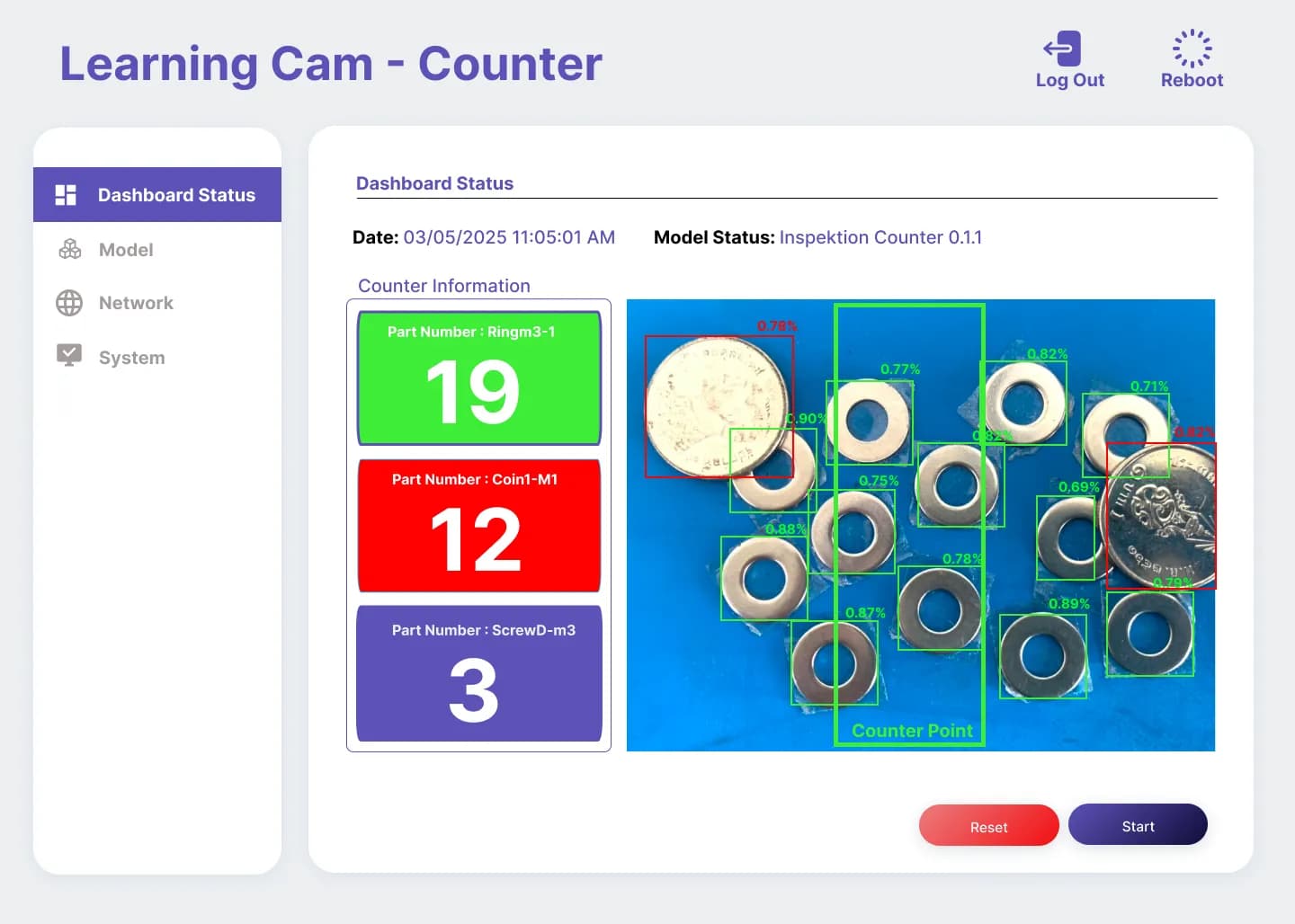
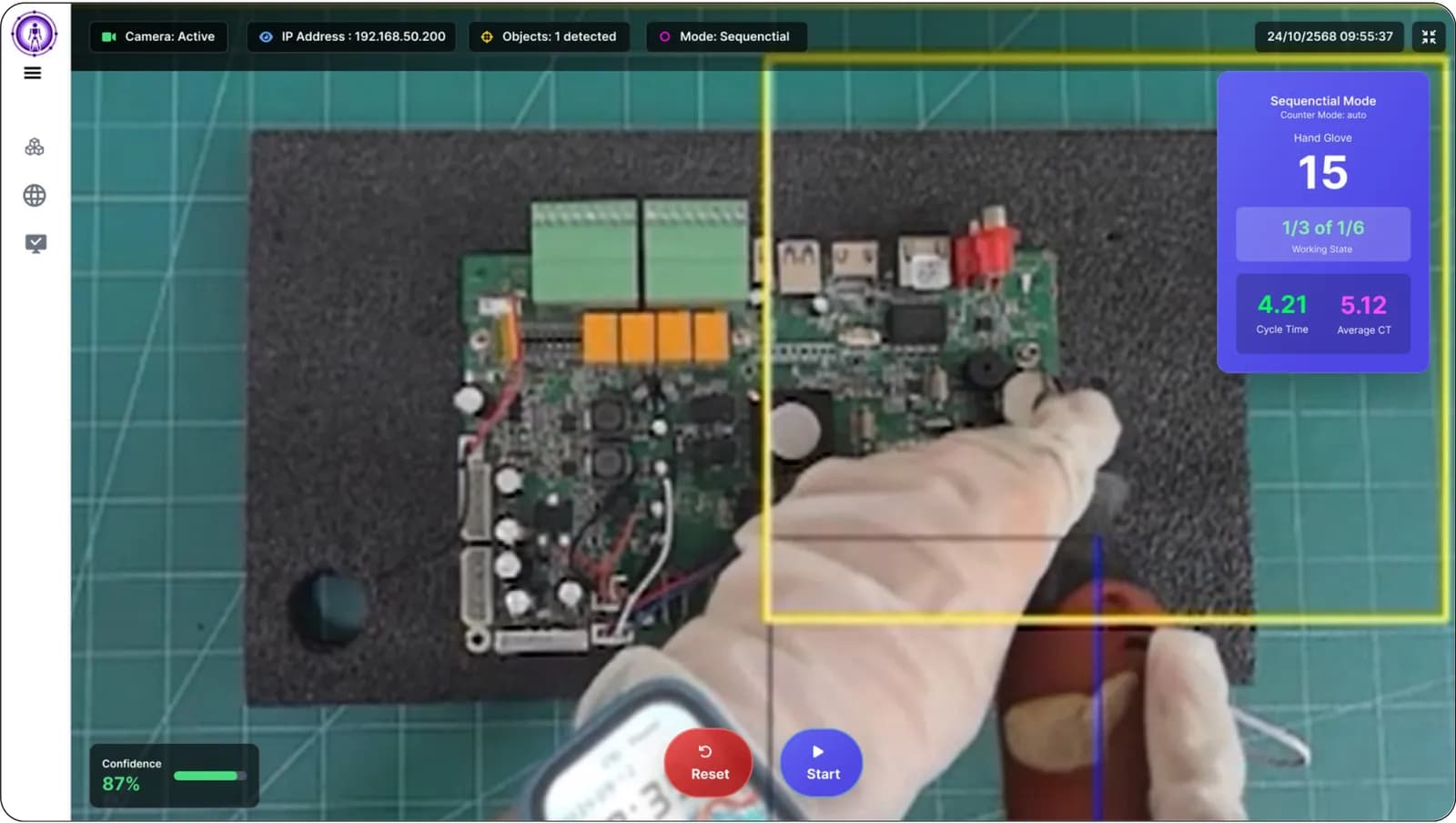
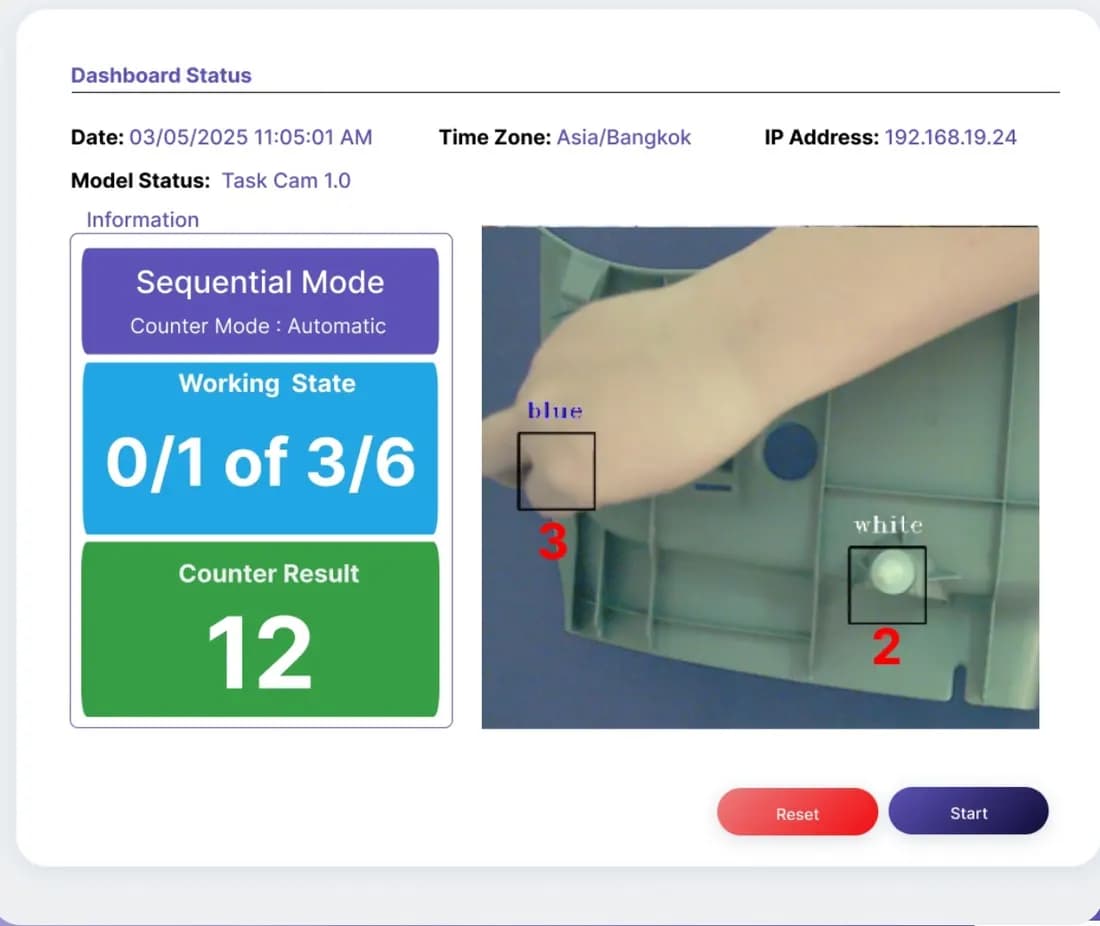
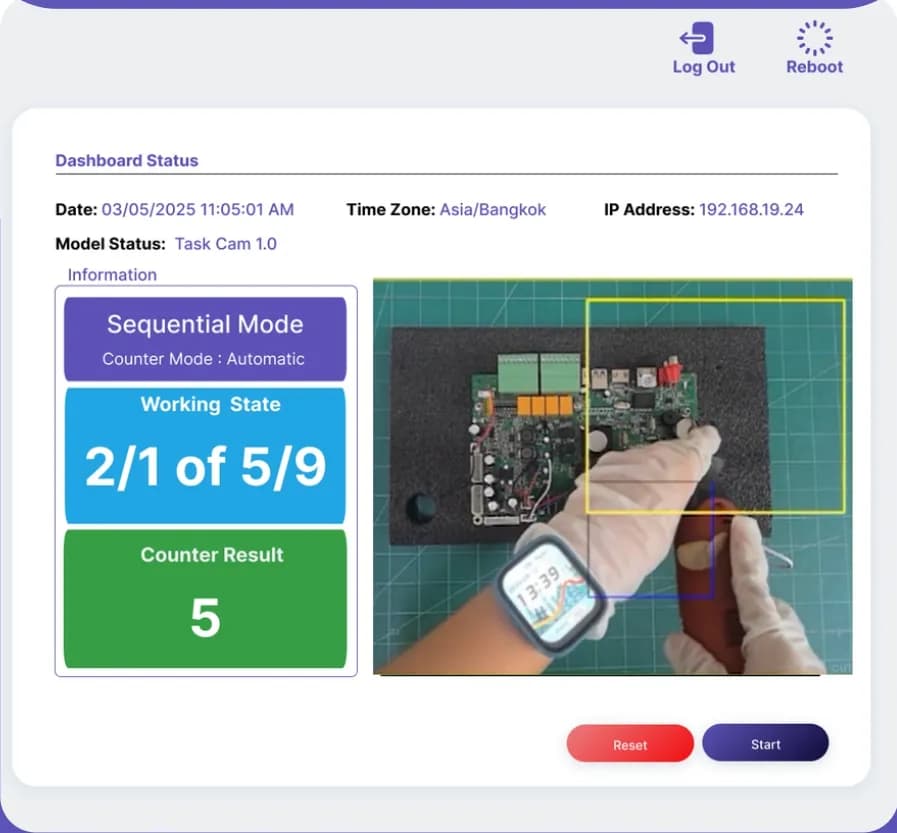
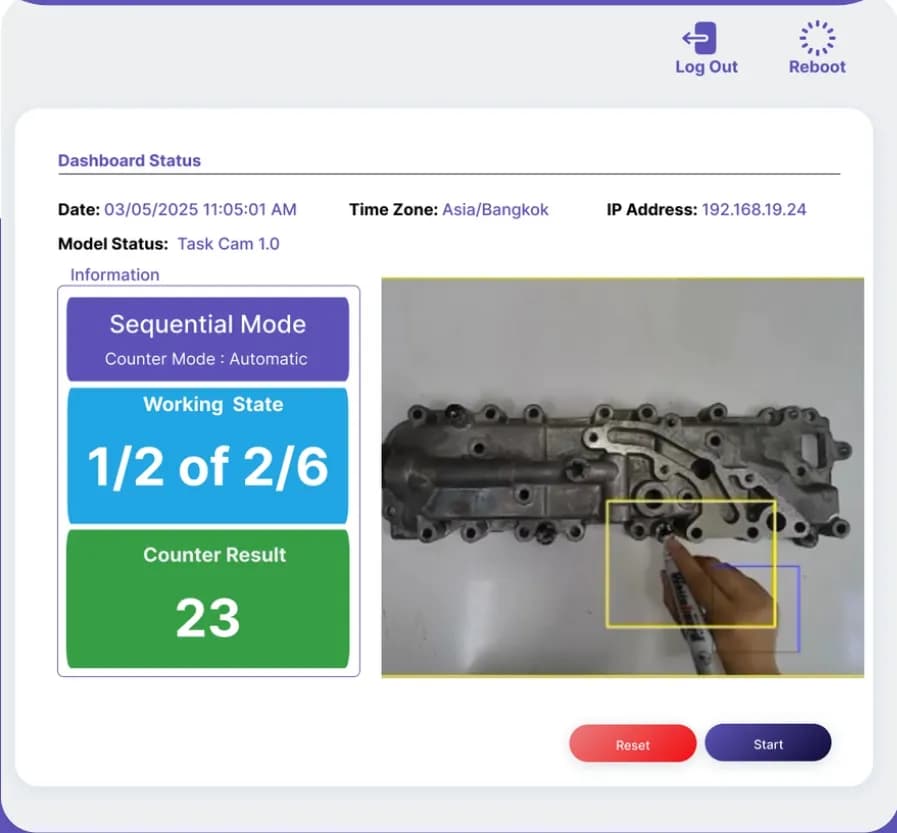
Example screen from Task Cam presentation
The appearance of the program may differ depending on the version
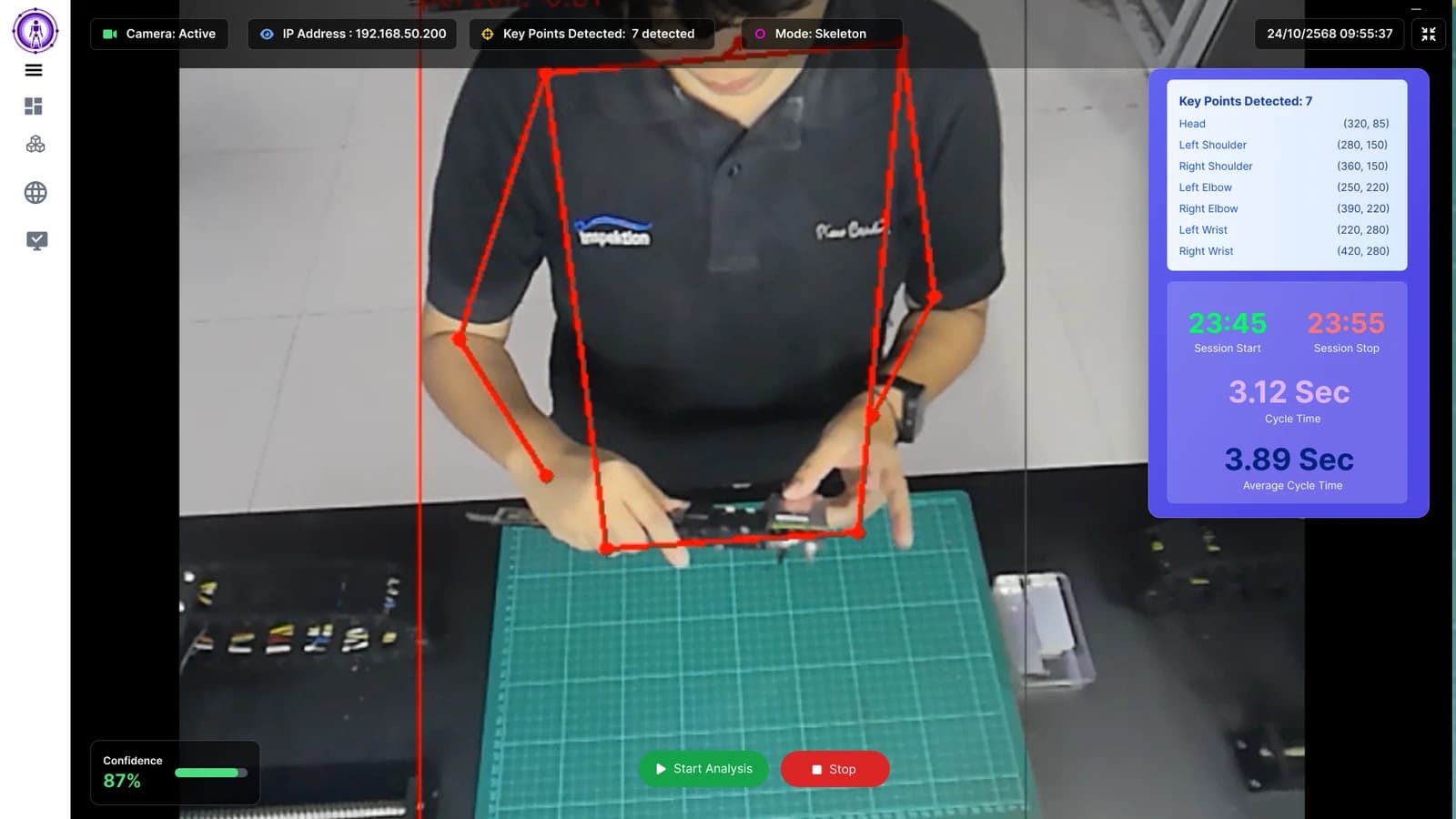
See posture points and time data to study working patterns
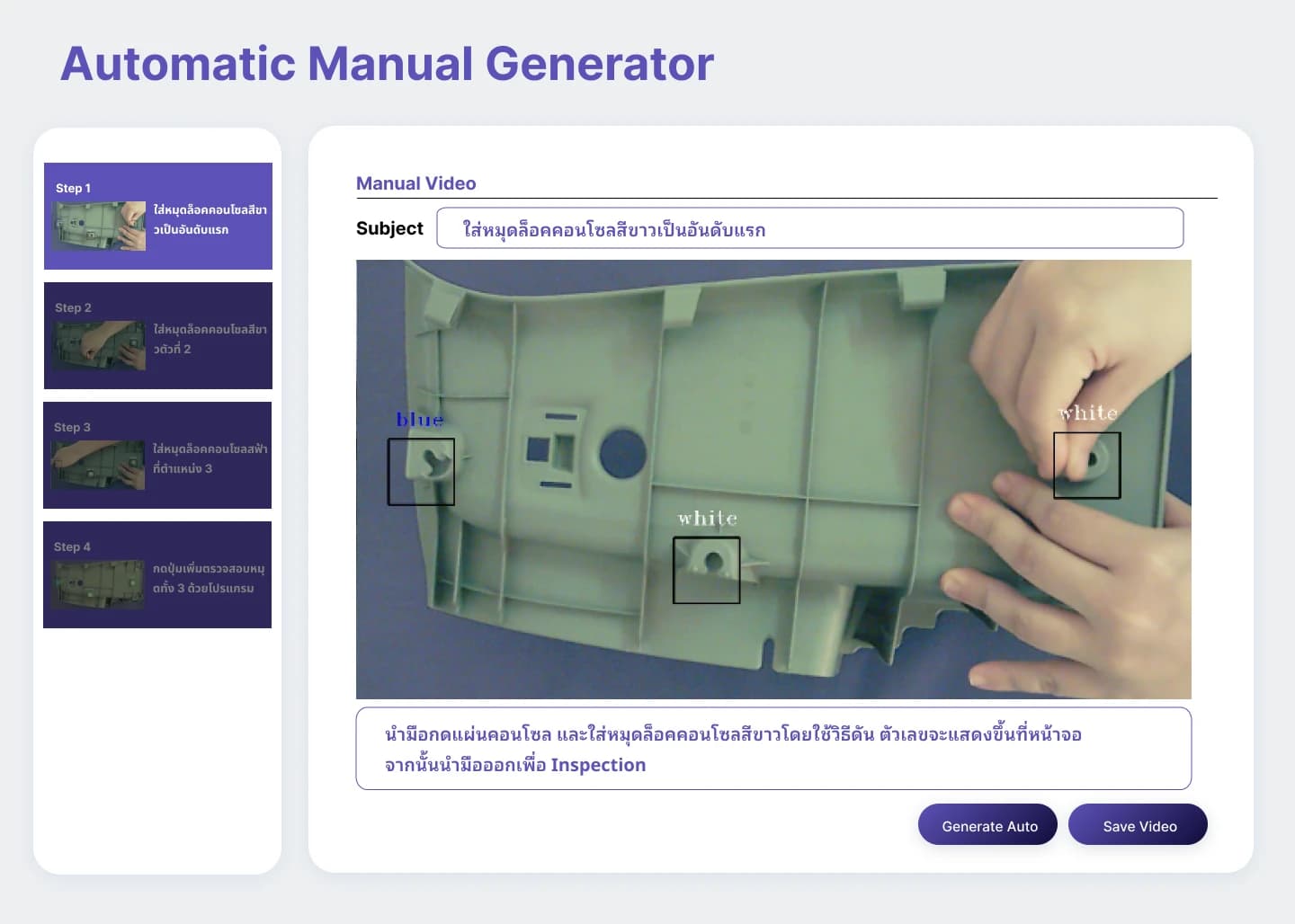
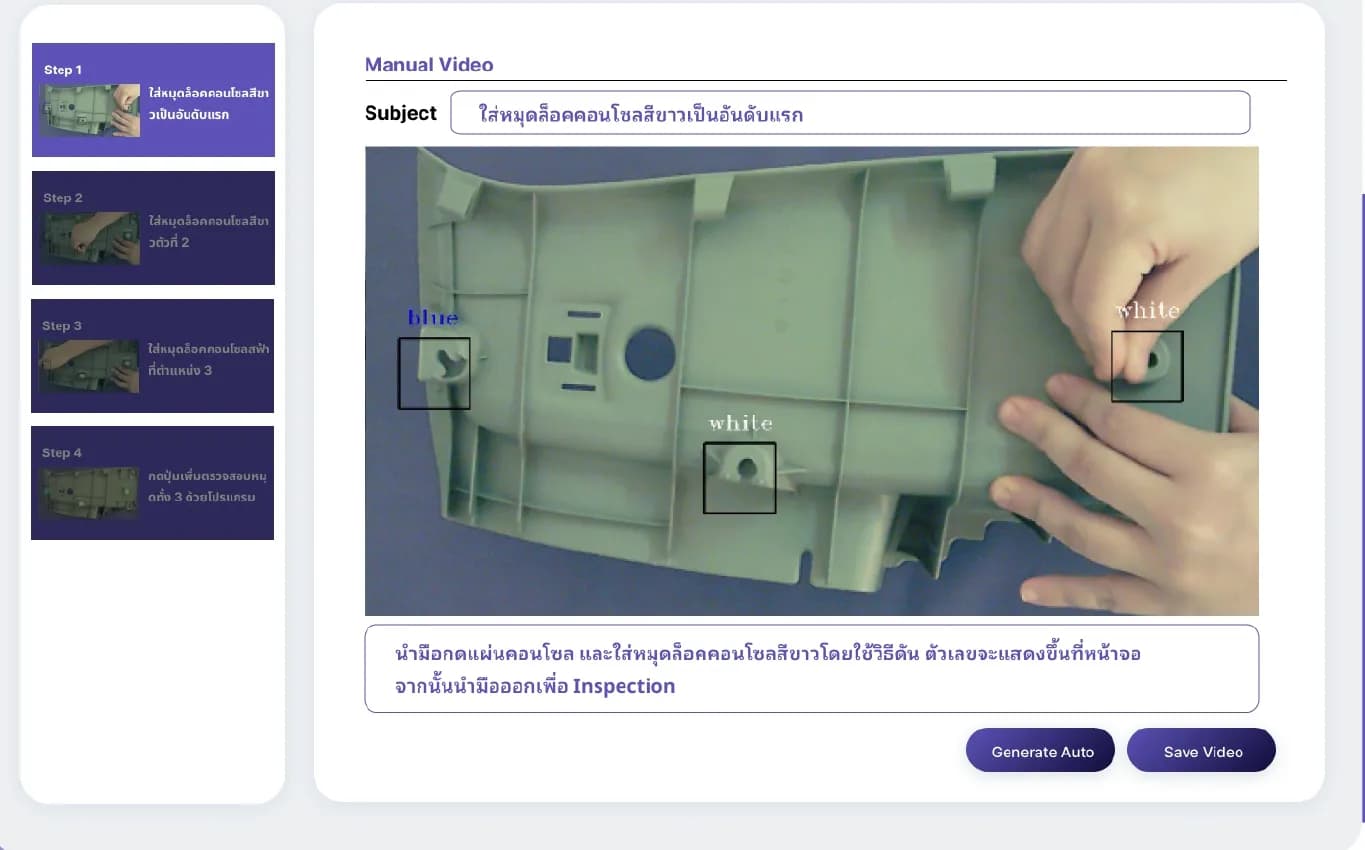
Use images and video of work steps to explain each step
Production department, IE engineers (industrial engineering) and training teams that manage assembly stations using human workers
Example video of work steps, camera installation positions at the station, and conditions to be checked. If using Skeleton mode, prepare an employee notification plan because this mode adjusts the station, not individual assessment
Task Cam is suitable for production departments, line supervisors, and Industrial Engineers (IE) in factories with multi-step manual assembly processes. Task Cam solves 2 issues: workers skipping or switching steps without anyone noticing, and factories lacking real-time cycle times for each step to balance workloads. The camera looks down from above the workstation and automatically records both the sequence and time.
Multi-step manual assembly work is prone to errors when repeated throughout a shift, such as missing a screw or reversing the order of inserting pins. Line supervisors cannot simultaneously inspect every station, and the actual time taken for each step is rarely recorded by anyone.
| On-site problems | How does Task Cam help? |
|---|---|
| Employees skip steps or switch sequences | Sequential mode ensures step-by-step execution according to order. The frame on the screen indicates which step should be performed next and can send signals through the I/O port, such as controlling a Tower Lamp (signal light on the pole). |
| Do not know which step takes longer time | Record cycle time for each step and round in CSV file to find standard time and bottleneck step before balancing production line work |
| Have to count workpieces themselves | Count completed workpieces on the screen immediately |
| Creating Work Instruction documents takes too long | Automatically take photos or record video of actual work, then export as digital manual according to desired format |
Examples of tasks that can use Task Cam include assembly work, electronic assembly such as inserting pins or screwing screws onto circuit boards, and component inspection work where employees must point out defects at specified points.
Task Cam verifies work sequence using detection frames placed on the image of the workstation. The AI on the camera detects the employee's hand. The system administrator places detection frames at the points where the hand needs to go in each step, and arranges them in work sequence. When the hand enters the correct step's detection frame, the system records the time and moves on to the next step automatically. We can help design detection frames and work sequences that match your station.
| Frame color on screen | Meaning |
|---|---|
| Yellow | Next step to be done |
| Green | Currently doing this step, system records time and automatically moves to next step |
| Red | Cannot do this step yet because it is not the right sequence |
| Mode | What to check | Suitable for which types of jobs? |
|---|---|---|
| Sequential | Step-by-step process from hand movement, such as 1 → 2 → 3, along with counting completed workpieces | Fixed order tasks, such as screw tightening sequence on circuit board |
| Completion | Completes all steps without forcing a sequence, while immediately counting workpieces | Work that can be reordered but must not skip any step |
| Skeleton | Full body posture at 17 points, such as head, shoulders, elbows, wrists, hips, knees, ankles, along with timing start-end of each cycle | Observe postures and movements according to ergonomics principles to adjust workstation and working methods |
Using the Skeleton mode with employees
The Skeleton mode uses posture analysis to adjust workstations and ergonomics, it is not an assessment or punishment tool for individual employees. The factory must inform employees beforehand what data the camera collects and how it will be used.
Dashboard has Sequential (work order) and Skeleton (posture) views to choose from based on the type of work. Task Cam comes in Standard NPU 1.0 TOPS and Pro NPU 3.0 TOPS models that process AI internally and install Task Cam software onto the camera. All values are listed in the table below.
Power the camera
Connect the camera to the power adapter
Network connection
Standard model connects via Wi-Fi 6 · Pro model connects via LAN RJ45 10/100M through Router or Switch in the same network as viewing device
Connect display device to the same network
Connect the PC, tablet, or Smart TV to the same router as the camera
Open the camera’s IP address in a browser
Enter the camera IP (port 8000) to access the web app, view live images and check work sequence immediately. User account on Line is separate from the administrator's setup account.
Task Cam provides various types of data, including screen values, video per cycle, CSV files, signals or APIs for other systems, and Work Instruction manuals. Single station results can be viewed immediately through the browser. If multiple stations need to be combined, send files to NAS (network attached storage) or nimitFlow.
| Screen values | means |
|---|---|
| Counter | the number of completed pieces in that session |
| Working State | the system stage, e.g., 1/3 of 1/6 means processing Frame 1 of 3 in Stage 1 of 6 |
| Cycle Time · Average Cycle Time | the total time of the steps that the system times in that cycle and cumulative average in the process |
| Session Start · Session Stop | start and end time of the assembly or operation cycle (displayed in Skeleton mode) |
| channels | What do you get? |
|---|---|
| Video (.mp4 / .webm) | Video clips are saved as separate files by work cycle — in Skeleton mode, from Start to Stop; in Sequential mode, according to the configured work element (Element). Use them for work reviews and manuals |
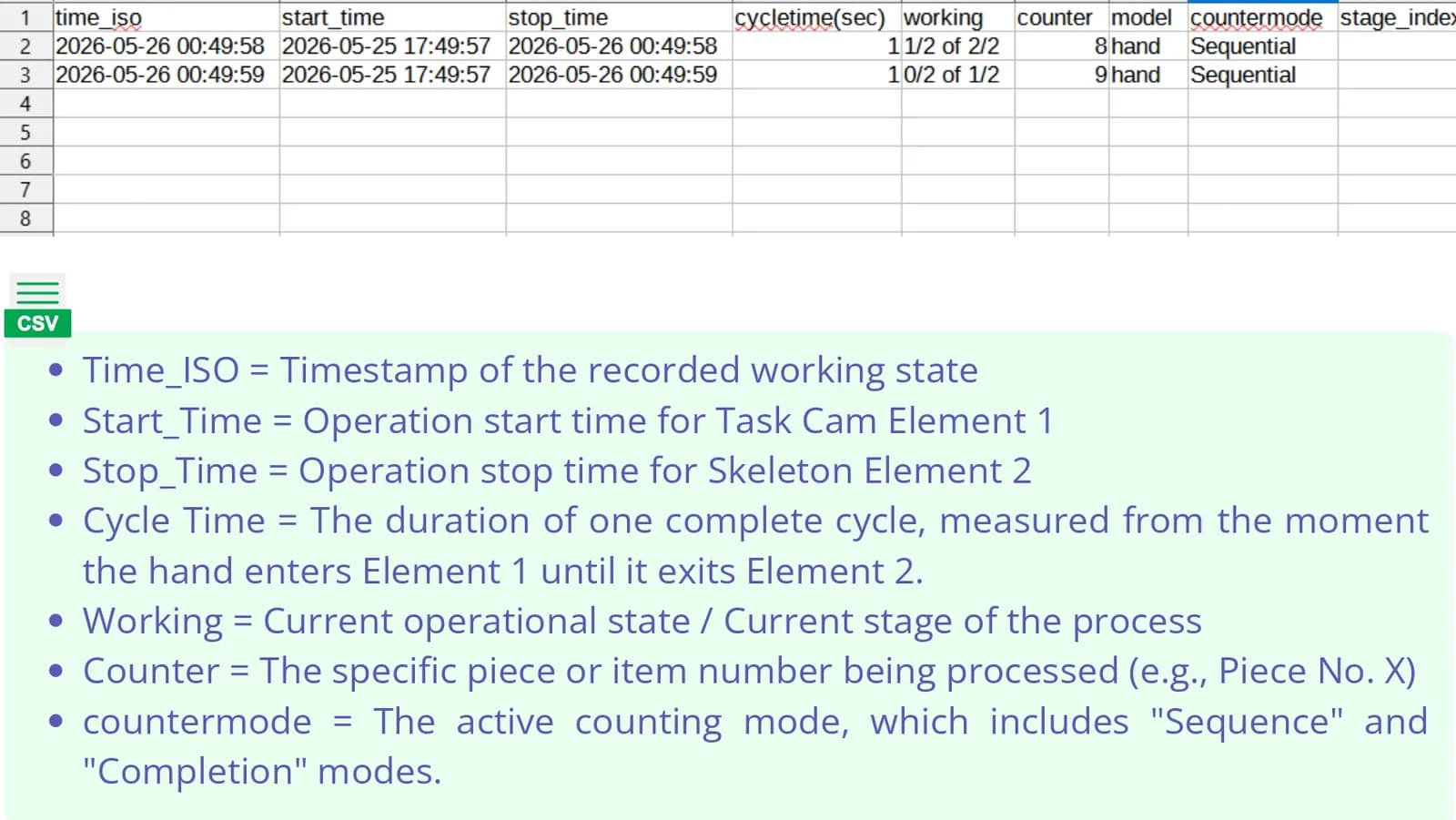
| CSV file in Sequential / Completion mode | Recording time, start-end cycle time (seconds), working state counter, counting mode, stage/step number, used model, and processing time (ms) |
| CSV file in Skeleton mode | Time, average confidence value, and coordinates (x, y) of points on the body, NaN cells indicate occluded points |
| HTTP API (JSON) | Counter value, counting mode, camera name, step status, time, and AI processing time (ms) for other systems to pull the latest status |
| I/O signals | I/O keybindings and I/O API to control Tower Lamp or send signals to check cameras when tasks are completed |
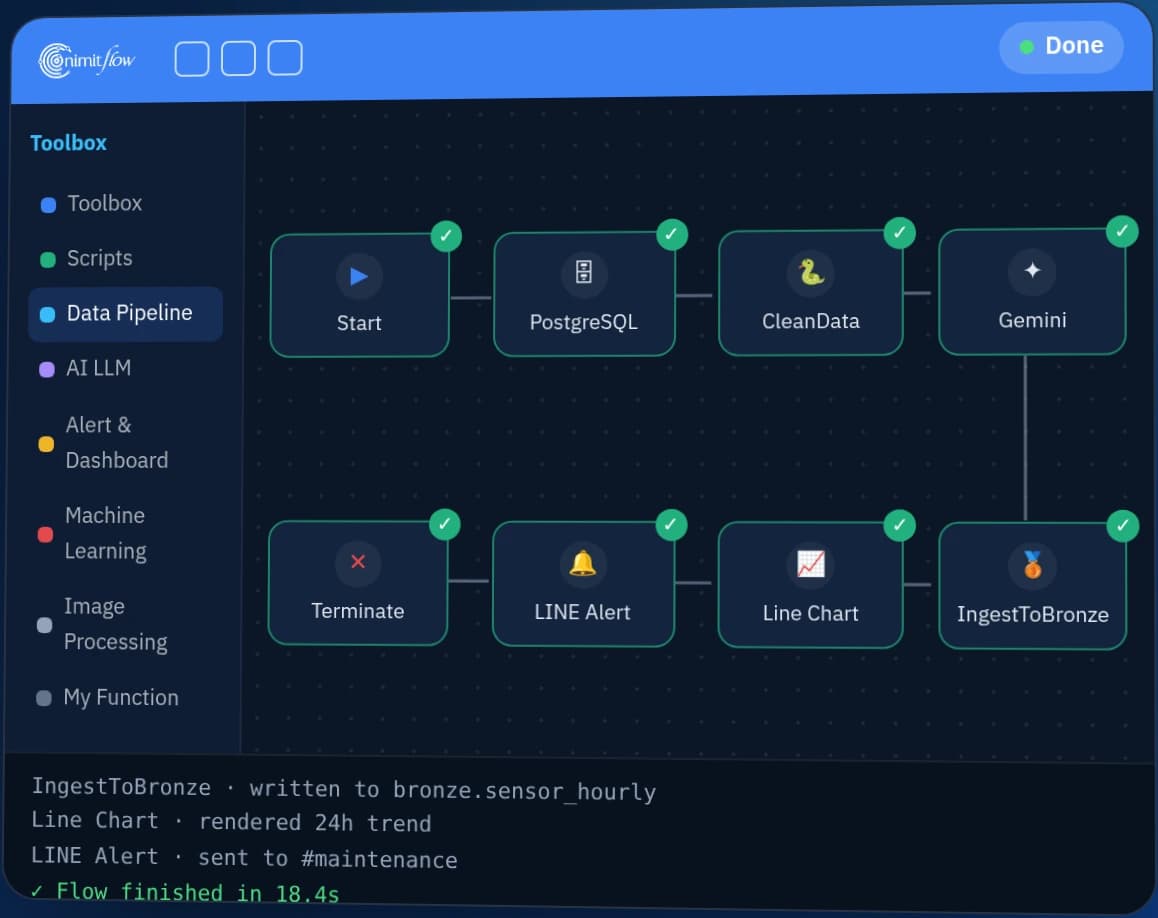
| nimitFlow | Send logs and CSV files for consolidation, create graphs, and further analyze on the central platform |
| Factory data storage | Send coordinate files, videos, and results reports to the specified database or external file storage, such as NAS |
| Work Instruction Manual | Generate digital manuals from images/videos of actual work into desired document formats |
Suitable for manual assembly or inspection tasks at a single station, where the workspace is within the view of the Task Cam. Not suitable for defect inspection of workpieces using images, nor is it a CCTV camera, as it detects movements of hands and records videos in separate clips based on work cycles.
| Job | Is this suitable for Task Cam? | Reasons or things to do |
|---|---|---|
| Manual assembly tasks with a fixed sequence, such as screwing on a circuit board | Suitable | Sequential Mode verifies the work sequence from hand movements |
| Reversible work but must not skip steps | Suitable | Completion Mode checks completeness without enforcing sequence |
| Find standard time and bottleneck step | Suitable | CSV file contains cycle time per step and per cycle |
| Observe posture to adjust workstation according to ergonomics principles | Suitable | Skeleton Mode reads full body pose at 17 points and employees must be informed before use |
| Evaluate or penalize individual employees | Not suitable | Task Cam adjusts workstations and methods, does not evaluate individuals (see above for Skeleton Mode policy) |
| Employees wear gloves | Test first | Handglove model available for white gloves, but real gloves may require additional training |
| The worker's hand moves very fast | Test first | The processing speed of the camera must keep up with the hand movement, send us a clip of the work face for evaluation |
| The working area is wider than 16×23 cm | Evaluate first | Send an image of the work face for us to evaluate the installation position |
| Inspect defects of the workpiece from the image | Not suitable | Use another camera to inspect the workpiece, which Task Cam sends I/O signals to control when completed |
| Continuous video recording like a CCTV camera | Not suitable | Task Cam records clips according to the work cycle or time period set |
| Topic | Details |
|---|---|
| Camera-to-workpiece distance | 65 cm view area 14×20 cm, farthest view 80 cm, view area 16×23 cm (lens 12 mm) |
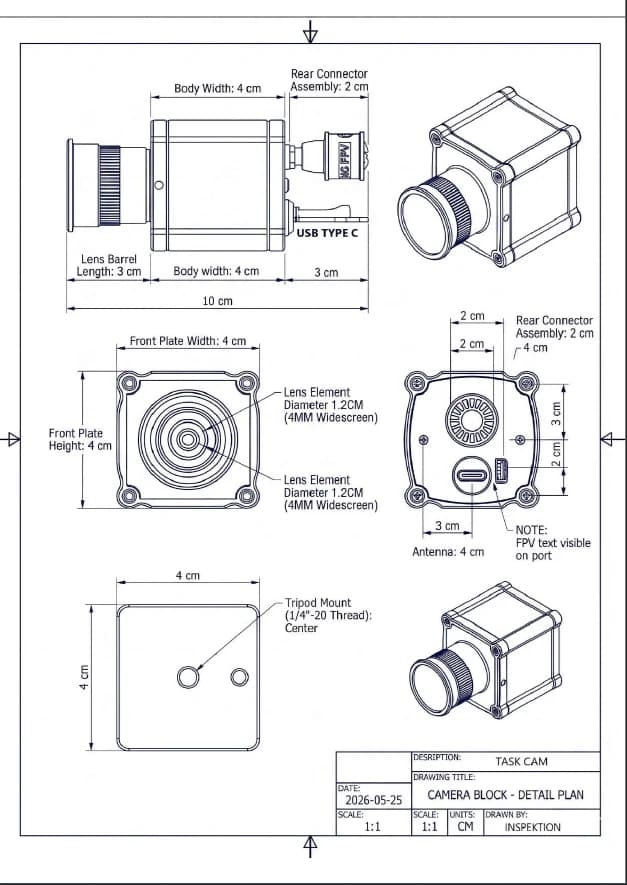
| Installation | Mounted from above the workstation, attached to tripod or arm mount through 1/4"-20 threaded hole under camera body |
| Resolution used by AI for processing | 640 × 448 pixels (supports up to 800 × 600) |
| Worker's hand | Select Hand (bare hand) or Handglove (white glove) model, adjust Confidence Threshold (confidence threshold) and Capture Duration (capture duration). Real gloves, even white ones, may require additional training from on-site images. |
| Inspection region | One frame image allows no more than 6 bounding boxes and must not overlap. If the same position needs to be checked repeatedly, set it in the next frame. |
| Network | Standard model connects via Wi-Fi 6 · Pro model connects via LAN RJ45 10/100M through Router or Switch in the same network as viewing device |
| Lighting | The product documentation does not specify the minimum light value yet. We estimate from the images or video clips you sent. |
| Camera heat | CPU temperature must not exceed 85°C. It should be installed in a well-ventilated area. The System Monitor screen shows CPU usage, RAM temperature, and storage space. |
| Use multiple cameras in series | When multiple cameras are ordered through I/O, the Device Automatic Start mode must be turned off so that each unit waits for a signal before starting. |
The product documentation does not specify weight, IP water and dust resistance level, and operational temperature range. If your workplace has dust, water, or high heat, please inform us during the assessment.
Higher processing models are in the development plan
If the job requires more processing or uses multiple models, please inform us during the assessment.
In B.E. 2569, we trialled and prepared Task Cam sets for 2 projects. These 2 projects are still in progress and are not yet in full operation. The first is a trial on an assembly line; the second is an equipment set for 1 workstation. The other 2 projects below concern cycle timing and work posture, but did not use Task Cam
In B.E. 2569, we installed Task Cam in Sequential mode alongside another Task Cam in Skeleton mode at a workstation on an automotive parts manufacturer’s assembly line. The POC (Proof of Concept — testing before full operation) trial is ongoing. The system saves video clips and CSV files for every step to NAS, and we have provided an operating manual for the on-site team
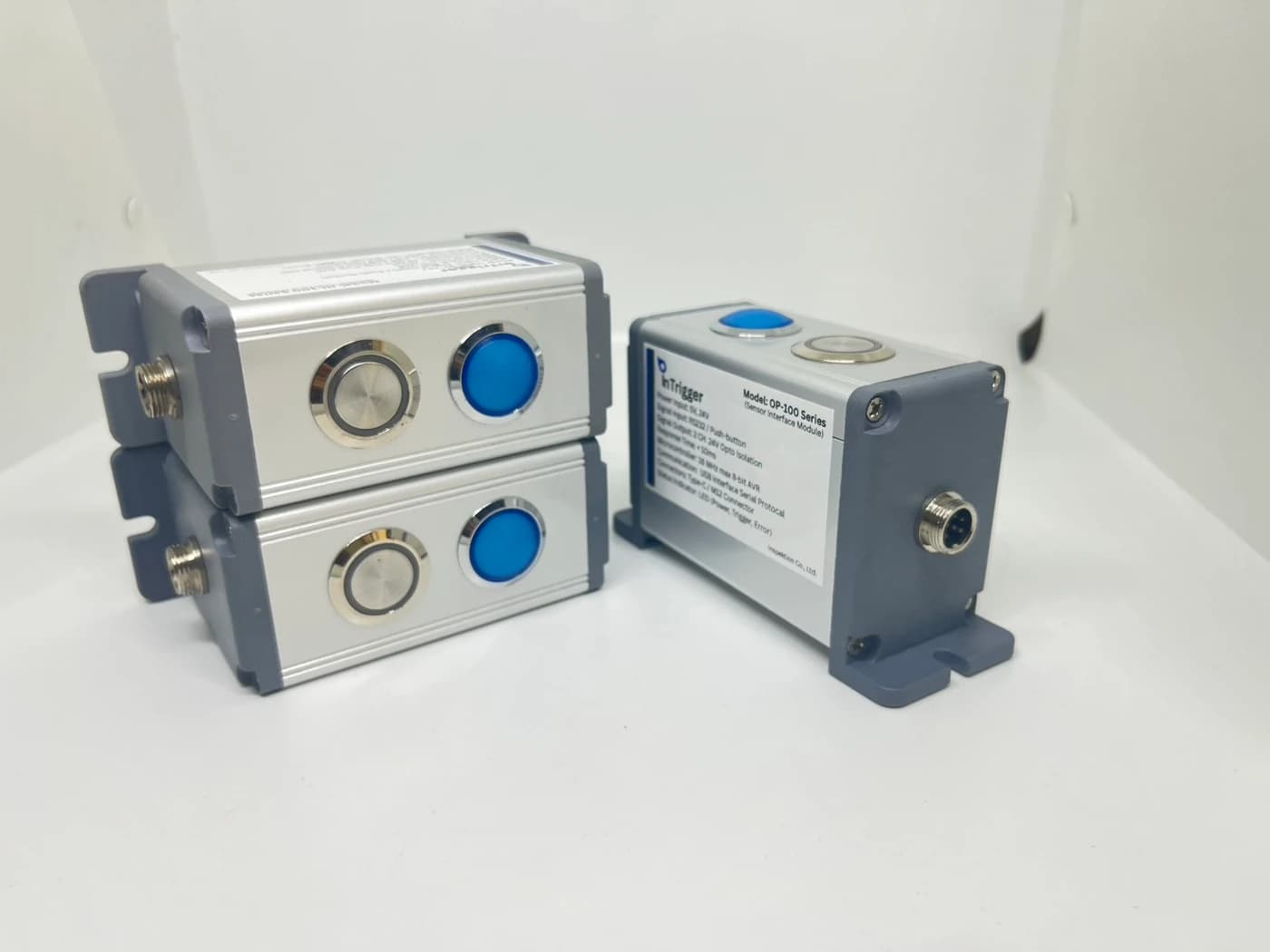
In B.E. 2569, we sourced, assembled, and delivered a Task Cam set for 1 workstation to a general manufacturing factory. It includes a camera on a 5-axis mounting arm, an Intrigger button for start/stop and reset, a Wi-Fi 6 router, NAS, and a tablet display. The customer ordered equipment only, excluding our installation service. Delivery and demonstration are complete; output-signal testing is ongoing
We previously implemented cycle-time measurement with video using another system. In B.E. 2562, we piloted it on 1 production line at an automotive parts manufacturer. It measured Cycle Time at each workstation from PLC (machine controller) signals and let users click a graph point to open video from the same period. It used IP cameras and a separate processing board, not Task Cam
In B.E. 2569, we held a 1-day ergonomics workshop for 5 groups of trainees, teaching the RULA, REBA, and NIOSH work-posture assessment tools, with a slide-based case study of an AI camera counting work cycles. No Task Cam was installed for this workshop. Participants assessed posture using their groups’ own estimates, not camera data
Read full case
Before providing a quotation, we ask for a video of one work cycle filmed from above the station, with the operator wearing the gloves actually used on the job. We use it to check whether the Hand or Handglove model works or needs additional training, and whether the camera can keep up with the hand movements
We recommend starting with the station that has the clearest work sequence problem, then defining the camera specifications and installation methods for other stations. If you install it yourself, make sure the end points of the I/O signals and the order of NAS startup are clear before the actual usage date.
What's inside the box
-- Inquire for details of the desired model and set from the team
Warranty
-- Inquire for details of the desired model and set from the team
STANDARD / PRO
Task Cam There are 2 hardware models. Choose the standard model for Wi-Fi connectivity or the Pro model for higher processing power and LAN networking.
| Specifications | StandardSTANDARD / Wi-Fi 6 | Pro3 TOPS / LAN RJ45 |
|---|---|---|
| Image Sensor | 1/3″ · Supports up to 800 × 600 | SONY IMX415 1/2.8″ · Supports 4K |
| CPU | 1.0 GHz | 1.6 GHz (RV1126B-P) |
| AI NPU | 1.0 TOPS | 3.0 TOPS |
| RAM | 256 MB DDR3 | 1 GB |
| Storage | 8 GB | 16 GB eMMC |
| Network | Wi-Fi 6 | LAN RJ45 10/100M |
| Power supply | 5V @ 500 mA (2.5W) | DC 5V (< 5W) |
| Software | Taskcam On-Board | |
According to the manufacturer, the Pro model is 2–3 times faster and more accurate than the standard model. Actual results depend on the AI model, task, lighting and installation. Test with your actual application before choosing a model.
4K refers to the resolution supported by the Pro sensor model, while resolution and AI processing speed depend on the model and settings
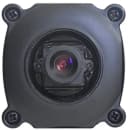
| Size | Standard model: Length 10 cm, excluding antenna · Camera face 4 × 4 cm · Pro model size, inquire team |
|---|---|
| Weight | Ask about the confirmed values for your model and intended use |
| Operating temperature | Ask about the confirmed values for your model and intended use |
| Water and dust protection level (IP) | Ask about the confirmed values for your model and intended use |
| Power supply | Standard: 5V @ 500 mA (2.5W) · Pro: DC 5V (< 5W) |
| Connection | Standard model connects via Wi-Fi 6 · Pro model connects via LAN RJ45 10/100M through Router or Switch in the same network as viewing device |
| AI model | Hand · Handglove (white gloves) · Skeleton 17 points |
| Output | Video .mp4 / .webm · CSV · HTTP API (JSON) · Selected I/O signal set |
| Access | Web browser via IP camera — Tablet / Smart TV / PC · Separate user account for Line face and administrator |
| Lens and installation distance for standard model | Lens 12 mm · Distance 65 cm covers 14 × 20 cm · Distance 80 cm covers 16 × 23 cm |
| Mounting for standard model | 1/4 inch-20 threaded mount under camera |
Compare hardware based on the latest standard and Pro models. Select inspection mode and test connection with on-site equipment before installation.
Start from the camera at the workstation, connect to the same network, then view results through a browser. Add signal transmission-reception equipment and data storage according to the work scope.
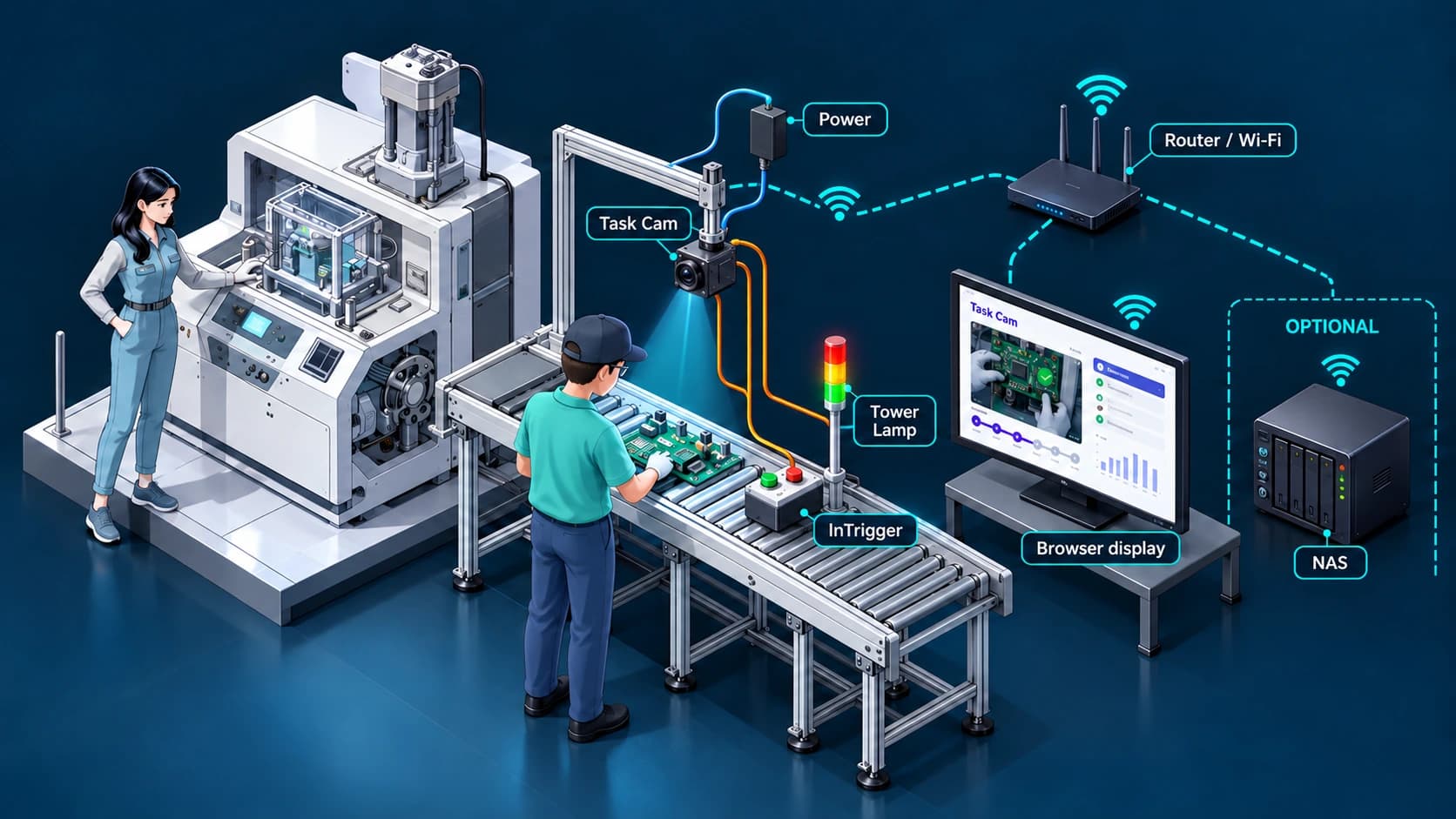
Standard model connects via Wi-Fi 6 · Pro model connects via LAN RJ45 10/100M through Router or Switch in the same network as viewing device
Mount the camera above the assembly area and power it through an adapter. The camera checks work sequence and timing internally.
Camera and PC tablet or Smart TV are on the same router network, open web with camera IP
Use InTrigger to control work cycles, send status to Tower Lamp via I/O or add NAS to store video and CSV
Single station does not require a server, NAS and nimitFlow are optional when file storage or multi-station data consolidation is needed. Additional equipment and connections are arranged according to agreed scope.
Task Cam camera price is 46,500 THB per unit, accessories and installation quoted separately according to scope of work
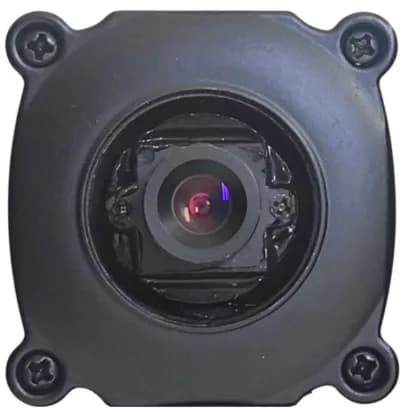
Task Cam does not have software to download, the software is on the camera itself. We arrange equipment sets according to work stations, help set up detection frames and work sequences to match your station, and evaluate settings on-site. Send us details of what you want to inspect, and schedule a demonstration with your actual workpieces.
The standard version uses a 1.0 GHz CPU, 1.0 TOPS NPU, 256 MB DDR3 RAM, and Wi-Fi 6. The Pro version uses the Sony IMX415 sensor supporting 4K, a 1.6 GHz CPU (RV1126B-P), 3.0 TOPS NPU, 1 GB RAM, 16 GB eMMC storage space, and a 10/100M LAN RJ45 port. According to the manufacturer, the Pro version is 2-3 times faster and more accurate than the standard version. However, actual performance depends on the AI model, job characteristics, lighting, and installation. It is recommended to test with real work before choosing the version.
A single station does not require a server. Task Cam processes AI inside the camera and displays results through a web browser on a tablet PC or Smart TV on the same network. Videos and CSV files are recorded separately for each cycle and can be transferred to the factory’s NAS or nimitFlow, and other systems can pull the latest status via a JSON HTTP API.
Yes, but it must be tested with actual gloves first. Task Cam has a Handglove model for white gloves, separate from the Hand model for bare hands. On an assembly line for automotive parts, workers wore white cloth gloves and worked quickly, so we trained a new model with real gloves from the production site.
Yes, in Skeleton mode, it reads the full body posture of 17 points to adjust the workstation and working methods according to ergonomics principles. This mode is not a tool for evaluating or punishing individual workers, and the factory must inform workers beforehand about what data the cameras collect and how it will be used.
They are separate products. LearningCam is an Edge AI camera that runs the TaskCam hand detection model or the Skeleton model. On the other hand, Task Cam here is a step-by-step assembly process inspection camera for assembly stations. It has Sequential, Completion, and Skeleton modes, sends I/O signals, and creates Work Instructions. If you're unsure which one to use, send us details about your work for recommendations.
The price of Task Cam camera is 46,500 THB per unit. The accessories and installation work are quoted separately according to the scope of work. We provide a quotation for the installation work, which can be selected based on the project. For trial installations on assembly lines, we install at the workstation and train the model using real gloves from the site. Another job, we deliver as a complete set of accessories without including installation work.