Face recognition customer greeting kiosk software (Greeting Kiosk) and a promotion management back-office system for a retail business
Greeting Kiosk is software for a 55-inch touchscreen kiosk that plays advertising while idle and, when it detects a customer, greets them and shows promotions based on their profile. The kiosk recognises the faces only of members who have registered and given consent. We developed the kiosk screen software and the back-office system for the marketing team, for a retail business's pilot project in 2019–2020.
- Industry
- Services
- Year
- 2019–2020
- Scope of work
- Design and development of 2 software parts, the Greeting Kiosk screens for a 55-inch touchscreen and the CMS & Kiosk Configuration back-office system, with installation and testing, plus design documents and user acceptance test (UAT) scripts, as a subcontractor to a consulting firm.
Summary
- Greeting Kiosk is software for a 55-inch touchscreen kiosk that loops advertising while idle and, when the camera detects a customer, greets them and shows promotions based on their profile.
- The kiosk recognises the faces only of members who have already registered their face and given consent, through the project's AI engine. For non-members, the system uses only the gender and age range estimated by the AI engine.
- The kiosk selects promotions by comparing the customer profile with the condition tags applied by the marketing team, so the marketing team can decide for itself which promotion is shown to whom.
- The CMS & Kiosk Configuration back-office system lets the marketing team change advertisements, promotions and screen themes themselves, with a statistics dashboard and CSV file export.
- We developed these 2 software parts as a subcontractor. The customer finished testing the system on 27 December 2019, and the project was closed as completed work in 2020.
The on-site brief
The retail business's marketing team wanted to trial advertising screens that greet customers and offer them the right promotions, instead of showing one set of advertisements to everyone. The team needed to change kiosk content themselves and see kiosk usage statistics, while the use of face images had to be limited to consenting members.
What we did
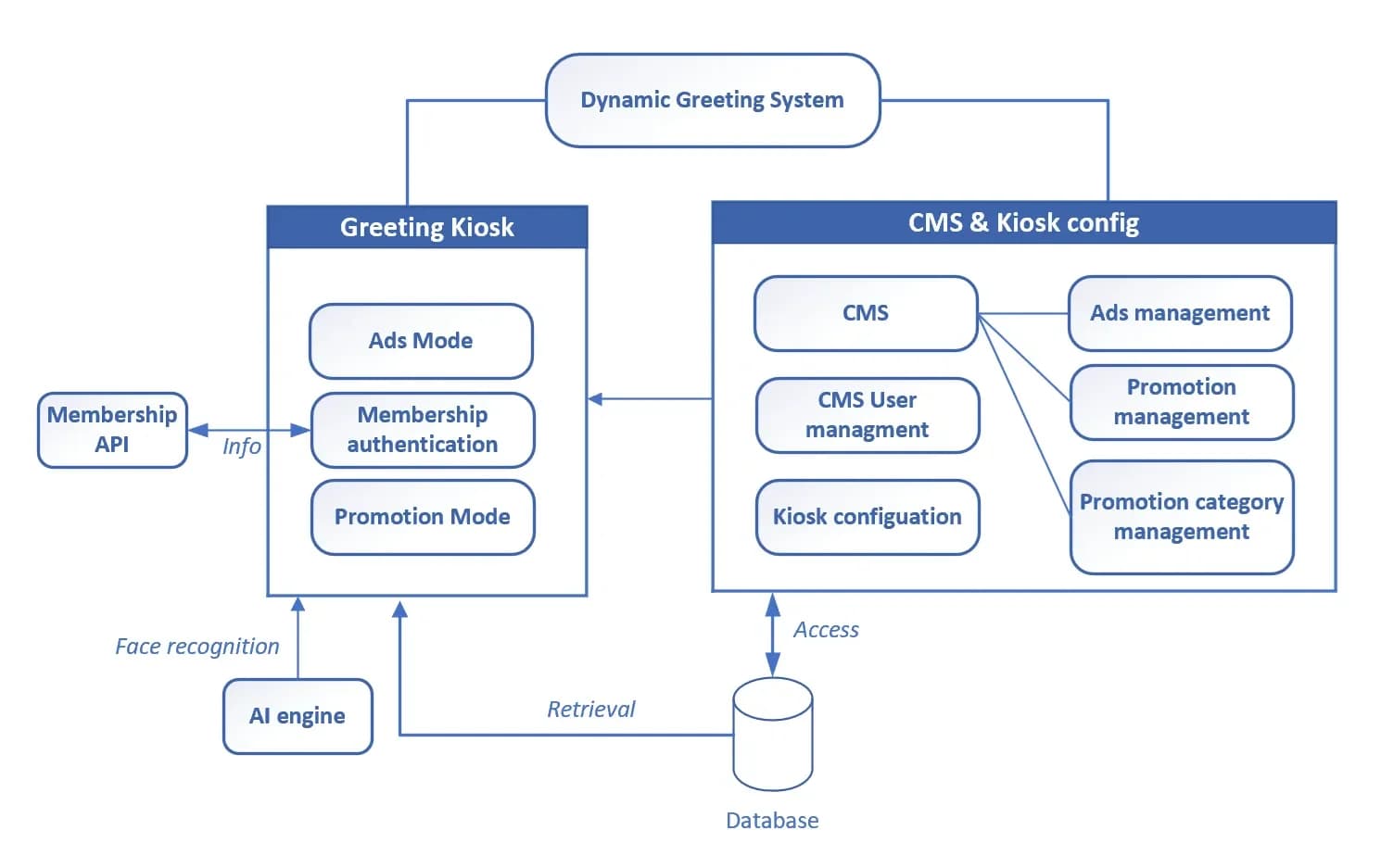
We developed a web application in 2 parts: the Greeting Kiosk screen, which switches between advertising mode and promotion mode, and the CMS & Kiosk Configuration back-office system, which the marketing team uses to manage content and view statistics. The kiosk connects to the project's AI engine to recognise member faces and retrieves member data through the Membership API.
- Camera at the Greeting KioskDetects customer faces
- Face recognition AI engineMember, or gender/age range
- Membership APIRetrieves member data
- Promotion mode on the touchscreenGreeting + profile-based promotions
- CMS & Kiosk ConfigurationContent management + dashboard
Results
We delivered, installed and tested the software according to the scope of work. The customer finished testing the system on 27 December 2019, and the project was closed as completed work in 2020.
How the brief came about
The brief for this case was to trial an advertising screen that could interact with customers, in a retail business's pilot project. A typical advertising screen shows the same content to everyone who walks past, so the marketing team did not know which promotion suited whom, or how much interest the screen attracted.
The marketing team wanted a kiosk that would greet customers and offer them the right promotions, let the team change advertisements and promotions themselves without waiting for a programmer, and show kiosk usage statistics. We joined the project as a subcontractor to a consulting firm, responsible for developing the kiosk software and the back-office system.
What face recognition is used for in this case
Face recognition means having an AI system compare a face image captured by the camera with registered faces. In this case it identifies which member is standing in front of the kiosk, so that the right promotion can be selected. It is not used to identify members of the general public who have not registered.
Requirements and constraints
The kiosk had to work with the project's existing systems, and the use of face images had to be restricted from the design stage. The main requirements and constraints are as follows.
- Screens designed for a 55-inch portrait touchscreen
- Face recognition only for members who have registered their face and confirmed the display of their information at the registration kiosk. For non-members, only the gender and age range estimated from the face may be used.
- Stored data must be encrypted, and data transmission must use secure protocols.
- The kiosk must connect to the project's AI engine (the AI program used for face recognition) and Membership API (the interface to the membership system).
- If the camera detects several faces at once, the system must select the person closest to the kiosk.
- Promotion product categories were defined from the outset, because adding or removing categories later affects the screen design.
- Face recognition can be scheduled to switch on and off according to store opening hours, to reduce server load while the store is closed.
How the kiosk selects a promotion for each customer
The kiosk selects promotions by comparing the customer profile with the condition tags the marketing team applies to each promotion: gender, age range, time period, and member or non-member. The AI engine handles face recognition and estimates gender and age range, while promotion selection uses rules based on the tags set by the marketing team.
This approach separates responsibilities clearly. The AI provides information on who is standing in front of the kiosk, the marketing team decides which promotion is shown to whom, and the team can change the rules itself from the back-office system. The kiosk works in the following steps.
- 1
Advertising mode (Ads Mode) while waiting for customers
The kiosk loops advertising still images or videos in the order set in the back-office system, in either full-screen or non-full-screen format.
- 2
Camera detects faces
When someone comes within the camera's capture range, the system looks for a face. If it finds several people at once, it selects the person closest to the kiosk.
- 3
Recognise the member or estimate the customer group
The face image is sent to the AI engine and compared with registered member faces. For a member, the system retrieves data through the Membership API to build the customer profile. For a non-member, the system uses the gender and age range estimated by the AI engine instead.
- 4
Greeting and promotions (Promotion Mode)
The screen shows a welcome page with a spoken greeting, then displays the promotions whose condition tags match the profile. Customers can browse promotions by product category. For non-members, the screen invites them to register for special privileges.
- 5
End of use and statistics recording
When the customer presses to end the session or walks away from the screen, the kiosk shows a thank-you page, records the usage history (Activity Log) in the database, then returns to playing advertisements as before.
Deliverables
We delivered a web application in 2 parts, developed with PHP, Python, HTML, JavaScript and a MySQL database, and installed and tested it. The delivered components are as follows.
- Greeting Kiosk screens: advertising mode, promotion mode, welcome page, thank-you page and Activity Log recording
- Advertising management: add, edit and delete image or video advertisements, in both full-screen and non-full-screen formats
- Promotion management: apply condition tags for gender, age range, time period, and member or non-member, by product category
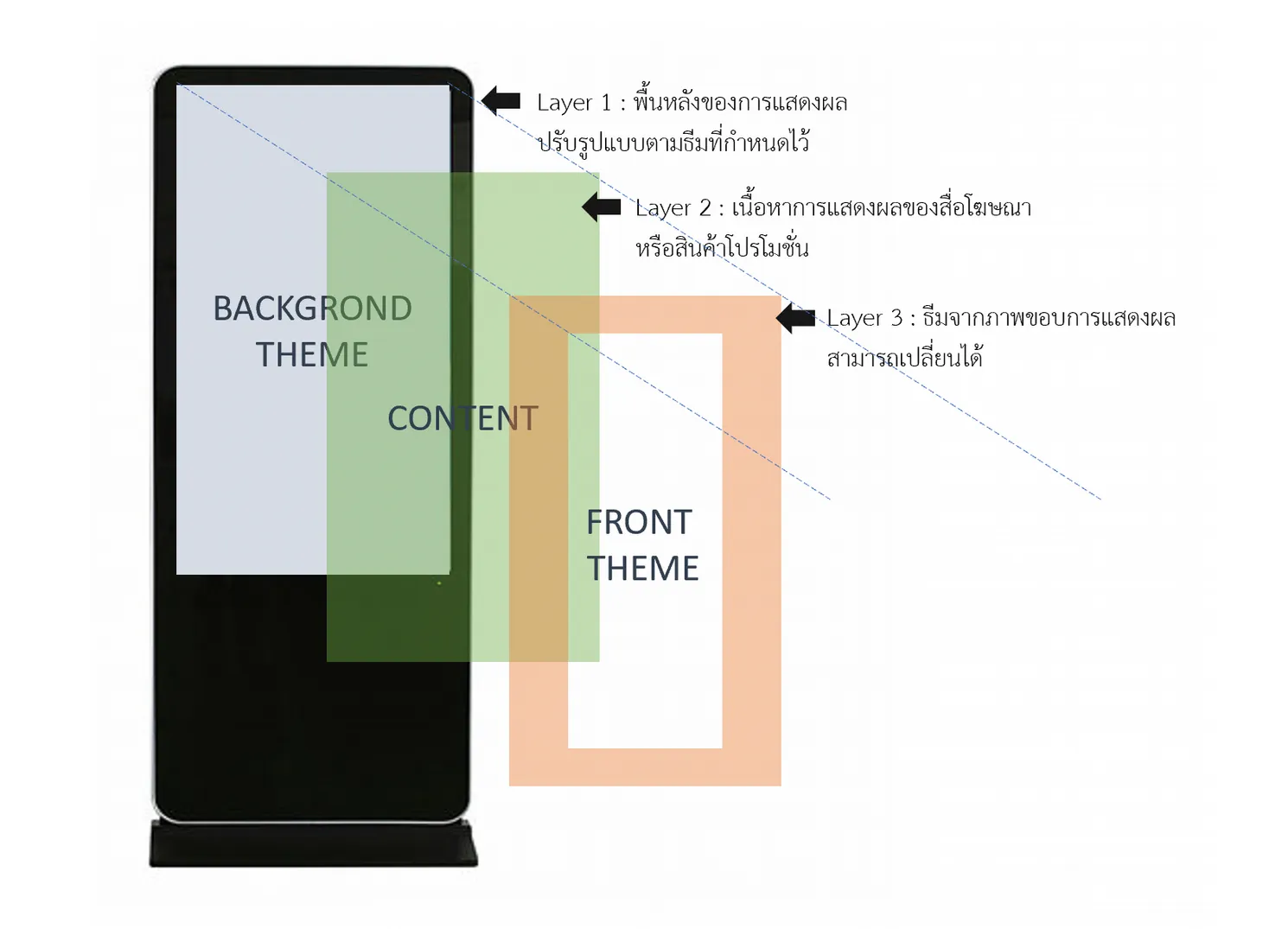
- Kiosk settings: morning and afternoon screen themes, and a preview of the kiosk screen before publishing
- Statistics dashboard: number of users split by member and non-member, time spent at the kiosk, how often members return, and the number of times each promotion was viewed, with data export to CSV files
- User management for the back-office system
- Design documents and acceptance test scripts (UAT is the testing the customer uses to decide whether to accept the work)
Confirmed results
We delivered, installed and tested the software according to the scope of work. The customer finished testing the system on 27 December 2019, and the project was closed as completed work in 2020.
This case was a pilot project. We have no marketing performance figures, such as sales or kiosk user numbers, so we report only the work status supported by documents.
What we learned
This work offers the following principles for systems that use customers' face images and must connect to other parties' systems.
- Privacy must be in the requirements from the outset. The system should recognise only people who have registered and consented, using only broad group information such as gender and age range for everyone else, and stored data must be encrypted.
- Test cases must be tied to requirements agreed before development starts. The problem encountered in this work was that test cases did not match the specification. When test cases are tied to requirements from the outset, acceptance testing does not need to be reinterpreted later.
- The kiosk works to its full potential when all external systems are ready. In this work, another vendor's marketing-side software could not be used in practice, so it is advisable to assign an owner for each system and check readiness from the early stage of the project.
How this approach can apply to your work
If your business already has a membership system and you want an in-store screen that offers promotions by customer group, you can use the same approach as this case: separate the kiosk, the face recognition system and the back-office system, and let the marketing team control the promotion selection rules itself. What needs adapting depends on your existing systems and the screen size you use.
Reusable parts and parts that need adapting
| System part | Reusable | Needs adapting when |
|---|---|---|
| Kiosk screens | Advertising mode and promotion mode, welcome page and thank-you page | If your screen differs in size or orientation from the 55-inch portrait screen, the screens must be redesigned. |
| Face recognition | Connection to the AI engine through an API, and the condition of recognising only consenting members | If your project does not yet have an AI engine, or a registration and consent process, these must be chosen and prepared first. |
| Promotion selection | Comparing the profile with condition tags for gender, age range, time period and membership | If you segment customers by other conditions, condition tags must be added and the back-office screens checked. |
| Membership system | Retrieving member data through the Membership API | If your membership system has no API, a connection interface must be prepared first. |
| Back office and statistics | Management of advertisements, promotions and themes, and a dashboard with CSV export | If you need other metrics, the list of metrics must be agreed before design. |
- Have the marketing team first summarise who each promotion suits, because these conditions are what the system uses to select promotions.
- Define promotion product categories from the start.
- Agree who is responsible for the AI engine, the membership system, the registration kiosk and the kiosk software, then write test cases that match the requirements before development.
- Schedule face recognition to switch on and off according to store opening hours.
Technology used
Frequently Asked Questions
Does the kiosk recognise the face of every customer who walks past?
No. The kiosk recognises only members who have registered their face and confirmed the display of their information at the registration kiosk. For non-members, the system uses only the gender and age range estimated by the AI engine from the face, to select promotions and invite them to register.
Can the marketing team change advertisements and promotions themselves?
Yes, through the CMS & Kiosk Configuration back-office system. The marketing team can add, edit and delete image or video advertisements, manage promotions with condition tags, set morning and afternoon screen themes, and preview the kiosk screen before publishing.
What statistics does the system collect?
The kiosk logs every use and shows the data on a dashboard, such as the number of users split into members and non-members, the time spent at the kiosk, how often members return, and how many times each promotion was viewed. You can view this by the hour, day, week or month, and export the raw data as a CSV file.
Which parts of this system did Inspektion develop?
We developed the Greeting Kiosk screen software and the CMS & Kiosk Configuration back-end system, then connected them to the project's face recognition AI engine and Membership API. We also installed and tested the system.
How much does a kiosk like this cost?
This work is developed to each project's requirements, so there is no standard price. The price depends on the functions you need, the existing systems to be connected, such as a membership system or AI engine, and the number of kiosks. Please contact us to request a quotation.