Camera-based vehicle entry and exit logging at the barrier, for a site with multiple tenant companies
This system is for recording vehicle entry and exit by camera instead of writing down vehicle registrations by hand, at a site with multiple tenant companies. We designed the system, installed 4 IP cameras and a server cabinet at the entrance and exit in 2019, and developed an image-recording program and a program that sends status lights to the barrier.
- Industry
- Services
- Year
- 2019
- Scope of work
- System design to requirements: an LPR module in which staff enter, within 24 hours, the details of images whose plates cannot be read, a visitor app, a tenant app and daily reports · On-site work: replacement with 4 IP cameras (2 for entry, 2 for exit, left and right angles), trial camera angle settings at distances of 1, 2 and 3 metres, and installation of a server cabinet · Barrier control unit hardware and processing unit · Software for controlling the entry and exit barriers, and a program that photographs entering and exiting vehicles from left and right angles and stores the images on a NAS
Summary
- This system is for recording vehicle entry and exit by camera instead of writing down vehicle registrations by hand, at a site with multiple tenant companies, following the site owner's brief for a "visitor system with no handwritten records".
- In 2019, we replaced the existing CCTV cameras with 4 IP cameras (2 for entry, 2 for exit) and installed a server cabinet on site.
- We developed a program that photographs vehicles and stores the images on a NAS, and a program that controls the barrier's I/O (input/output) signals, using Python and SQLite.
- The system design specifies that staff enter back into the system, within 24 hours, the details of images whose plates cannot be read.
- This work is a capability we have previously developed in vehicle-recording cameras: the parts installed and developed are the cameras, the server and the image-recording program, while the plate reading module, apps and daily reports remain in the system design.
The on-site brief
The site owner wanted a "visitor system with no handwritten records" instead of having security guards write down visitors' vehicle registrations by hand. The system had to allow searching back to see which vehicle passed the barrier and when, let tenant companies pre-register vehicles themselves, and produce daily reports with photographs.
What we did
We designed a system with a licence plate reading module (License Plate Recognition, or LPR), a visitor logging app, a tenant vehicle registration app and daily reports. On site, we replaced the existing CCTV cameras with Hikvision IP cameras, installed a server cabinet, and developed, using Python and SQLite, a program that stores vehicle images on a NAS (network-attached storage) and a program that controls the barrier's I/O (input/output) signals.
Test results with real workpieces
The 4 cameras and the server cabinet were installed on site in 2019. The image-recording program was completed but is not yet running stably. The licence plate reading module, visitor app, tenant app and daily reports remain in the system design we prepared.
How the brief came about
The brief for this case was to stop writing down visitors' vehicle registrations by hand at the entrance and exit of a site with multiple tenant companies. The site owner called this brief a "visitor system with no handwritten records". Previously, security guards wrote vehicle registrations in a logbook, so searching back was slow and there was no photographic confirmation.
Multiple tenant companies at this site share the entrance and exit, so each company wanted to know when vehicles visiting it came in and went out, while the site owner wanted information on every vehicle in one place.
Requirements and constraints
The system had to meet the needs of the site owner, the security guards and the tenant companies sharing the entrance and exit. The main requirements from the requirements document were as follows:
- Search which vehicle passed which barrier point and when, by licence plate, date and time, or place visited
- Security guards log visitors with photographs instead of writing by hand
- Tenant companies can pre-register permitted vehicles themselves, with start and end dates
- Daily reports show a licence plate image, a vehicle front image, entry time and exit time
- For images whose plates the system cannot read, a person must enter the details within 24 hours
The scope changed during the project; for example, fingerprint scanning and some reports were removed.
How this vehicle entry and exit logging system is designed to work
This system is designed so that cameras first capture and store an image of every vehicle passing the barrier, and the licence plate reading (LPR) module then converts the images to text. For images whose plates cannot be read, staff enter the details within 24 hours. This approach means every vehicle has a supporting image, even if the plate reading module cannot read some images.
What is License Plate Recognition (LPR)?
LPR is software that automatically reads the letters and numbers on vehicle licence plates from camera images and stores them as searchable text, instead of having staff write them down by hand.
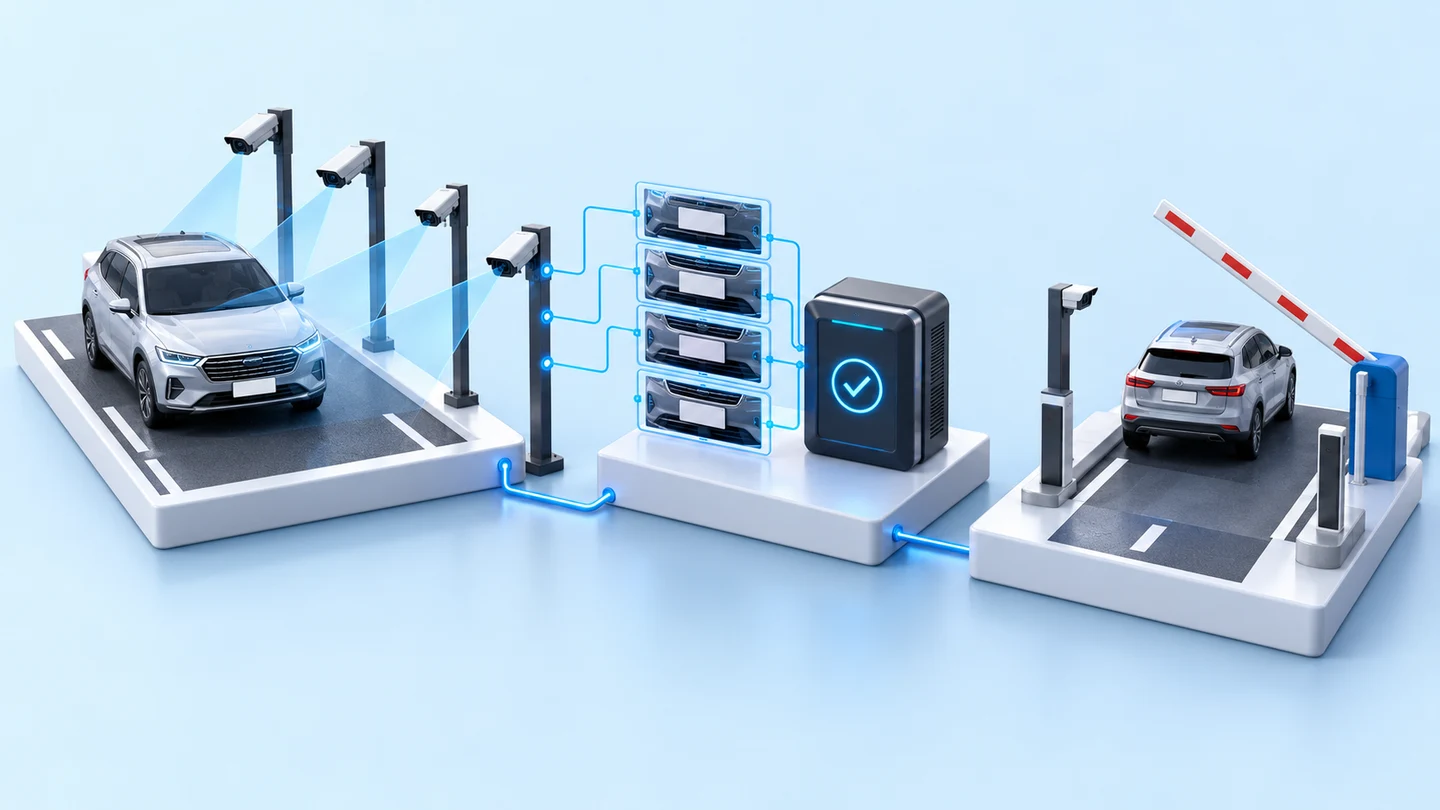
According to the project's inspection checklist, the sequence at the barrier has 4 steps, and the entry and exit sides work in the same way.
- 1
Vehicle detection sensor at the barrier
When there is no vehicle, the status light at the barrier is off. When a vehicle moves in, the sensor at the barrier detects it.
- 2
IP cameras photograph the vehicle from two angles
4 Hikvision IP cameras, 2 for entry and 2 for exit, photograph the vehicle from the left and right angles.
- 3
Store images on the NAS
A Python program in the server cabinet saves the images to the NAS (network-attached storage) and keeps the records in an SQLite database.
- 4
Send status lights to the barrier
After an image is saved successfully, the I/O control unit gives one pulse of green light. Once the vehicle has passed, it gives one pulse of red light, and the light then goes off. The inspection checklist specifies the status lights only; there is no step that opens the barrier based on the plate reading result.
What has been installed and developed
What we installed on site was the 4 cameras and the server cabinet. What we developed was 2 programs: an image-recording program, and a program that controls the I/O and the status lights at the barrier.
- Replaced the existing CCTV cameras with 4 Hikvision IP cameras at entry and exit, left and right angles
- Trial camera angle settings at distances of 1, 2 and 3 metres, at both entry and exit
- Installed a server cabinet with a stand
- A program that photographs entering and exiting vehicles from left and right angles and stores the images on the NAS, which was completed but is not yet running stably
- A program that controls the I/O signals of the entry and exit barriers, giving green and red status lights after an image is saved
What we designed as part of the same system:
- Barrier control unit hardware and processing unit
- Licence plate reading (LPR) module and the procedure for staff to enter the details of images whose plates cannot be read
- Visitor logging app for security guards, for selecting the place visited and photographing the front of the vehicle and the visitor card instead of writing by hand
- App for tenant companies to register permitted vehicles, with start and end dates
- Daily reports with licence plate, place visited, entry time, exit time and supporting photographs
On-site test results
On site, we tried camera angles at distances of 1, 2 and 3 metres, at both entry and exit, to find the position that gives a clear licence plate image. The 4 cameras and the server cabinet were installed in 2019. The image-recording program was completed but is not yet running stably.
Licence plate reading accuracy depends on camera angle, lighting and vehicle speed, so it must be measured with real vehicles at each site. This system design therefore stores an image of every vehicle first as evidence.
What we learned
This work offers 3 principles for vehicle-recording camera and licence plate reading work.
- Camera position and angle must be trialled at the real site before the design is finalised. In this work, we tried cameras at several distances at both entry and exit, because distance and camera angle affect how clear the licence plate is.
- Automatic plate reading needs a fallback with a person responsible for it. This system design stores an image of every vehicle first and sets a time limit for staff to enter the details of images that cannot be read, so information is not lost when the reading module makes a mistake.
- Agree the scope and acceptance criteria for each part from the start. This work had an inspection checklist that clearly specified barrier operation and image storage, but the scope changed along the way, so parts finished earlier should have their own completion criteria.
How this approach can apply to your site
If your site has a shared entrance and exit and you want to stop writing down vehicle registrations by hand, you can use the design approach from this case: entry and exit cameras, an on-site server, image storage and status lights at the barrier. What needs adapting is the camera positions, the existing barrier system and who is responsible for the data.
Approaches you can apply, and what needs adapting
| System part | Approach you can apply | Needs adapting when |
|---|---|---|
| Cameras and shooting angles | A design with entry and exit cameras photographing vehicles from left and right angles | If your entrance and exit differs in width or length from this case, camera positions must be trialled again on site |
| Image storage | Storing an image of every vehicle on a NAS before reading the plate | If images must be kept longer or there are several entry and exit points, storage capacity must be reassessed |
| Barrier | Sending green and red status lights to the barrier after an image is saved | If your barrier is a different model, the signal input points must be checked first |
| Plate reading | Having a person enter the details of unreadable images within a set time | The plate reading module must be tested with the real vehicles and lighting of the site before use |
| System users | Separate apps for security guards and for tenant companies | If your site has other user groups, such as transport vehicles or contractors, permissions must be redefined |
- Agree a clear scope and acceptance criteria for each part before work starts
- Decide who enters the details of images whose plates cannot be read, and within what time
- Driver photographs and visitor cards are personal data, so before going live you should decide who may view them and how long they are kept
- Prepare the network, power and image storage at the server cabinet to support daily image recording
Read more
- AI / IoT consulting and system design service
- Custom inspection and control system development service
- AI and IoT system installation service
- Article: how an I/O (input/output) signal isolation board is designed to be safe
- Case: welcome kiosk with face recognition
- Case: cross-border transfer of data and camera images from a production line in Cambodia
Technology used
Frequently Asked Questions
Where does the system store vehicle images, and how are they searched later?
A Python program in the server cabinet saves images of entering and exiting vehicles from left and right angles to the NAS (network-attached storage) and keeps the records in an SQLite database. The system design specifies searching by licence plate, date and time, or place visited.
How accurately does the system read licence plates?
Accuracy depends on the camera angle, lighting and vehicle speed at each site, so it must be measured with real vehicles on site. This system design has a fallback: it stores an image of every vehicle first, and staff enter, within 24 hours, the details of images whose plates cannot be read.
Can existing CCTV cameras be used?
It depends on the case. In this work, we replaced the existing CCTV cameras with 4 new IP cameras, then tried camera angles at distances of 1, 2 and 3 metres. For your site, the existing cameras and installation positions must be surveyed on site before reaching a conclusion.
Does the system open the barrier by itself when it reads a plate?
This project was not designed to open the barrier based on licence plate readings. The inspection checklist for the I/O control program we developed specifies only the green and red status lights at the barrier after the image is recorded. If you want the barrier to open according to the plate reading, that part must be designed and tested separately.
What information should be prepared before work begins?
You should prepare a plan of the entrances and exits with the barrier positions, information on the existing barrier system, a list of the tenants or places that visitors can select, and the report format you need. This type of work has no standard price. Please contact us to request a quotation after a site survey.