Software for detecting slag in molten steel with a FLIR thermal camera, for the steel industry
Slag Carry Over Report is prototype software on Linux that receives images from a FLIR thermal imaging camera and shows the ratio of slag to molten steel in the molten steel stream as figures and graphs in real time. The program turns on an alarm light when slag reaches a level set by the user and records video for later review. We developed this software and tested its operation with a FLIR camera.
- Industry
- General manufacturing
- Scope of work
- Slag Carry Over Report software measures the ratio of slag to molten steel in the molten steel stream during pouring, according to 6 requirements · Input: images from a FLIR thermal imaging camera via an IEEE 1394a port · Processing: C++ software with OpenCV on Linux analyses the colour of infrared images of molten steel, separates molten steel from slag according to thresholds the user adjusts with sliders under the histogram, and calculates the ratio in real time · Display: a wxWidgets screen with a ratio graph, a slag-over-time graph, an alarm light for when slag reaches the set level and a video recording status light · Recording: video for later review and user-entered data; the requirements call for values to be recorded for at least 50 hours · What we built and tested: the software and screen design, with image input and display tested with a FLIR camera
Summary
- Slag Carry Over Report is prototype software on Linux that receives images from a FLIR thermal imaging camera via an IEEE 1394a port and shows the ratio of slag to molten steel in real time.
- The software separates molten steel from slag by the colour of the infrared image and lets users adjust the thresholds using sliders under the histogram.
- The screen shows a ratio graph, a slag-over-time graph, an alarm light for when slag reaches the set level and a video recording status light.
- The prototype's requirements specify that values can be recorded for at least 50 hours and reviewed later, along with a field for entering the Heat Number.
- We tested the prototype with a FLIR camera, covering image input, graph display and the alarm light. The slag separation thresholds must be set from images of real molten steel pouring on site before the alarm light is put into use.
The on-site brief
Slag floating on the surface of molten steel may flow out with the molten steel stream during pouring, which is called Slag Carry Over. The task for the prototype was to measure the ratio of slag to molten steel from thermal images in real time, display it as figures and graphs, and give an alert when slag reached the set level.
What we did
We developed the Slag Carry Over Report software in C++ on Linux. It receives images from a FLIR camera via an IEEE 1394a port. The software analyses the colour of the infrared image to separate molten steel from slag, with users adjusting the thresholds using sliders under the histogram, then displays a ratio graph, a slag-over-time graph and an alarm light, and records video.
- FLIR thermal imaging cameraVia an IEEE 1394a port
- Slag Carry Over Report softwareOn Linux (C++ / OpenCV)
- Separating molten steel from slagBy the colour of the infrared image
- Ratio graph and time graph
- Alarm light + video recording
Test results with real workpieces
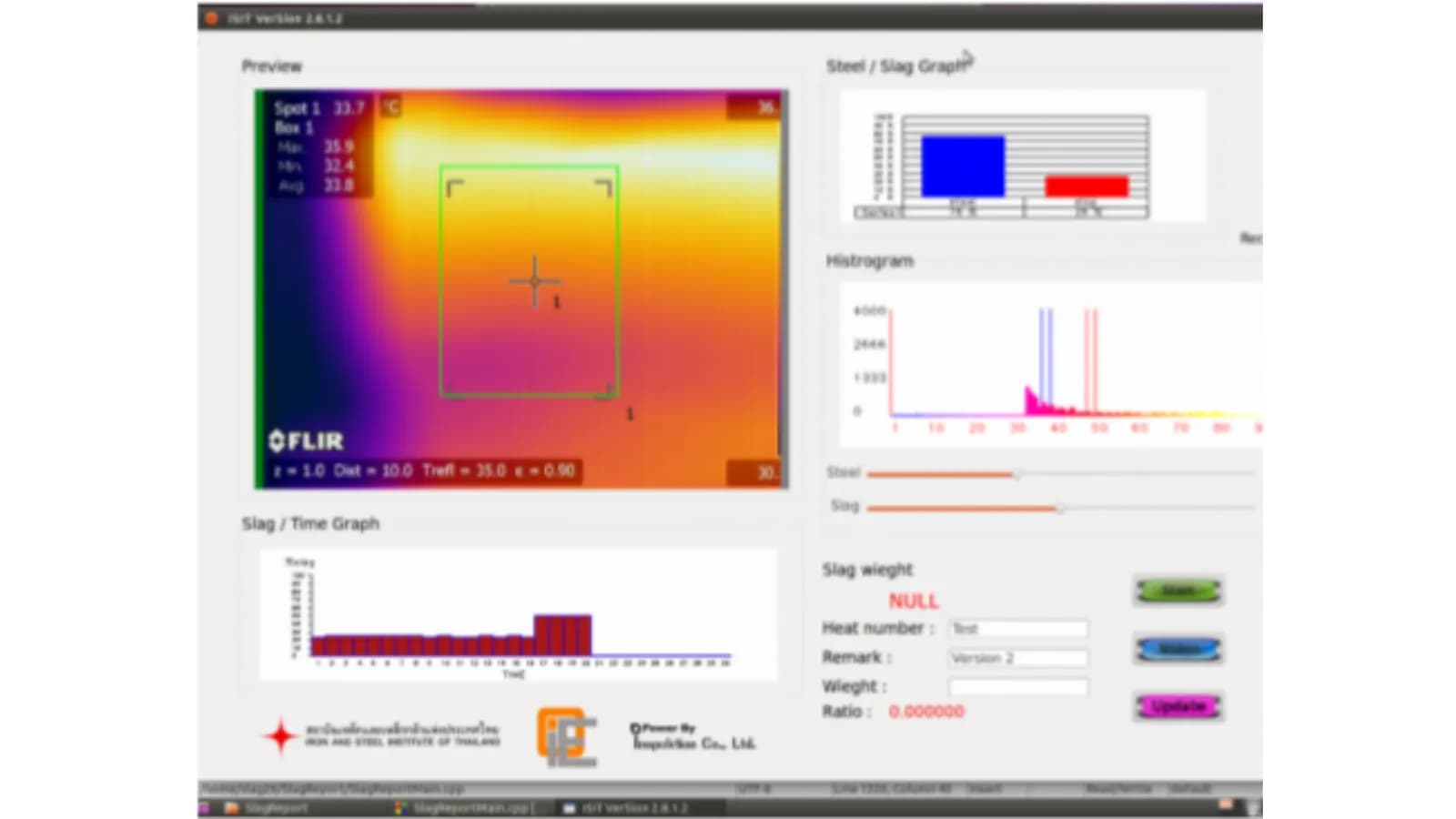
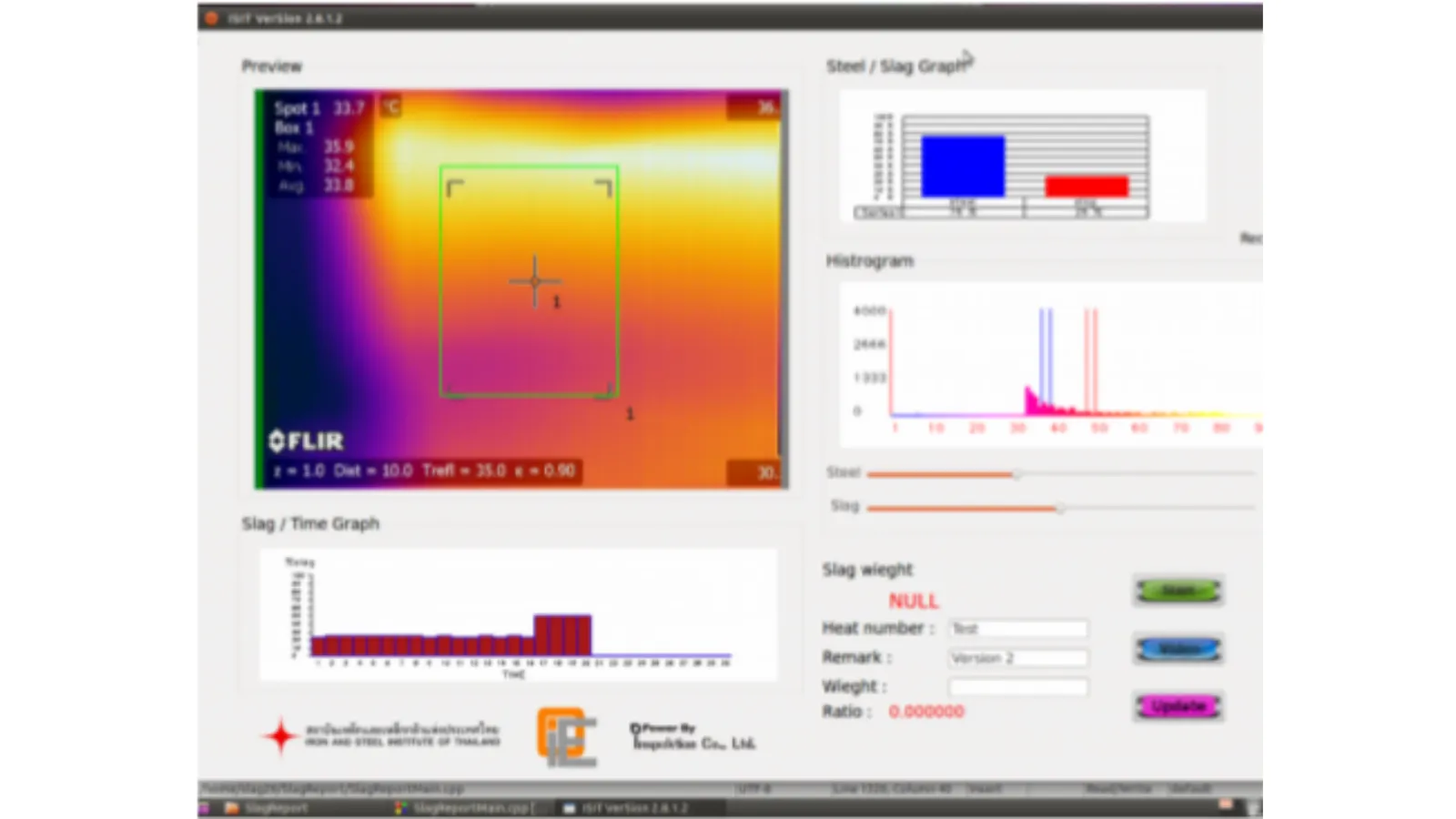
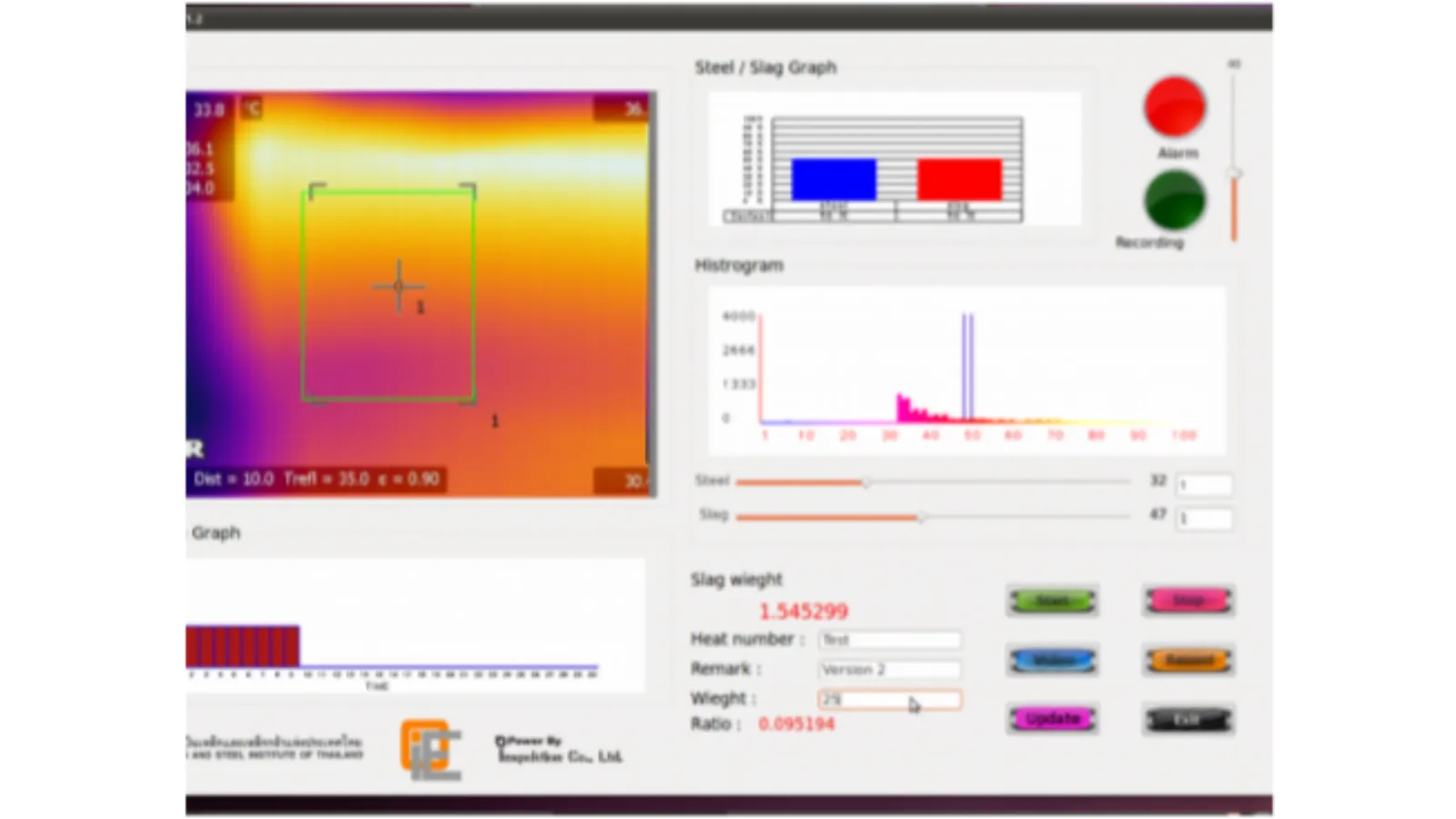
Program screenshots confirm that the prototype could receive images from a FLIR camera and display the ratio graph of molten steel to slag, the time graph, the alarm light and the video recording status light. This result is from testing the software with a FLIR camera; the thresholds for separating molten steel from slag must be set from images of real molten steel pouring on site.
How the brief came about
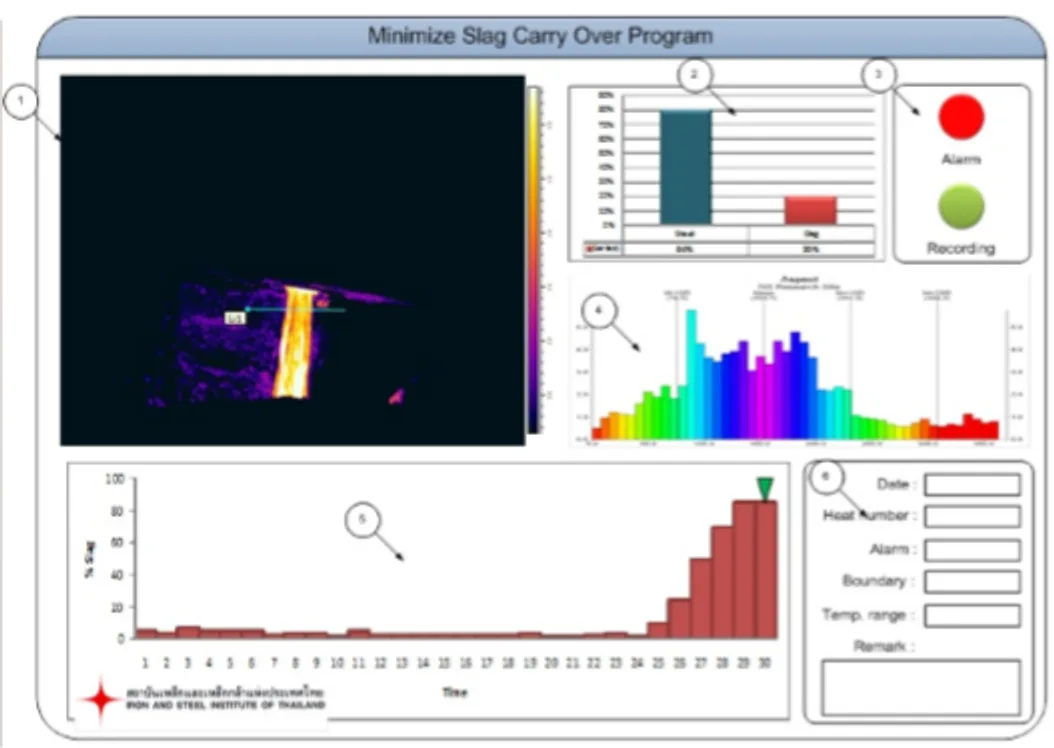
The task in this work was to measure how much slag is being carried out in the stream of molten steel being poured, and to display this as figures and graphs in real time. The input is images from a thermal imaging camera (Thermal Camera), which shows the temperature of each point in the image as a colour. The screen design for this work is named Minimize Slag Carry Over Program, the aim being to keep slag carry-over as low as possible.
What is Slag Carry Over?
Slag is the impurity that floats on the surface of molten steel. When molten steel is poured out of a furnace or vessel, some of the slag may flow out with the molten steel stream. This flow is called Slag Carry Over.
Requirements and constraints
This prototype must work to 6 requirements, and must receive images from a FLIR camera via an IEEE 1394a (FireWire) port on the Linux operating system. The 6 requirements are as follows.
- Analyse the colour of the infrared image of the molten steel
- Calculate the ratio of slag to molten steel
- Work in real time
- Allow alerts to be set for when slag reaches a specified level
- Record values for at least 50 hours and allow them to be reviewed later
- Record basic data entered by the user
How does the software separate slag from molten steel in a thermal image?
The software separates slag from molten steel by analysing the colour of the infrared image, then classifying each part of the image as molten steel (Steel) or slag (Slag) according to thresholds set by the user. Both thresholds can be adjusted using sliders under the histogram (a graph of the distribution of colour values in the image), so users can see the distribution of colour values in the actual image before setting the thresholds.
We wrote the software in C++ using the OpenCV library (image processing) and wxWidgets (program screen). The process is as follows.
- 1
Receive thermal images in real time
The FLIR camera sends images to a Linux computer via an IEEE 1394a port.
- 2
Separating molten steel from slag
The software analyses the colour of the infrared image, then separates parts of the image into Steel or Slag according to thresholds set by the user.
- 3
Calculate the ratio and trend
The software calculates the ratio of slag to molten steel and tracks slag values over time (Slag / Time) to show the periods when more slag is being carried out.
- 4
Alert and record
The program gives an on-screen alert when slag reaches the set level and records video for later review.
What we built and tested
We developed the Slag Carry Over Report prototype software, together with a screen design defining the program's components, then tested it with a FLIR camera. The program screen has the following components.
- Live thermal image from the FLIR camera, with a measurement box and maximum, minimum and average temperature values
- Histogram with Steel and Slag threshold sliders
- Bar graph of the ratio of molten steel to slag, and a slag-over-time graph
- Alarm light (Alarm), video recording status light (Recording) and Video button
- Fields for entering the Heat Number, weight and notes
- Fields showing slag weight and ratio
Test results with the FLIR camera
The test results were recorded as screenshots of the program while it received images from a FLIR camera, and as a demonstration video of the program working with a FLIR camera. These results show image input, the ratio graph, the time graph, the alarm light and the video recording status light. The thresholds for separating molten steel from slag depend on the metal type, camera angle and shooting distance, so they must be set and tested with images of real molten steel pouring at each site.
Before real-world use
Before this approach is applied, the site must first be surveyed, thresholds set from real images, and tests carried out with real molten steel pouring.
What we learned
This work offers principles for measuring from thermal images: thresholds must be adjustable and visible, figures must be tied to each pour, and the alarm light is a signal for a person to make a decision. Each point is detailed below.
- The thresholds used to separate objects in a thermal image should be adjustable on screen, and users should be able to see the data used to set them. This prototype places the threshold sliders under the histogram.
- Figures from images can be used for later checks when they are tied to the data for that pour. This prototype has fields for the heat number, weight and notes on the same screen as the graphs and the video recording status light.
- The alarm light is a signal for a person to make a decision. In this prototype it is a light on the screen. Before real-world use, you must define who receives the signal and what must be done next when the light comes on.
How this approach can apply to your factory
If your factory pours molten metal and you want to see the slag ratio as a figure, you can use the same approach as this prototype: receive images from a thermal imaging camera, separate parts of the image by adjustable thresholds, display graphs and keep records for later review. What needs adapting is the image input from the camera and the thresholds set from real images of your site.
Reusable parts and parts that need adapting
| System part | Reusable | Needs adapting when |
|---|---|---|
| Image input | Image input from a FLIR camera via an IEEE 1394a port on Linux | If the camera is a different model or uses a different port, the camera image input must be adapted first. |
| Separating molten steel from slag | Infrared image colour analysis and threshold sliders under the histogram | If the metal type, camera angle or shooting distance differs, thresholds must be set again from real images of the site. |
| Display and alerts | Ratio graph, time graph and on-screen alarm light | If alarm signals need to go to other devices, additional design and testing are required first. |
| Recording | Video recording, and fields for entering the heat number, weight and notes | If the factory needs to keep different data, the data fields and retention period must be redefined. |
- The camera mounting position must have a clear view of the molten steel stream and be protected from heat, smoke and dust.
- Collect real images from several pours for setting thresholds and testing, before putting the alarm light into use.
- Agree clearly who watches the screen during pouring, who receives the alerts and who reviews past data.
Read more
- Case study: combining thermal images of electrical control cabinets from a FLIR camera, with temperature values per grid cell
- Case study: prototype program for camera-based workpiece colour shade inspection with AI
- Custom system development service
- Consulting and system design service
- Article: How AI Vision Inspection differs from the human eye
Technology used
Frequently Asked Questions
What camera and software does this system use?
It uses a FLIR thermal imaging camera connected to a Linux computer via an IEEE 1394a port. The software is written in C++, using OpenCV for image processing and wxWidgets for the program screen.
How does the system know that there is slag in the molten steel?
The software analyses the colour of the infrared image, then separates the molten steel and slag portions according to thresholds the user adjusts with sliders under the histogram. It then displays a ratio graph and a time graph. When slag reaches the set level, the on-screen alarm light comes on.
Can data be kept for later review?
Yes. The prototype's requirements specify that values can be recorded for at least 50 hours and reviewed later. The program can record video and has fields for entering the Heat Number, weight and notes.
What does the factory need to prepare before testing?
You need a camera mounting position with a clear view of the molten steel stream that is protected from heat, smoke and dust. You also need to collect real images from several pours for setting thresholds and testing, and to agree who watches the screen during pouring, who receives the alerts and who reviews past data.
What are the price and development time?
Price and development time depend on the camera model, the mounting points and the data to be recorded, so there is no fixed figure. Contact us to request a quotation and work plan after a site survey.