Workpiece colour shade inspection program with camera and AI (IKS2 Shading), for general manufacturing
IKS2 Shading is a program that inspects workpiece colour shades by camera. It learns criteria from images of good and defective workpieces, has AI group the shades, then shows the result as good (OK) or defective (NG). We developed this prototype program ourselves and notified the Department of Intellectual Property of the copyright in 2018.
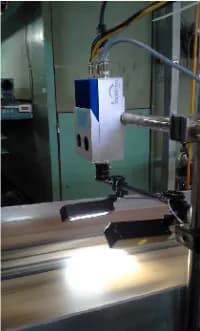
- Industry
- General manufacturing
- Year
- 2018 (copyright notification year)
- Scope of work
- Input: images of good and defective workpieces from a camera · Processing: image filtering, sorting RGB colour values by histogram, image Feature Extraction, colour shade grouping with K-means Clustering and decision criteria selection with Fuzzy Logic · Output: good (OK) or defective (NG) with a summary report · Software: a criteria teaching module, an inspection and display module, a colour database for later review, and a screen for adding new standard shades without programming · What we built: the IKS2 Shading prototype program, developed in-house
Summary
- IKS2 Shading is a prototype camera-based workpiece colour shade inspection program that we developed in-house, and we submitted a copyright notification to the Department of Intellectual Property in 2018
- Users teach the criteria with images of good and defective workpieces. When there is a new standard colour shade, a new set of sample images can be added without programming
- AI groups colour data using K-means Clustering, Fuzzy Logic selects the decision criteria, and the user decides which sample images count as good or defective
- Inspection results are shown as good (OK) or defective (NG) with a summary report, and colour data is stored in a database for later review
- IKS2 Shading is a prototype program that sets its criteria from sample images, so applying it to any workpiece requires teaching the criteria and testing with that site's workpieces and lighting
The on-site brief
Many factories still sort workpiece colour shades by eye. Individual staff may answer the question "does this piece's colour pass or fail?" differently, and manual sorting takes a lot of labour and time.
What we did
We developed IKS2 Shading as a Decision Support System that converts the colours in an image into numbers, uses K-means Clustering (an automatic data grouping method) to separate good work from defective work, and uses Fuzzy Logic to select the decision criteria. Inspection results are shown as OK or NG with a summary report, and colour data is stored for later review.
- Capture images of good and defective workpiecesMachine Vision
- Sort colour values by histogramRGB Histogram + Feature Extraction
- AI colour shade groupingK-means Clustering
- Select decision criteriaFuzzy Logic
- OK/NG result and summary report
Test results with real workpieces
The result is a prototype program that judges colour shade from the numeric values of an image, using the same criteria every time, and we submitted a copyright notification to the Department of Intellectual Property in 2018. Applying it to any given workpiece requires teaching the criteria and testing with that site's workpieces and lighting conditions.
How the brief came about
The task here was to judge whether a workpiece's colour passes or fails using criteria that do not depend on the inspector. Many factories still sort colour shades by eye, individual staff may judge the same workpiece differently, and manual sorting takes a lot of labour and time.
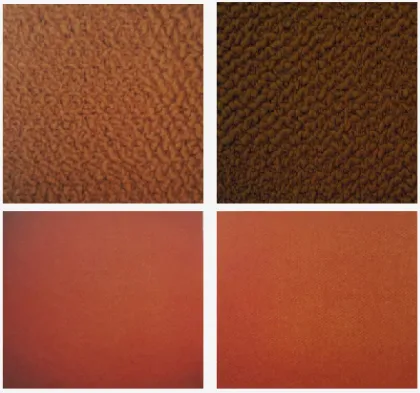
We developed IKS2 Shading ourselves as a prototype program. Our presentation document gives examples of applying it to colour shade inspection of labels, tiles and carpets.
Requirements and constraints
The program has to set its criteria from images of real workpieces and let users add new standard colour shades themselves. The main requirements of the prototype are as follows.
- Use images of good and defective workpieces as the data for setting criteria
- Add new standard colour shades from a screen by training the model on a new set of sample images, with no programming required
- Show inspection results as good (OK) or defective (NG) with a summary report
- Store colour data in a database for later review and for adjusting the criteria
The main limitation comes from the images. Colour values in an image change with the lighting, and the resulting criteria are only as good as the sample images used for teaching. The sample images therefore have to cover the range of shades actually encountered, and the team must first agree on what counts as good work.
Why we chose to have the program learn its criteria from images of good and defective workpieces
We chose this method because the question on site is "does the colour pass or fail?", and the answer lies in the sample workpieces the team has already sorted. The program therefore converts the colours of the sample images into numbers, then groups good work and defective work from those numbers. When there is a new standard colour shade, the team can add a new set of sample images without changing the program.
AI does one part only: grouping colour data. Criteria selection uses Fuzzy Logic (a way of reasoning with values that do not divide clearly into yes or no). The user defines the good and defective sample images and uses the OK / NG result to support decisions. The workflow is as follows.
- 1
Capture sample images of good and defective work
The user takes images of workpieces whose colour shades pass and fail and keeps them as samples. This image set is the data the program uses to set its criteria.
- 2
Filter images and sort colour values
The program filters the image, then sorts the red, green and blue colour values by histogram (a histogram is a graph of how colour values are distributed in an image) to select only the important colour data.
- 3
Combine image features
The colour data from all colour channels is combined into a set of numbers describing the image's characteristics (Feature Extraction means extracting an image's key features as numbers), so that images can be compared with one another.
- 4
AI colour shade grouping
AI groups the data using K-means Clustering, separating good workpieces from defective ones, then stores a representative value for each group for judging the next workpieces.
- 5
Select criteria and produce results
Fuzzy Logic selects the group with good statistical results as the decision criterion. The program shows a good (OK) or defective (NG) result, issues a summary report and stores the colour data in the database.
What is K-means Clustering?
K-means Clustering is an automatic data grouping method. The system finds the centre of each group, then assigns each set of data to the nearest group. In this work the data is the colour numbers from the images, so workpieces with similar colour shades end up in the same group.
System components
IKS2 Shading is Decision Support System software that combines criteria teaching, inspection and data storage in one program. IKS2 Shading judges each workpiece as one of 2 results, good (OK) or defective (NG), and stores colour data in the database. The prototype's components are as follows.
- Criteria teaching module: receives images of good and defective workpieces, then creates colour shade groups and a representative value for each group
- Inspection and display module: compares an image of a new workpiece with the criteria, then shows the result as OK or NG
- Summary report: summarises the sorting of workpieces into OK and NG groups
- Colour database: stores workpiece colour data for later review
- New standard colour shade screen: adds a set of sample images and retrains the model with no programming required
What we built
We developed IKS2 Shading as a prototype program (PoC, meaning proof of concept), with steps from teaching criteria from images through to showing OK / NG results, and we submitted a copyright notification for the automatic colour shade inspection program (IKS2 Shading) to the Department of Intellectual Property in 2018. A copyright notification is a record of the work, not a registration or an endorsement of the program's quality.
The accuracy of colour shade decisions depends on the workpiece, the lighting and the set of sample images used for teaching. The metrics used for evaluation are the defect catch rate and the false alarm rate, which have to be measured with each factory's workpieces and imaging points.
What we learned
This work offers the following principles for camera-based colour shade inspection.
- Colour criteria start from sample images the team has already agreed on. When the program learns from images of good and defective work, the resulting criteria are only as consistent as the selection of sample images, so the team has to agree on a shared definition of good work before training the model.
- Convert colours into numbers before the AI works on them, and define clearly which part the AI handles. In this work, AI groups the colour data, Fuzzy Logic selects the criteria and people define the sample images, and colour data kept in the database is available for later review when the criteria need revisiting.
- Lighting is part of the criteria. Colour values in an image change with the lighting, so criteria set under one lighting setup cannot be moved to another imaging point until they have been tested under that point's lighting.
How this approach can apply to your factory
If your factory has to sort workpieces by colour shade before packing or shipping to customers, you can use the approach in this case: teach criteria from images of good and defective workpieces, convert colours into numbers, then group them to decide OK / NG. What needs adapting is the lighting, the camera and the set of sample images for your workpieces, which must first be tested with your actual workpieces.
Reusable parts and parts that need adapting
| System part | Reusable | Needs adapting when |
|---|---|---|
| Setting criteria | Teaching criteria from images of good and defective workpieces | Your workpieces have colour shades or colour ranges that differ from the existing sample images: a new set of sample images has to be taken |
| Converting colours into numbers | Sorting colour values by histogram and Feature Extraction | Workpiece surfaces differ in pattern, gloss or reflectance: testing is needed to check that the colour values read can still separate good work from defective work |
| Grouping and criteria selection | K-means Clustering and Fuzzy Logic | Your team's definition of good and defective work differs from the original: the model has to be retrained |
| Image capture | The concept of imaging workpieces with a camera at the inspection point | Your inspection point has different lighting: the camera and lights have to be chosen and the lighting kept constant |
| Results and data | OK / NG results, summary report and colour database | Results need to be sent to other factory systems: additional integration work has to be assessed |
Read more
- Custom inspection and control system development service
- AI / IoT consulting and system design service (including prototype PoC work)
- Prototype case: camera for sorting colour shades and detecting black spots on recycled paper sheets
- MVDeep prototype machine case: helping to select camera and lighting sets for colour shade inspection
- Case: camera for inspecting cracks in double-corrugated roof tiles
- Article: How AI Vision Inspection differs from human visual inspection
- Article: choosing an AI inspection camera between off-the-shelf Task Cam and custom-built Machine Vision
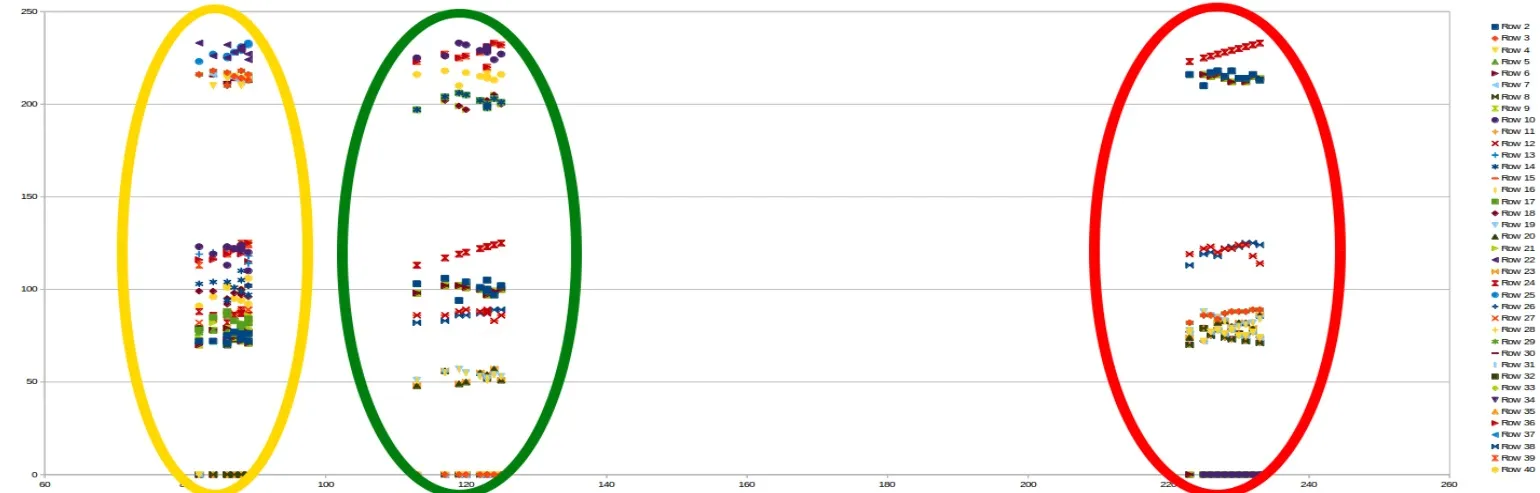
Technology used
Frequently Asked Questions
Do standard colour values have to be entered as numbers manually?
The main criteria in IKS2 Shading come from grouping the colour data of sample images of good and defective work. The detailed setup method depends on the program version and the workpieces used for testing.
Which part does AI handle, and who decides the result?
AI groups colour data using K-means Clustering to separate good work from defective work, then Fuzzy Logic selects the decision criteria. The program is designed as a decision support system: the user defines the sample images and uses the OK / NG result to support decisions.
How does lighting at the inspection point affect colour shade inspection results?
Colour values in an image change with the lighting, so criteria set under one lighting setup cannot be moved to another imaging point until they have been tested under that point's lighting. The inspection point therefore needs the camera and lights chosen, and the lighting kept constant, before sample images are taken for teaching the criteria.
What types of workpiece can it be used with?
Our presentation document gives labels, tiles and carpets as examples, but each type of workpiece has a different surface and gloss, so testing with sample workpieces from your factory is needed before this can be confirmed.
What do we need to prepare to test with our own workpieces?
Prepare sample workpieces, both good and defective, covering the colour shades actually encountered, the criteria for good work your team has agreed on, and information about the imaging point, such as lighting conditions. There is no standard price. We estimate the price and timeframe after testing with the sample workpieces.