Internal tools that reduce repetitive manual work for a software development team: data masking in spreadsheet files, scripts that carry out steps on the web and in programs, meeting recording and a quotation prototype
This set of 5 internal tools reduces repetitive manual work for our software development team. We developed them for our own use during 2020–2024. The set comprises an Anonymization program that masks data in spreadsheet files, a Selenium script that carries out steps on web pages, an RPA recorder that records mouse and keyboard use and replays it, the InMeet app for starting meeting video recording, and the DoQuot screen prototype for preparing quotations. We built and tested every tool within our own team.
- Industry
- Services
- Year
- 2020–2024
- Scope of work
- 5 internal tools we built and tested within the team: Anonymization program (Python) reads CSV, XLSX or XLS files, masks data according to a configuration file, then creates an output file and a mapping file for reversal (Jan–Mar 2024, 5 weeks) · Selenium + ChromeDriver script selects menu values, attaches Excel files and presses submit on web pages, with a manual (Jan–Mar 2024, 8 weeks) · RPA recorder (PyAutoGUI + pynput) records mouse clicks and key presses as a log with screen video, then replays them, tested with a case of typing text in Notepad (test files dated Apr 2023) · InMeet app in Controller mode instructs machines in Client mode to start and stop video recording, then uploads to a server, according to the 2020 manual · DoQuot screen prototype with a status table page and a quotation creation page, plus an Android installation file (Oct 2024, 2 days)
Summary
- This set of 5 internal tools reduces repetitive manual work for our software development team. We built and tested them as internal tools and prototypes during 2020–2024.
- The Anonymization program masks data in CSV, XLSX and XLS files according to a configuration file, and can reverse the masking with a mapping file. We completed it in January–March 2024, taking 5 weeks.
- The automation work is split into 2 types: Selenium for web pages whose buttons can be referenced from the page code, and the RPA recorder, which replays by on-screen position, for programs on the computer.
- InMeet lets a machine in Controller mode instruct machines in Client mode to start and stop meeting video recording, then upload to a server, according to the 2020 manual.
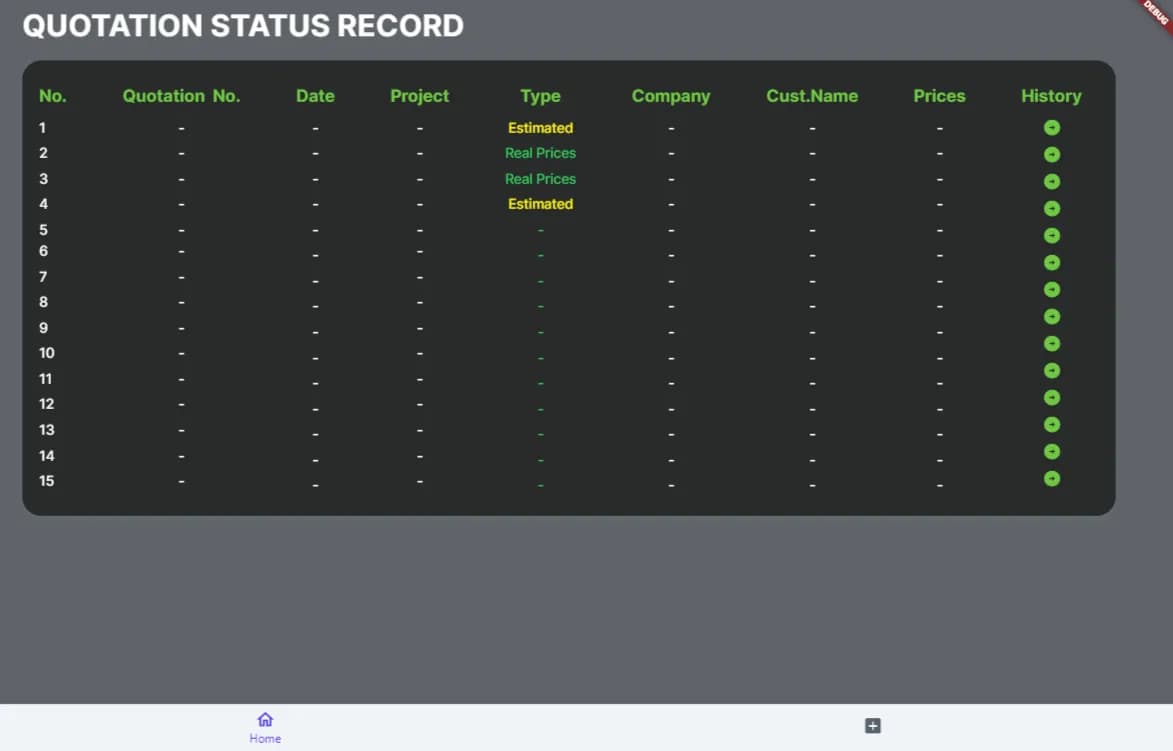
- DoQuot is a screen prototype of a status table page and a quotation creation page, which we built in October 2024, with an Android installation file.
The on-site brief
Our development team had work that had to be done by hand every time: masking data in Excel files before further use; clicking to select menu items, attaching files and pressing submit on the same web page many times over; recording meetings on video; and preparing quotations from task lists and the number of working days (Manday). This work takes time and is prone to error when repeated many times.
What we did
We wrote small tools, each for a separate task: a Python program that masks data in CSV, XLSX and XLS files reversibly; a Selenium script for steps on web pages; an RPA recorder (Robotic Process Automation means having software carry out the same steps on a computer in a set order) for programs on the computer; the InMeet app, which lets one machine instruct other machines to record meetings on video; and the DoQuot screen prototype.
- The team's repetitive manual workData masking · Clicking on web pages · Meeting recording · Quotations
- Python toolsAnonymization · Selenium · RPA recorder
- InMeet appStarts meeting video recording and uploads
- DoQuot prototypeStatus and quotation creation screens
Test results with real workpieces
Our 2024 annual project summary document states that the Anonymization program and the Selenium script were completed, although Selenium cannot capture elements drawn on a canvas (such as charts). The RPA recorder has test case run results with logs and video. InMeet can start video recording and upload according to the 2020 manual, and DoQuot has a screen prototype of the status table and the quotation creation page.
How the brief came about
The challenge in this case came from work within our own development team. The tasks that had to be done by hand every time were masking data in Excel files before further use, clicking through the same steps on web pages, recording meetings on video, and preparing quotations from task lists and Manday.
This work can be done by hand, but it takes time and is prone to error when repeated many times, for example clicking through tests on the same web page every time the program is changed. We therefore made small tools, each for a separate task, and developed them in different years during 2020–2024.
What is RPA?
RPA (Robotic Process Automation) means having software carry out steps on a computer in a set order, such as clicking, filling in, attaching files and pressing submit. It suits work where the steps are the same every time.
Requirements and constraints
Each tool has its own requirements, according to the requirements documents, manuals and work scope we wrote. The main requirements are as follows.
- Anonymization: read CSV, XLSX and XLS files, define the data to be masked in a configuration file (file_config), and be able to convert back to the original data.
- Selenium: select values in dropdown menus, attach Excel files, and press submit or download buttons on web pages.
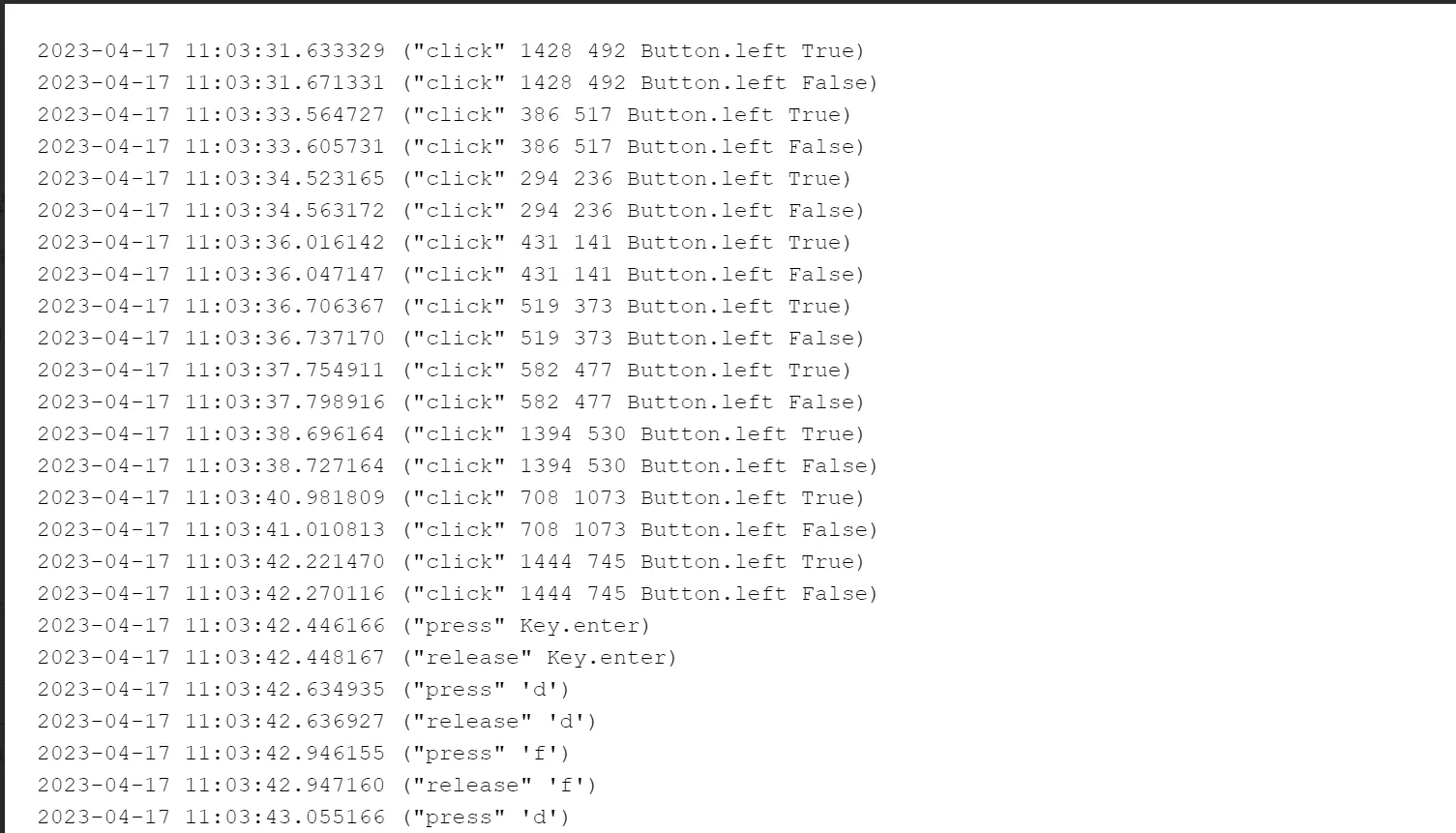
- RPA recorder: record mouse clicks and key presses as a log with screen video, so that both the recording run and the replay run can be reviewed afterwards.
- InMeet: let one machine start and stop video recording on other machines, then upload the video files to a server.
- DoQuot: screens for preparing quotations from task lists and Manday, starting with a status table page and a quotation creation page.
The main limitations come from how each tool refers to the screen. Selenium reads buttons and input fields from the web page code, so it cannot capture elements drawn on a canvas, such as charts. The RPA recorder replays by on-screen position, so it depends on window position and screen resolution.
Should you use Selenium or a mouse and keyboard recorder?
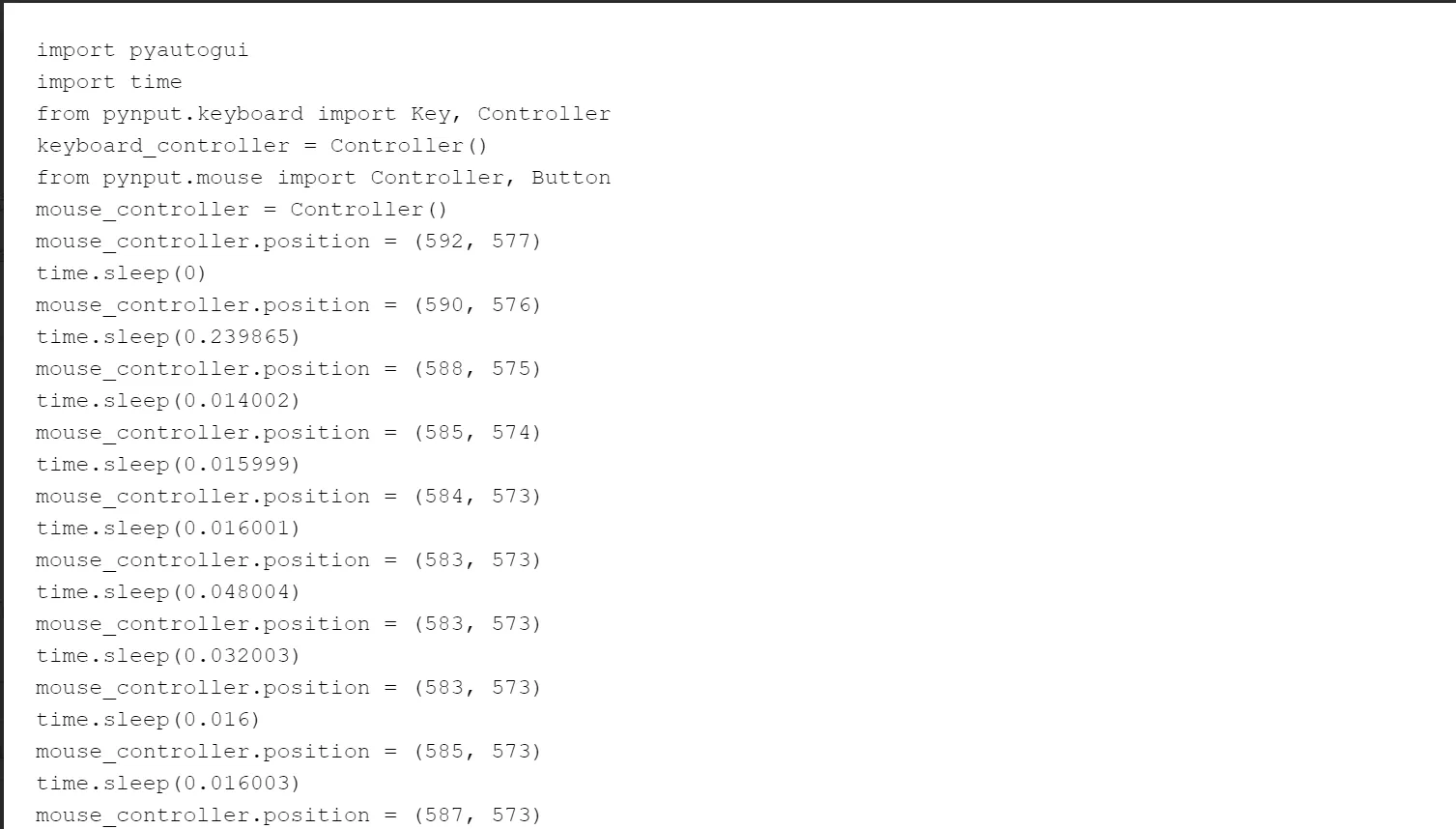
Use Selenium when the work is on a web page, and use the recorder when the work is in a program on the computer. Selenium refers to buttons and input fields from the web page code, such as ID, NAME, XPATH or CSS selector, so it does not depend on on-screen position. The recorder uses PyAutoGUI/pynput to drive the mouse and keyboard according to the recorded positions.
The recorder can therefore be used with programs that have no web page code to refer to. Our test case was typing text in the Notepad program.
- 1
Anonymization: masking data in spreadsheet files
The user prepares a configuration file (file_config), then runs the encode command on the source CSV, XLSX or XLS file through a command window (Terminal). The program creates a masked file and a mapping file in the output folder. To get the original data back, run the decode command with the mapping file.
- 2
Selenium: instructing the browser to carry out steps on web pages
A Python script opens the web page through ChromeDriver, selects menu values, attaches an Excel file, then presses the submit or download button. Our manual explains how to locate buttons and input fields from the web page code.
- 3
RPA recorder: record, then replay
While the user works as normal, the program records mouse clicks and key presses as a log with screen video. The log is then converted into a PyAutoGUI/pynput script for replay, and the log and video of the replay run are saved for later review.
- 4
InMeet: starting meeting video recording from one machine
The machine set to Controller mode instructs the machines that pressed Join in Client mode to start or stop video recording, and the video files are then uploaded to a server.
- 5
DoQuot: quotation screen prototype
The prototype has a quotation status table page and a quotation creation page. These are static screens, and there is an Android installation file (APK) for viewing the screens on a device.
What we built and tested
We built the following programs, scripts, manuals and prototypes, and used them within the team.
- Anonymization program with a requirements document and manuals for creating configuration files, encoding and decoding
- Selenium + ChromeDriver script with a manual on locating buttons and input fields
- RPA recorder: recording script, replay script, and test cases with logs and video
- InMeet app with a 2020 user manual for Controller and Client modes
- DoQuot prototype: quotation status table page, quotation creation page and Android installation file (APK)
Test results for each tool
The Anonymization program and the Selenium script were completed in 2024. The RPA recorder has test case run results. InMeet can start video recording and upload, and DoQuot has a screen prototype. Our 2024 annual project summary document states that the Anonymization program was completed in 5 weeks and the Selenium script in 8 weeks, both in January–March 2024. The results in the table below come from the project summary document, the manuals, and the test log files and videos.
What each tool can do, and its technical limitations
| Tool | What it can do, as tested | Technical limitations |
|---|---|---|
| Anonymization | Completed in 2024. Masks and reverses CSV, XLSX and XLS files with a mapping file | The mapping file must be stored separately from the files passed on |
| Selenium | Completed in 2024 | Cannot capture elements drawn on a canvas |
| RPA recorder | Has test case run results with logs and video; files dated Apr 2023 | Replays by on-screen position |
| InMeet | Can start video recording and upload according to the 2020 manual | Handles video recording and upload; has no speech-to-text transcription |
| DoQuot | Prototype of a status table page and a quotation creation page, with an Android installation file, Oct 2024 | Static screens with no price calculation |
In 2024 we stored the RPA code in the company's reusable code set (Code Reuse).
What we learned
This work offers the following principles for small-scale automation within a team.
- Choose the method according to what the program lets you refer to. If there is web page code to refer to buttons and input fields, use a Selenium-style method first. If not, then use on-screen position recording. Anything drawn on a canvas needs a separate checking method planned from the start.
- Automation must be reviewable afterwards. The RPA recorder keeps logs and video of both the recording run and the replay run, so when results do not match, we can compare which step differed.
- Reversible data masking moves the risk to the mapping file. This file must be stored separately from the files passed on, and access to it must be restricted.
How this approach can apply to your work
If your team has clicking, form-filling, file-attaching or data-masking work whose steps are the same every time, you can use the same approach as this case: separate the work one task at a time, choose the tool according to the type of program, and keep logs for later review. What needs adapting is how buttons and input fields are referenced, when your program differs from the one in this case.
Reusable parts and parts that need adapting
| Job | Reusable | Needs adapting when |
|---|---|---|
| Steps on a web page | Selenium + ChromeDriver, locating elements by ID, NAME, XPATH or CSS selector | The web page has charts or parts drawn on a canvas, or its page structure changes often |
| Steps in a desktop program | Recording to a log and video, then converting them into a replay script | The window position or screen resolution differs from when it was recorded, so you must re-record or adjust the script |
| Masking data in tabular files | A configuration file, and encode/decode with a mapping file | The file is not CSV, XLSX or XLS, or you do not want the data to be reversible |
| Recording meetings | Triggering video recording from a single machine and uploading to a server | You also need a text transcript, so a transcription component must be added as separate work |
| Quotation | Draft designs of the status table page and the quotation creation page | You want calculation from Manday or automatic price estimation, so this part must be newly developed |
- Separate tasks whose steps are the same every time from tasks that change often. Tasks that change often are not suited to record-and-replay.
- Check whether your web page or program allows its buttons and input fields to be referenced.
- Decide who keeps the mapping file and where it is stored before you start masking real data.
- Define the desired result and the scope of each tool clearly from the outset.
Technology used
Frequently Asked Questions
If you want tools like this in your team, how should you start?
We use this set of tools within our own team. If you need a system of this kind, we can develop it according to your scope of work. Start by separating out the tasks whose steps are the same every time, then check whether your web page or program allows its buttons and input fields to be referenced, so that you can choose between Selenium and a mouse and keyboard recorder.
What is the difference between Selenium and a mouse and keyboard recorder?
Selenium controls the browser by referencing buttons and input fields from the web page's code, so it is suited to web apps. The recorder uses PyAutoGUI/pynput to drive the mouse and keyboard as recorded. It can be used with desktop programs, but it depends on positions on the screen.
Can masked data be converted back?
Yes. When you run encode, the program also creates a mapping file. When you run decode with this mapping file, you get the original data back. You therefore need to store the mapping file separately from the files you pass on, and restrict who can access it.
How can InMeet trigger meeting video recording from a single machine?
According to the 2020 manual, the machine set to Controller mode instructs the machines that have pressed Join in Client mode to start and stop video recording, and the video files are then uploaded to a server. InMeet handles video recording. If you also need a text transcript, a transcription component must be added as separate work.
Can Selenium scripts be used on web pages with charts?
They can be used with the buttons, menus and input fields on that web page, but our Selenium scripts cannot capture elements drawn on a canvas, such as charts, because Selenium references elements from the web page's code by ID, NAME, XPATH or CSS selector. If your work requires checking the parts drawn on a canvas, a separate checking method must be planned from the outset.