Upgrading Active Directory and moving email off Exchange Server 2013 for 2 companies in the same group
Customer: A large organisation in Thailand (subcontracted work through a main contractor)
This case covers upgrading Active Directory (the organisation's central system for user accounts and access rights) and moving email off Exchange Server 2013 for 2 companies in the same group. Under the scope of work, the first company moves to Exchange Online on Microsoft 365 and the second moves to Exchange Server 2019, connected to Microsoft 365 in a Hybrid setup. We took on this work as a contractor under a purchase order from the main contractor in 2025.
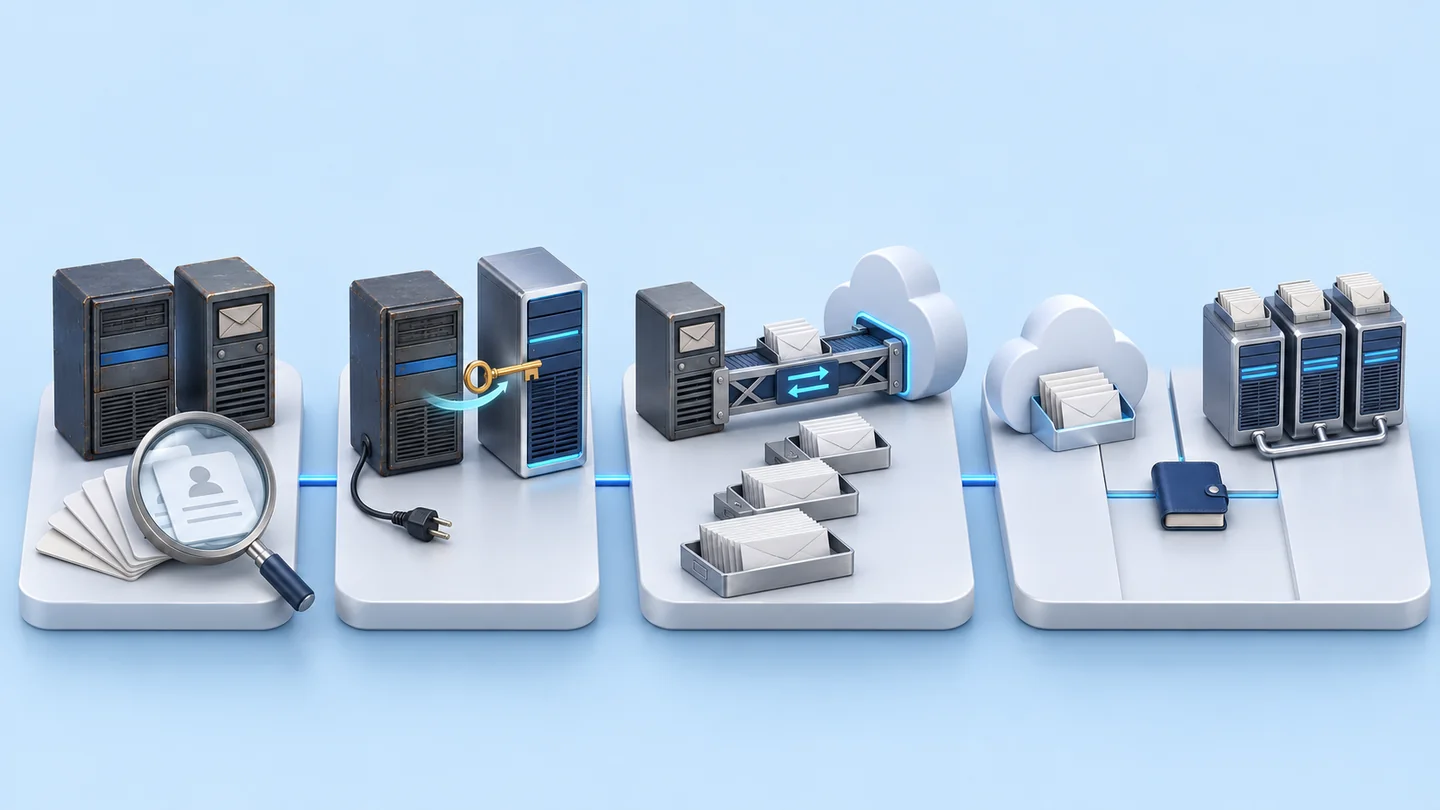
- Existing Active Directory + Exchange Server 2013
- Active Directory health checkIdFix
- New Active DirectoryWindows Server 2022 or later
- Microsoft Entra ID Connect + Exchange Hybrid
- Mailbox migration in batchesPilot first, then migrate all
- Exchange Online / Exchange Server 2019Connected to Microsoft 365
- Industry
- Services
- Year
- 2025–2026
- Scope of work
- Subcontracted work under a purchase order for 2 companies in the same group: an Active Directory health check and a check of user account information with IdFix; upgrading Active Directory to Windows Server 2022 or newer; transferring the FSMO roles and decommissioning the old machines; preparing Microsoft 365 and Microsoft Entra ID Connect; configuring Exchange Hybrid; and moving email off Exchange Server 2013 — the first company to Exchange Online, the second to Exchange Server 2019 in a 3-node DAG connected to Microsoft 365 in a Hybrid setup. Also included are testing with the customer, training for system administrators and the IT Support team, and system documentation.
Summary
- This case covers upgrading Active Directory and moving email off Exchange Server 2013 for 2 companies in the same group. We took on the work as a contractor under a purchase order from the main contractor, and we hold billing and payment documents from 2026.
- Under the scope of work, the first company moves its mailboxes to Exchange Online on Microsoft 365 and the second moves to Exchange Server 2019 in a 3-node DAG connected to Microsoft 365 in a Hybrid setup.
- The work plan begins with an Active Directory health check and a check of user accounts with IdFix, followed by adding new servers on Windows Server 2022 or newer, transferring the FSMO roles and decommissioning the old machines.
- The scope of work includes a script to sync the address book between the Active Directory environments of the 2 companies, so that users can look each other up even though their email sits at different destinations.
- The installation, training and documentation items on this page are the scope under the purchase order, because there is not yet an acceptance report to refer to.
The on-site brief
Email at the 2 companies was still running on Exchange Server 2013 and the existing Active Directory servers. The 2 companies had to change to newer servers and migrate the mailboxes of several thousand user accounts, while the business systems tied to Active Directory, email sending and receiving, and the address book between the 2 companies all had to keep working.
What we did
The scope under the purchase order covers 2 parts: upgrading Active Directory to Windows Server 2022 or newer in the existing domain, and migrating email through Exchange Hybrid, using Microsoft Entra ID Connect to sync user accounts to Microsoft 365. The work begins with an Active Directory health check and a check of user account information with IdFix. Mailboxes move in a pilot round first, then all of them move in batches.
Results
We hold billing and payment documents from 2026 for the work under the purchase orders of the 2 companies. There is not yet an acceptance report or technical report to refer to, so the installation, training and documentation items on this page are the scope under the purchase orders.
How the brief came about
The task in this case is to replace the older user account and email systems of 2 companies in the same group, while users can still sign in to business systems and send and receive email during the change. Email at the 2 companies runs on Exchange Server 2013 and uses the existing Active Directory servers. The companies' business systems use user accounts from this Active Directory for sign-in.
Active Directory is the gateway to almost every system in an organisation, and email is the main communication channel both internally and with business partners. If these two systems are changed without a sequence of work, users may be unable to sign in to business systems or to send and receive email on the same day.
We took on this work as a contractor under a purchase order from the main contractor in 2025. The details on this page come from the scope of work in the quotation and purchase order. What was actually carried out must be checked against the delivery documents.
Requirements and constraints
The main requirement is that the existing systems must remain usable during the change, and the scope of work clearly separates what the customer is responsible for. The items in the scope of work are as follows.
- The new Active Directory servers must join the existing domain, so that business systems tied to Active Directory remain usable.
- The 2 companies use different email destinations, but the address book must still be able to find the other company's names.
- Microsoft 365 and Windows Server licences are procured by the customer.
- The customer provides system and network information and the list of users to migrate in each round, and handles communication with users, including the Helpdesk, during migration.
- Firewall and Proxy must allow the IP ranges and URLs used by Microsoft 365 before Hybrid is configured.
- Enforcing MFA (multi-factor authentication) may affect sign-in via VPN and to internal business systems.
- The scope excludes migrating archived email files (PST) on user machines, upgrading client operating systems, and day-to-day Helpdesk work.
Why the work plan upgrades Active Directory before migrating email
The work plan upgrades Active Directory first because both Exchange and Microsoft 365 use user accounts from the same Active Directory. If user accounts have values that cannot sync to the cloud, or the existing servers are not ready, the problems carry through to mailbox migration. The scope of work therefore starts with an Active Directory health check and a check of account information with IdFix (a tool that finds values in user accounts that cannot sync to the cloud).
Once user accounts are ready, Microsoft Entra ID Connect (a tool that syncs user accounts from Active Directory to the cloud) syncs the accounts to Microsoft 365, and Exchange Hybrid is then configured so that on-premises Exchange and Exchange Online work together. This allows mailboxes to migrate round by round, while users who have migrated and users who have not can still email each other.
For the 2 companies with different destinations, the scope of work includes a script to sync the address book between the Active Directory environments of the 2 companies. Users of the first company on Exchange Online and users of the second company on Exchange Server 2019 can therefore still look each other up.
What is Exchange Hybrid?
Exchange Hybrid connects on-premises Exchange servers with Exchange Online on Microsoft 365 so that they share an email domain and address book. An organisation can then migrate mailboxes round by round, or choose to keep some mailboxes on-premises, while users continue to email each other as normal.
Deliverables under the scope of work
The scope under the purchase orders sets the same deliverables for the 2 companies, differing only in the email destination. The items are as follows.
- New Active Directory servers on Windows Server 2022 or newer that join the existing domain and take over the FSMO roles (the main roles that control the domain) from the old machines
- A Microsoft 365 tenant (the company's Microsoft 365 space) linked to the company's domain, with password policy, Password Writeback and MFA
- Microsoft Entra ID Connect for syncing user accounts to the cloud
- Exchange Hybrid, Mail Flow routes, and a script to sync the address book between the 2 companies
- Mailbox migration: the first company to Exchange Online, the second to Exchange Server 2019 in a 3-node DAG (a group of servers that keeps copies of the mailbox databases on several machines)
- Hands-on training for system administrators and the IT Support team, and system documentation
Work sequence and migration in batches
The work sequence under the scope runs from the user account system to the email system, and mailbox migration is divided into rounds, starting with a pilot round. The 2 companies follow the same sequence.
- 1
Health check of the existing systems
Run an Active Directory health check and check user account information with IdFix to find values that cannot sync to the cloud, then prepare user information, contact lists, the address book and Distribution Groups.
- 2
Prepare Microsoft 365
Configure the Microsoft 365 tenant according to the deliverables above, and install Microsoft Entra ID Connect.
- 3
Upgrade Active Directory
Back up the entire Active Directory before starting, add the new servers to the existing domain, transfer the FSMO roles to the new machines, then decommission the old machines.
- 4
Configure Exchange Hybrid
Connect on-premises Exchange with Microsoft 365 in a Hybrid setup, set up the mail routes, and install the script that syncs the address book between the Active Directory environments of the 2 companies.
- 5
Mailbox migration in batches
Migrate pilot mailboxes first, then migrate all of them according to the Migration Batch plan to each company's destination. The Exchange Server 2019 side has separate load-balancing servers.
- 6
Testing, decommissioning and handover
Test with the customer's application team that systems tied to Active Directory remain usable, test email sending and receiving, decommission Exchange Server 2013, train system administrators and the IT Support team, and hand over the system documentation.
Confirmed results
The confirmable result of this case comes from financial documents, not technical measurements. Inspektion holds billing and payment documents from 2026 for the work under the purchase orders of the 2 companies.
There is not yet an acceptance report or technical report to refer to, so this page does not show the number of accounts migrated or other result figures, and it presents the installation, training and documentation items as the scope under the purchase orders.
What we learned
This scope of work offers 3 principles for migrating user account and email systems.
- Correct user accounts before migrating email. Cloud and on-premises email use accounts from the same Active Directory, so the health check and account information check must be finished before syncing, rather than fixing issues during mailbox migration.
- Group companies can choose different email destinations if the address book and mail routes are in the plan from the start. In this work, the address book sync script was in the scope of work from the quotation onwards.
- Decommission old systems only after testing with the business system owners. The sequence of work is pilot, migrate in batches, test with the application team, then decommission Exchange Server 2013.
How can your organisation apply this approach?
If your organisation still runs Exchange Server 2013 or older Active Directory servers, you can use the same sequence of work as this case: check user accounts, upgrade Active Directory, configure Hybrid, then migrate mailboxes in batches. What needs adapting is the email destination and the business systems tied to your organisation's Active Directory.
Reusable parts and parts that need adapting
| Part of the work | Reusable | Needs adapting when |
|---|---|---|
| Check user accounts | Check Active Directory health and check account data with IdFix before syncing | If many accounts need correcting, allow time to fix them before the sync starts |
| Email destination | Exchange Online or on-premises Exchange connected in a Hybrid setup | If your organisation must keep some mailboxes on premises, the destination for each user group must be chosen first |
| Cross-company address book | Script for ongoing address book sync between Active Directory environments | If your organisation is a single company, you do not need this part |
| MFA | Password policy and MFA enforcement | If a VPN or internal systems sign in with the same account, identify these systems and test them before enforcing |
| Migration in batches | A pilot batch, then migrate everything according to the batch plan | If the number of users differs from this case, the size and number of batches must be set again |
- Check that you have all the Microsoft 365 and Windows Server licences before work starts
- List the business systems that use Active Directory accounts and the person responsible for each, so they can be tested before the old machines are decommissioned
- Prepare the Firewall and Proxy openings for Microsoft 365 and a plan for communicating with users in each batch
Start the pilot with the IT department's mailboxes
Migrate the IT team's mailboxes first as the pilot batch. A team that understands the systems can help find problems with mail routes, the address book and sign-in before all users are migrated.
Technology used
Frequently Asked Questions
Did this work migrate all email to the cloud?
Not all of it. According to the scope in the purchase order, the first company migrates its mailboxes to Exchange Online on Microsoft 365, while the second company migrates to on-premises Exchange Server 2019 in a 3-node DAG, connected in a Hybrid setup with Microsoft 365.
Do existing systems tied to Active Directory still work?
The scope of work is designed so they can continue in use. The new Active Directory servers join the existing domain, and systems connected to Active Directory are tested with the customer's application team before the old machines are decommissioned. Actual test results must be confirmed from the delivery documents.
What does the customer need to prepare?
The customer needs to prepare Microsoft 365 and Windows Server licences, system and network information, technical contacts, lists of users to migrate in each batch, Firewall and Proxy openings, and a Helpdesk team to support users during the migration.
Once the migration is finished, can the in-house IT team look after the system themselves?
This scope of work prepares the handover through hands-on training for system administrators and the IT Support team, together with system documentation. If you need an ongoing support service, you can request a separate quotation.
How much does this kind of work cost and how long does it take?
There is no fixed price. Price and time depend on the number of users, the number of servers, the chosen email destination (cloud or on-premises) and the systems that need to connect to Active Directory. Contact us to request a quotation after an assessment of your existing systems.