Service for renting and supplying InGauge USB for transmitting measurement instrument values into computers for Thai manufacturing plants
Customer: International office equipment manufacturer
InGauge USB sends digital measuring-instrument readings to a computer through USB and is available for rental or outright purchase. A factory in Thailand has rented it for its QC department for 4 periods of 3 months each since September B.E. 2568. Another industrial company in Thailand purchased 3 sets outright in 2568
- Industry
- General manufacturing
- Year
- 2025–2026
- Scope of work
- Renting InGauge USB V2.1 to a manufacturing plant in Thailand, 1 set at a time, for 3 months per round, with rental accessories (waterproof SPC cable and direct-connect USB converter), and selling 3 InGauge USB sets as an outright purchase to another industrial company in Thailand
- Duration
- 3 months per rental round, 4 rounds in total, since Sep 2025
Summary
- InGauge USB V2.1 converts Digimatic/SPC signals from digital measuring instruments to USB and sends values into programs on a computer as if typed on a keyboard (HID mode)
- A manufacturing plant in Thailand rents InGauge USB, 1 set at a time, for 3 months per round, so its QC department can send dimension readings of injection-moulded parts to a computer instead of writing them down by hand
- The customer has issued rental purchase orders for 4 rounds since Sep 2025, and rental round 4 is in progress
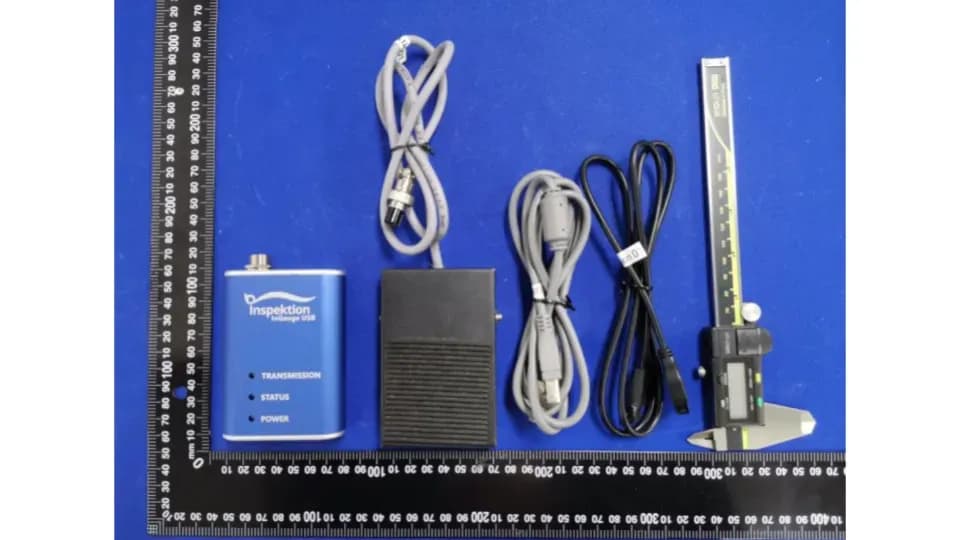
- Measuring instruments without a data cable yet use rented accessories: a waterproof SPC cable with send button, or a direct-connect USB converter that sends values to the computer without going through InGauge
- Another industrial company in Thailand chose to buy 3 InGauge USB sets outright, delivered in Aug 2025
The on-site brief
The customer's QC department measured the dimensions of injection-moulded parts with digital vernier calipers, thickness gauges and dial gauges, and wrote the values down by hand. The customer wanted readings to go directly into a computer and wanted the option to rent or buy the equipment. Some thickness gauge models did not yet have a data cable.
What we did
We rent out InGauge USB V2.1, 1 set at a time, for 3 months per round. The device converts Digimatic/SPC signals to USB and sends readings into a program as if typed on a keyboard (HID mode). For measuring instruments without a cable yet, we also rent out a waterproof SPC cable with send button and the measuring instrument manufacturer's direct-connect USB converter. For another buyer, we sold 3 InGauge USB sets as an outright purchase.
- Digital measuring instrumentVernier / thickness gauge / dial gauge
- Waterproof SPC cable with send button
- InGauge USB V2.1Converts Digimatic/SPC to USB
- Program on the computerReceives values as keyboard input (HID mode)
Current status
Rental round 4 is in progress; its equipment was delivered in Sep 2026. Before this, the customer issued rental purchase orders for 3 rounds (Sep 2025, Jan 2026 and May 2026), and delivery reports (Actual Report) are recorded in the customer's procurement system. The 3 InGauge USB sets bought outright were delivered according to the delivery note in Aug 2025.
Measured results
- InGauge USB sets delivered as an outright purchase to another buyer in Thailand
- 3
- Rental rounds for which the customer issued purchase orders (3 months per round)
- 4
How the brief came about
The challenge in this case was sending workpiece dimension readings from digital measuring instruments directly to a computer, instead of reading the figures on the display and writing them down by hand. The customer's QC department measures injection-moulded parts with digital vernier calipers, thickness gauges and dial gauges. The existing method was recording values by hand.
We surveyed the site before quoting. The survey found that some thickness gauge models did not yet have a data cable, and the customer wanted the option to rent or buy the equipment.
What is Digimatic/SPC?
Digimatic, or SPC output, is the data port on digital measuring instruments such as vernier calipers and dial gauges. This port sends measured values out through a cable, so staff do not have to read the figures on the display and write them down. InGauge receives this signal and converts it to USB.
Requirements and constraints
The device had to receive values from the measuring instruments the QC department already uses, without replacing those instruments. The main requirements and constraints are as follows:
- Receive values from the digital vernier calipers, thickness gauges and dial gauges already in use
- Some thickness gauge models do not yet have a data cable, so an additional cable or accessory has to be sourced
- The customer wanted a choice between renting and buying
- Each rental round must go through the customer's procurement system: quotation, purchase order and delivery report (Actual Report)
Why use InGauge USB in HID mode for this job
We use InGauge USB in HID mode because the computer sees the device as a keyboard, so no driver installation is needed, and values can be sent to any program that accepts keyboard typing, such as a spreadsheet or an inspection record form. The reading goes into the field where the cursor is.
The customer's measuring instruments were already digital. What needed adding was a signal converter to USB and data cables for some models, so the main work was cabling and signal conversion. For some instruments, the measuring instrument manufacturer's direct-connect USB converter is another route, which sends values to the computer without going through InGauge.
- 1
Connect the measuring instrument to InGauge
Connect the measuring instrument to InGauge USB V2.1 via an SPC cable, then connect InGauge to the computer with a USB cable
- 2
Place the cursor in the required field
Open the recording program and place the cursor in the field that will receive the reading
- 3
Measure and send value
Staff measure the part and press send. The reading goes into that field with no manual typing.
Deliverables
We deliver equipment in 2 forms: periodic rental and outright purchase. The items according to the purchase orders are as follows:
- Rental: InGauge USB V2.1, 1 set at a time, 3 months per round, delivered to the plant according to each round's purchase order
- Rental: waterproof SPC cable with send button, for measuring instruments without a cable yet
- Rental: measuring instrument manufacturer's direct-connect USB converter, which connects to the computer without going through InGauge
- Outright purchase: 3 InGauge USB sets, for another industrial company in Thailand
How each InGauge USB rental round works
Each rental round starts with that round's quotation and purchase order, after which we deliver the equipment to the plant. After 3 months, the customer decides whether to issue a purchase order for a new round. Accessories have purchase orders separate from the InGauge set.
The rental sequence, by delivery date in the documents, is as follows:
- Sep 2025: rental round 1 began; 1 InGauge USB V2.1 set delivered
- Oct 2025: rental accessories delivered: waterproof SPC cable and direct-connect USB converter
- Jan 2026: rental round 2 began
- May 2026: rental round 3 began
- Sep 2026: rental round 4 began, and this rental is in progress
Confirmed results up to rental round 4
A manufacturing plant in Thailand has issued purchase orders to rent InGauge USB V2.1 for 4 rounds, 3 months per round, since Sep 2025. Each round has a delivery report (Actual Report) in the customer's procurement system, and rental round 4 is currently in progress.
We delivered 3 InGauge USB sets as an outright purchase to another industrial company in Thailand, according to the delivery note, in Aug 2025. This case has no measured performance figures, such as reduced time or fewer recording errors, so the confirmed results are the continuing rental and the documented deliveries.
What we learned
This work offers 3 principles for sending measuring instrument readings to a computer:
- Check measuring instruments model by model before proposing equipment. In this job, the survey found that some measuring instrument models did not yet have a data cable, so cables or accessories had to be added. The site survey therefore has to come before the quotation.
- Make the data route of each measuring instrument clear. Some send values through InGauge and some through a direct-connect USB converter, so the QC team should know which route each instrument uses.
- Sending values as keyboard input requires no change to the destination program, but values always go into the field where the cursor is, so the field order in the recording form must be set to match the measurement order.
How this approach can apply to your factory
If your QC department uses digital measuring instruments with a Digimatic/SPC port and still records values by hand, you can use the same approach as this case: connect the measuring instruments to InGauge, then send values to the program you already use. What needs adjusting is the cable for each instrument model and how you acquire the equipment, by renting or buying.
Reusable parts and parts that need adapting
| Part of the work | Reusable | Needs adapting when |
|---|---|---|
| Receiving values | InGauge USB receives values from the Digimatic/SPC port | If the measuring instrument has no data port, InGauge cannot receive its values |
| Cables and accessories | Waterproof SPC cable with send button and direct-connect USB converter | If your measuring instrument models differ from this case, the cable for each model must be checked anew |
| Destination program | HID mode sends values to programs that accept keyboard typing | If your program has no field for placing the cursor to receive values, another input method must be chosen |
| How the equipment is acquired | Periodic rental at 3 months per round, or outright purchase | If it will be used over many rounds, compare the total rental cost with the outright purchase price first |
- Send us the brand, model and a photo of the port of every measuring instrument so we can check compatibility before you start renting or buying
- Choose the destination program that will receive values, such as a spreadsheet or an inspection recording app, and arrange the fields to match the measurement order
- Estimate how long you will use it, then compare the total rental cost with the outright purchase price
Read more
- InGauge: converting digital measuring instrument values to a computer via USB, with purchase and rental prices
- InQC: SPC app on Android that receives values from InGauge
- Case: ITAP program developing InGauge USB version 2.1
- Case: quality report web app that receives values from a digital vernier
- Article on SPC and P-Chart for factory managers
Technology used
Frequently Asked Questions
How many months per round can InGauge USB be rented?
In this case, the customer rents for 3 months per round, 1 set at a time, and renews with a purchase order for each round. InGauge's standard rental price is on the product page. For other terms, please request a quotation from us.
Do you need to install additional software or drivers?
No. In HID mode, the computer sees InGauge as a keyboard. Place the cursor in the required field and press send; the reading goes into that field.
What about measuring instruments without a data cable yet?
In this case, we rent out 2 types of accessory: a waterproof SPC cable with send button for connecting to InGauge, and a direct-connect USB converter that sends values to the computer without going through InGauge. Please send us the brand, model and a photo of the port of your measuring instrument so we can check first.
Can I choose an outright purchase instead of renting?
Yes. In 2025, an industrial company in Thailand bought 3 InGauge USB sets outright. Standard prices for both outright purchase and rental are on the product page. For sets that include cables or accessories, please request a quotation from us.
Can it be used with the InQC app?
Yes. In HID mode, InGauge can type readings into the input fields of the InQC app as with other programs. In this case, however, the rental and sales documents specify only InGauge USB and accessories.