Expanding a Power Apps 5M1E production-line form app with approval workflows for an automotive parts manufacturer in Thailand
Customer: Automotive parts manufacturer (Japanese conglomerate)
We expanded the customer's Power Apps prototype to the first 6 production lines of an automotive parts manufacturer in Thailand. Production teams can record 5M1E changes, repairs, rejects and shift reports in the app instead of on paper. We copied and adapted a 37-page app for each line and created approval workflows with Power Automate in 2022.
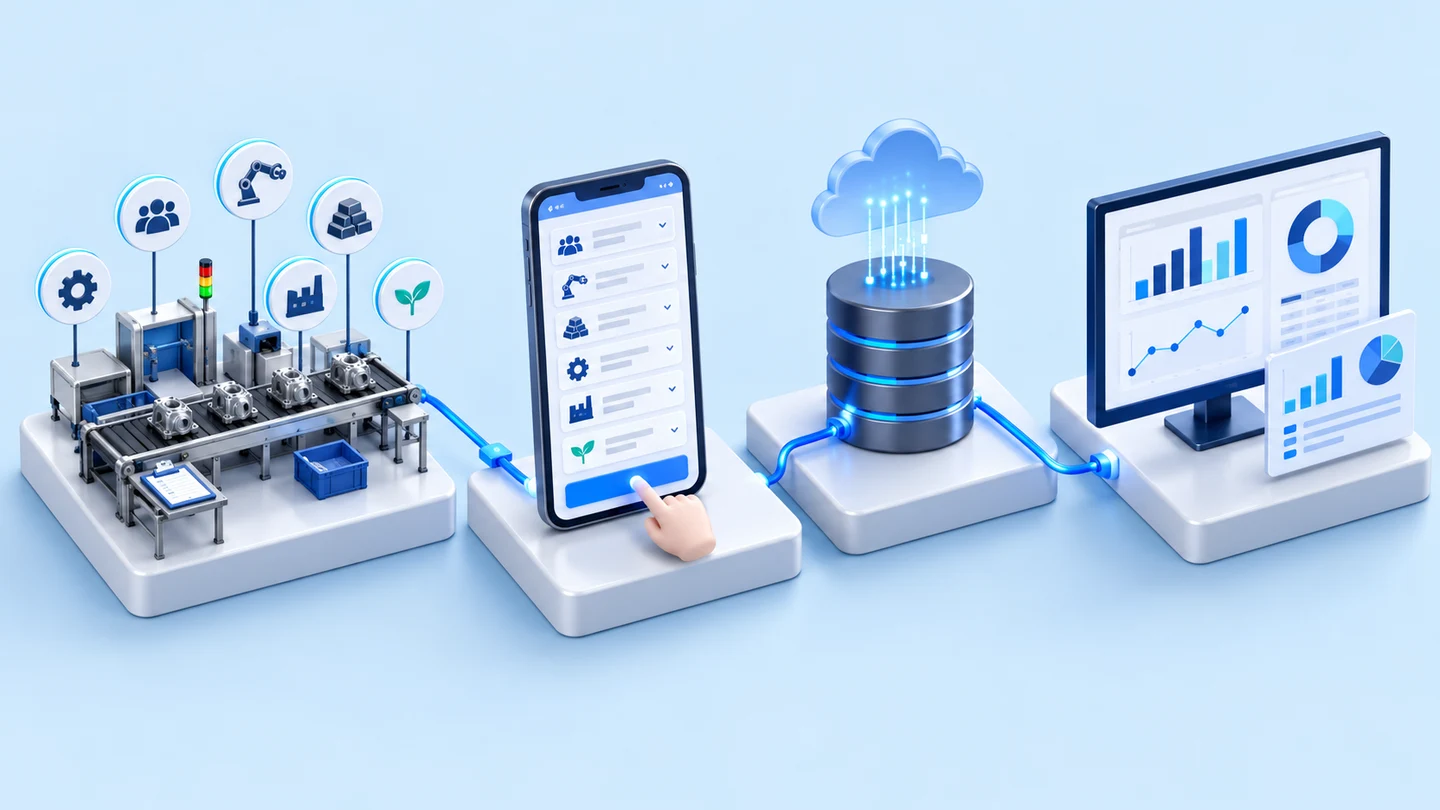
- Production team fills in forms in Power Apps5M1E change record forms, rework, defects, shift reports
- Saved to SharePointSeparated by production line
- Power Automate routes for approvalTL / manager / QA by report type
- View reports and print from the appDefect charts, plan vs actual output
- Industry
- Automotive
- Year
- 2022
- Scope of work
- Copying and adapting the prototype app on Power Apps connected to SharePoint, 37 pages per set, for the first batch of 6 production lines out of a total plan of 58 lines that the customer was handing over in batches; building approval flows with Power Automate; installing via VPN; and preparing development documents, work acceptance forms and user manuals.
- Duration
- Feb–Mar 2022
Summary
- We extended the prototype app on Power Apps built by the customer's team to the first batch of 6 production lines at an automotive parts manufacturer in Thailand, so that the production team could record 5M1E change record forms, rework, defects and shift reports through the app instead of on paper forms.
- The main work was highly repetitive: copying the 37-page app set for each line, fixing the points where the app reported errors, adding the line name and importing the part code list from an Excel file into SharePoint.
- Power Automate routes items to the team leader, manager or QA for approval according to report type, and every step includes a link back to the app.
- Our 2022 annual project summary states that the first phase was successful and that the customer commissioned phase 2 to extend to other groups of production lines.
- This approach is reusable for factories that already use Microsoft Power Apps and have a prototype app. What must be prepared anew each time is each line's master data and each report's approval chain.
The on-site brief
The production lines used several sets of paper forms, and the customer's team already had a prototype app on Power Apps that stored data in SharePoint (Microsoft's document and data storage system). The outstanding work was to copy the app and build approval steps for dozens more production lines.
What we did
We copied the prototype app, 37 pages per set, to the first batch of 6 production lines, fixed the points where the app reported errors, added the line names, and imported the part code lists (Part No.) from Excel files into SharePoint. We then built approval flows with Power Automate (Microsoft's workflow automation tool) that route items to the team leader (TL), manager or quality assurance (QA) according to report type, and installed everything on the customer's system via VPN.
Results
Our 2022 annual project summary states that the first phase was successful and that the customer commissioned phase 2 to extend the app and the LL Patrol form to other groups of production lines, which the same summary states was completed on schedule. We prepared an acceptance test list (Exit Criteria) dated 23 Mar 2022, running from login through to approval.
How the brief came about
The task in this case was to roll out the form app built by the customer's team to every production line. Several sets of paper forms had to move into the app, such as 5M1E change record forms, abnormal workpiece report forms, repair work (Rework) and shift reports. With paper forms, supervisors had to collect documents for signed approval and had to search back through several sets of files when a quality problem occurred.
Each line has a different name, part list and approvers, so copying the app line by line was a large amount of repetitive work that had to be correct at every point.
What is 5M1E?
5M1E refers to the factors that affect production quality: Man, Machine, Material, Method, Measurement and Environment. The 5M1E change record form is used to note which factors changed that day, so that the cause can be traced when a quality problem occurs.
Requirements and constraints
This work had to use the customer's app and source files as its base and had to be repeated identically on every line. The main requirements and constraints were as follows.
- The total plan was 58 lines, handed over by the customer in batches, with 6 lines in the first batch.
- The prototype app has 37 pages per line. Many pages needed fixes at points where the app reported errors, and every line needed the correct production line name entered on the app pages.
- Each line's part code list (Part No.) was in an Excel file and had to be imported into SharePoint before use.
- Approvers differ by report type, and some reports must pass through several stages.
- Installation on the customer's Microsoft system via VPN (an encrypted remote network connection).
- The project plan identified changes to the scope of work along the way as one of the risks.
Why not write a new app for each line?
The work requirements specified using the customer's app and source files as the base. The customer's team had already designed the app pages and the SharePoint database, so our work was to copy and adapt the app correctly for each line and to build all the approval flows.
Deliverables
The scope of the first phase covered the apps for the first batch of 6 production lines, the approval flows and the documents specified in the scope of work, namely:
- Apps on Power Apps, 37 pages per line, with error points fixed and line names added
- Part code lists (Part No.) imported from Excel files into SharePoint
- Approval flows on Power Automate that route items by report type, with links back to the app
- Installation on the customer's system via VPN
- Development documents, work acceptance forms and user manuals
Each line's app works through the same steps, as follows.
- 1
Log in and select a department
Staff log in with their employee ID and select their own department or production line, and the app then takes them to that line's report page.
- 2
Fill in the line's forms
Daily 5M1E change records by shift, line patrol sheets (LL Patrol), process control and safety, abnormal workpiece reports, rework, defects, shift reports, Kaizen plans (continuous improvement plans) and records of abnormality-spotting practice (Ijiwaru Test).
- 3
Saved to SharePoint
Data from each form is stored in that line's SharePoint list. The part code list imported from the Excel file is immediately available for selection during data entry.
- 4
Route for approval with Power Automate
The flow routes items to the team leader (TL), manager or quality assurance (QA) for approval according to report type. Rework goes through the team leader and the manager and then reaches QA. Every step includes a link back to the app page.
- 5
View reports and print
Supervisors view charts of abnormal workpiece counts, rework and defect proportions, view plan vs actual output for the morning meeting (Asakai), and print 5M1E change record forms and daily or monthly forms from the app.
How was this app extended from the first batch of lines to other lines?
This app was extended in phases, starting with the first batch of production lines and then moving on to other groups of lines in phase 2. Working in batches made it possible to test the app on real lines before copying further. The sequence of work was as follows.
- First phase, Feb–Mar 2022: copied and adapted the app for the first batch of 6 production lines and built the approval flows. Our 2022 annual project summary states that this phase was successful.
- Phase 2: the customer commissioned further work to extend the app and the LL Patrol form to other groups of production lines. The same summary states that this phase was completed on schedule.
Confirmed results from project documents
The confirmed results for this case come from 2 sets of documents: our 2022 annual project summary, which states the status of each phase as in the work sequence above, and the acceptance test list (Exit Criteria) dated 23 Mar 2022.
The test list runs from login, selecting a department in the first-batch line zone, and saving and printing 5M1E change record forms, through to approval. This document sets out which tests the work must pass, but it is not a record of acceptance results. This case has no usage figures or business results from after the app went into use, so we report only what is supported by documents.
What we learned
This work offers the following principles for extending a form app across multiple production lines.
- The prototype app must be stable before copying begins. In this work, every line had a 37-page app that had to be checked and corrected page by page. If the prototype changes after copying, all lines have to be corrected to match.
- The more of the differences between lines can be moved into data, the less work each line requires. In this work, the part code list could be imported from an Excel file, but the line name still had to be entered page by page in the app, so the copying work still grew with the number of lines.
- Approval chains must be defined by report type before the flows are built. In this work, each report had different approvers and every step needed a link back to the app. When the approval chain is clear, the approver at each step knows which reports they are responsible for.
How this approach can apply to your factory
If your factory already uses Microsoft Power Apps and SharePoint and has a prototype app for its production line forms, you can use the same approach as this case: copy the app for each line, import each line's master data, then build approval flows by report type. What needs adapting depends on your factory's forms and approval chains.
Reusable parts and parts that need adapting
| Part of the work | Reusable | Needs adapting when |
|---|---|---|
| Form app | How to copy the prototype app for each line and fix error points page by page | No prototype app yet: the app pages must first be designed from the forms actually in use |
| Line master data | Importing the part code list from Excel files into SharePoint | Master data is held in another system: how to retrieve it must be agreed first |
| Approval flow | Flows on Power Automate that route items by report type, with links back to the app | Your factory's approval chain differs from this case: the approvers for each report must be defined anew |
| Installation | Installation on the factory's Microsoft system via VPN | The factory does not allow system access from outside: a different installation plan is needed |
- List all report types, with the approvers at each level for each report, before requesting a quotation
- Prepare each line's master data, such as line names, part code lists, employee lists and approver email addresses
- Set the installation date and prepare VPN access rights in advance, and allow time for testing and corrections before acceptance
Read more
- Custom inspection and control system development service
- Case: Power App for technical catalogue search for engineering teams
- P-Chart Control web app case: recording defects in place of paper
- InQC — SPC app on Android for recording quality measurements
- Article: should factory data be stored in the cloud or on the factory's own servers?
Technology used
Frequently Asked Questions
What software does this system require?
This system uses Microsoft Power Apps for the data entry screens, SharePoint for data storage and Power Automate for approval flows. All of it runs on the customer's Microsoft system. In this case, we installed it via VPN.
If a factory does not yet have a prototype app, can Inspektion design one?
In this case, the customer's team designed the prototype app themselves. We were responsible for copying and adapting the app for each line, importing the part code lists and building the approval flows. If your factory does not yet have a prototype app, we can assess new design work based on the forms you actually use.
How long does it take to extend an app across multiple lines?
The first phase of this case took place over Feb–Mar 2022 for the first batch of 6 production lines. Your project will depend on the number of lines, the number of pages in the app and the readiness of your master data. We quote the price and timeframe after seeing your actual forms.
Can the app be extended to other production lines later?
Yes. In this case we expanded in phases, starting with a first group of 6 production lines and then extending to other groups of lines in phase 2. Each added line needs its own master data, a copied and adapted app, and its own approval flow.