Waste grinder motor control cabinet with automatic reversing to free jammed waste, for a manufacturing plant
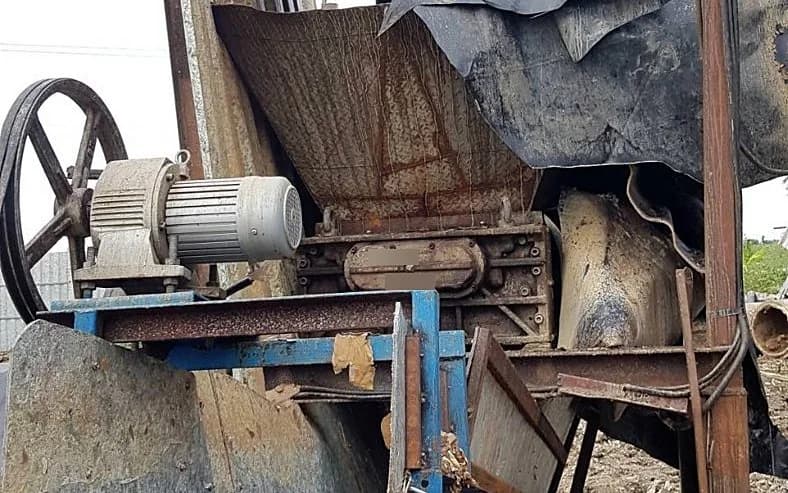
This case is a control cabinet for the 30 hp motor of a factory waste grinder. It measures the motor's electrical current to detect jammed waste, then runs a sequence of stopping, reversing and resuming grinding, up to 3 times before stopping to wait for the operator. We designed, assembled and tested the cabinet in 2019–2020 and installed it at the factory in 2020.
- Industry
- General manufacturing
- Year
- 2019–2020
- Scope of work
- System analysis and design, electrical work, control cabinet assembly, control board programming, configuration screen development, system testing, documentation, and installation of the cabinet on the waste grinder's motor
Summary
- A new control cabinet for a waste grinder's 30 hp motor, using a current sensor to detect jammed waste from the current the motor draws
- When the current is abnormal, the cabinet runs a sequence of stopping, reversing (Reverse) to free the waste, then running forward (Forward) to resume grinding. After 3 cycles, the motor stops and waits for the operator to press the Forward button.
- The front of the cabinet has a Manual/Off/Auto mode selector switch and an emergency stop button, so the operator can run the machine by hand or stop it at any time.
- The control program passed testing at our office in both Auto and Manual modes, and we installed the cabinet at the factory in 2020.
- This work is a capability we have previously developed: a motor control cabinet that reverses to free material according to an agreed sequence, which we designed, assembled, tested and installed ourselves.
The on-site brief
The factory's waste grinder uses a 30 hp motor. When waste jams and can no longer be ground, the motor is overloaded (Overload), and the machine must be stopped, reversed to free the waste, then run forward to resume grinding. The factory wanted a control cabinet that would detect the jam and carry out this sequence, while still allowing manual operation and emergency stopping.
What we did
We designed a new control cabinet that measures the motor current with a current sensor connected to an Arduino ATmega328 board, and switches the motor's direction using a solid-state relay (SSR) and a magnetic contactor according to the agreed sequence. The front of the cabinet has a Manual/Off/Auto mode selector switch and an Emergency Stop button, while system configuration is done remotely through a Wireless Router.
- Current sensorMonitors the waste grinder motor's current
- Arduino ATmega328 boardReads the current value
- Main control board per the system designStop, reverse, forward sequence
- SSR + magnetic contactorSwitches Forward/Reverse direction
- Wireless RouterRemote system configuration
Test results with real workpieces
The control program passed testing at our office in both Auto and Manual modes, and we installed the cabinet at the factory in 2020. The recorded results are the program test results for the 2 modes. No figures from continuous use on site were recorded.
How the brief came about
This requirement came from a waste grinder already in use at the factory. The new control cabinet had to be installed on the grinder's existing motor and use the motor's electrical current as the signal indicating jammed waste. We started this work in 2019.
What are Overload and a Current Sensor?
Overload is when a motor carries more load than it can handle, for example when waste blocks the grinding blades so they cannot turn. The motor then draws an electrical current that differs from normal. A Current Sensor is a sensor that measures electrical current. This system uses the current value as the condition for detecting a jam.
Requirements and constraints
The requirements for this work are set out in a requirements document (User Requirement). The document specifies the grinder's operating sequence, the system configuration and the system's software environment.
- Operating sequence: run forward to grind, detect jammed waste from the current, stop, reverse, then run forward to resume grinding
- Jam clearing is limited to 3 cycles. Once this limit is reached, the motor must stop and wait for the operator to press the Forward button on the cabinet.
- The front of the cabinet must have a Manual/Off/Auto mode selector switch, control buttons, status lights and an Emergency Stop button
- Remote system configuration through a Wireless Router
- System software environment: Python and a MySQL database on the Ubuntu operating system
- The cabinet must be installed on the motor of the waste grinder the factory is using
Why use the motor's electrical current to decide that waste is jammed?
We use the motor's electrical current because jammed waste overloads the motor and makes it draw a current that differs from normal, so the current value indicates a jam from the motor itself. The current sensor sends its readings to an Arduino ATmega328 board, and the cabinet uses this value as the condition for starting the reversing sequence.
We limit jam clearing to 3 cycles so that the cabinet does not keep reversing endlessly when a jam is beyond what reversing can clear. Once the cycles are complete, the operator must be the one who decides to keep running the machine.
- 1
Press Start to run the motor forward
The operator presses the Start button on the front of the cabinet, and the motor turns in the forward direction (Forward) to grind the waste.
- 2
The current sensor detects jammed waste
When waste jams and can no longer be ground, the motor current changes from normal, the front of the cabinet shows the Overload light, and the cabinet stops the motor.
- 3
Reverse to free the waste
The cabinet commands the solid-state relay (SSR) and magnetic contactor to turn the motor in reverse (Reverse) to shift the jammed waste, then stops again before changing direction.
- 4
Resume grinding, or stop and wait for the operator
The motor returns to running forward and resumes grinding. If it jams again, the cabinet repeats the same sequence. After 3 cycles, the motor stops and waits until the operator presses the Forward button on the cabinet.
- 5
Emergency stop and remote configuration
The operator can press the emergency stop button at any time. System configuration is done through a remote connection via a Wireless Router.
What we designed and built
We carried out this work end to end, from system analysis through to installing the cabinet on the grinder's motor. The work is divided into hardware, software and documentation, as follows.
- Forward/Reverse motor control cabinet for a 30 hp motor, with cabinet drawings and electrical work
- Current sensing set: current sensor connected to an Arduino ATmega328 board
- Motor direction switching set: solid-state relay (SSR) and magnetic contactor
- Cabinet front: Start Forward, Stop and Run Reverse buttons, Manual/Off/Auto mode selector switch, status lights and emergency stop button
- Control board program, and a configuration screen accessed through a Wireless Router
- System testing and supporting documentation
What tests has this control cabinet passed?
This control cabinet passed program testing at our office in both Auto and Manual modes, and we installed the cabinet at the factory in 2020. The recorded results are the program test results for the 2 modes. No figures from continuous use on site were recorded, so this page does not report those figures.
What this work shows
This work shows an approach to designing a motor control cabinet that detects jams from the current, then reverses to free material according to an agreed sequence and number of cycles, with a manual operating mode and an emergency stop button.
What we learned
This work offers 3 principles for motor control cabinet jobs that must clear jams according to a sequence.
- The operating sequence and the number of times the cabinet may clear a jam by itself must be agreed in writing before programming. Once that number is reached, the cabinet must stop and wait for a person to decide, and must not continue trying by itself.
- The cabinet's installation location must be confirmed before manufacture and must be safe for maintenance. On this job, the installation area changed during the project, and the project records state that the installation area was not safe for maintenance.
- The scope of electrical and network (LAN) cabling on the factory side must be written clearly from the start of the work. On this job, the project records state that the LAN cabling scope was unclear.
How can you apply this approach to your grinder or shredder?
If your grinder or shredder jams often and the motor direction must be switched to free the material, you can use the same approach as this case: measure the motor current to detect the jam, then have the cabinet run a sequence of stopping, reversing and running forward for the agreed number of cycles. What needs adjusting depends on your motor, machine and installation area.
Reusable parts and parts that need adapting
| System part | Reusable | Needs adapting when |
|---|---|---|
| Jam detection | Measuring motor current with a current sensor | If your motor draws a different current from the machine in this case, the current value treated as abnormal must be redefined from the nameplate data and testing on the actual machine |
| Jam-clearing sequence | The stop, reverse and forward sequence, and stopping to wait for the operator once the cycles are complete | If you need a different reversing time or number of cycles from this case, it must be agreed anew in the requirements document |
| Motor direction switching set | The approach of using an SSR and a magnetic contactor to switch Forward/Reverse direction | If the motor is not 30 hp, the equipment must be sized and the cabinet redesigned |
| Cabinet front | Manual/Off/Auto switch, control buttons, status lights and emergency stop button | If the factory specifies its own button positions or safety requirements |
| System configuration | Remote configuration through a Wireless Router | If the factory does not allow wireless networks in the area, another connection method must be chosen |
- Prepare the motor data from the nameplate, and record the symptoms that occur when the machine jams
- Agree in writing the operating sequence, the reversing time and the number of times the cabinet may clear a jam by itself before stopping to wait for a person
- Confirm the cabinet's installation location and the routes for electrical and LAN cabling before manufacture of the cabinet begins
- State clearly who prepares the area and runs the cabling on the factory's side
Read more
- System development service tailored to factory requirements
- On-site system installation service
- Article: Designing a safe I/O signal isolation board (Arduino/ATmega328)
- Case: RS232 signal isolation board controlling status lights on a workpiece measuring machine
- Case: PLC control of the slide rail on a workpiece measuring set
- Case: PLC System Check for Chulabhorn Royal Academy
Technology used
Frequently Asked Questions
How does the control cabinet know that waste is jammed in the grinder?
The cabinet uses a current sensor to monitor the current the motor draws. When waste jams and can no longer be ground, the current changes from normal, the front of the cabinet shows the Overload light, and the cabinet stops the motor before starting the reversing sequence.
If it is still jammed after reversing, what does the cabinet do?
The cabinet repeats the stop, reverse and forward sequence. After 3 cycles, the motor stops and waits until the operator presses the Forward button on the cabinet. During this time, the operator can press the emergency stop button at any time.
Can the machine still be operated by hand?
Yes. The front of the cabinet has a Manual/Off/Auto mode selector switch, and the control program passed testing in both Auto and Manual modes.
What does the factory need to prepare?
Prepare the motor data from the nameplate, record the symptoms when the machine jams, and agree in writing the operating sequence, the reversing time and the number of times the cabinet may clear a jam by itself. Then confirm a cabinet installation location that is safe for maintenance, and the routes for electrical and LAN cabling on the factory's side.
Can it be used with motors or shredders of other sizes, and how much does it cost?
The same approach can be used, but the cabinet must be designed to suit your motor size, required operating sequence and installation area conditions. We survey the site first, and then issue a quotation.