Machine Vision demo kit for inspecting and counting parts in 5 categories, in general manufacturing (internal development work)
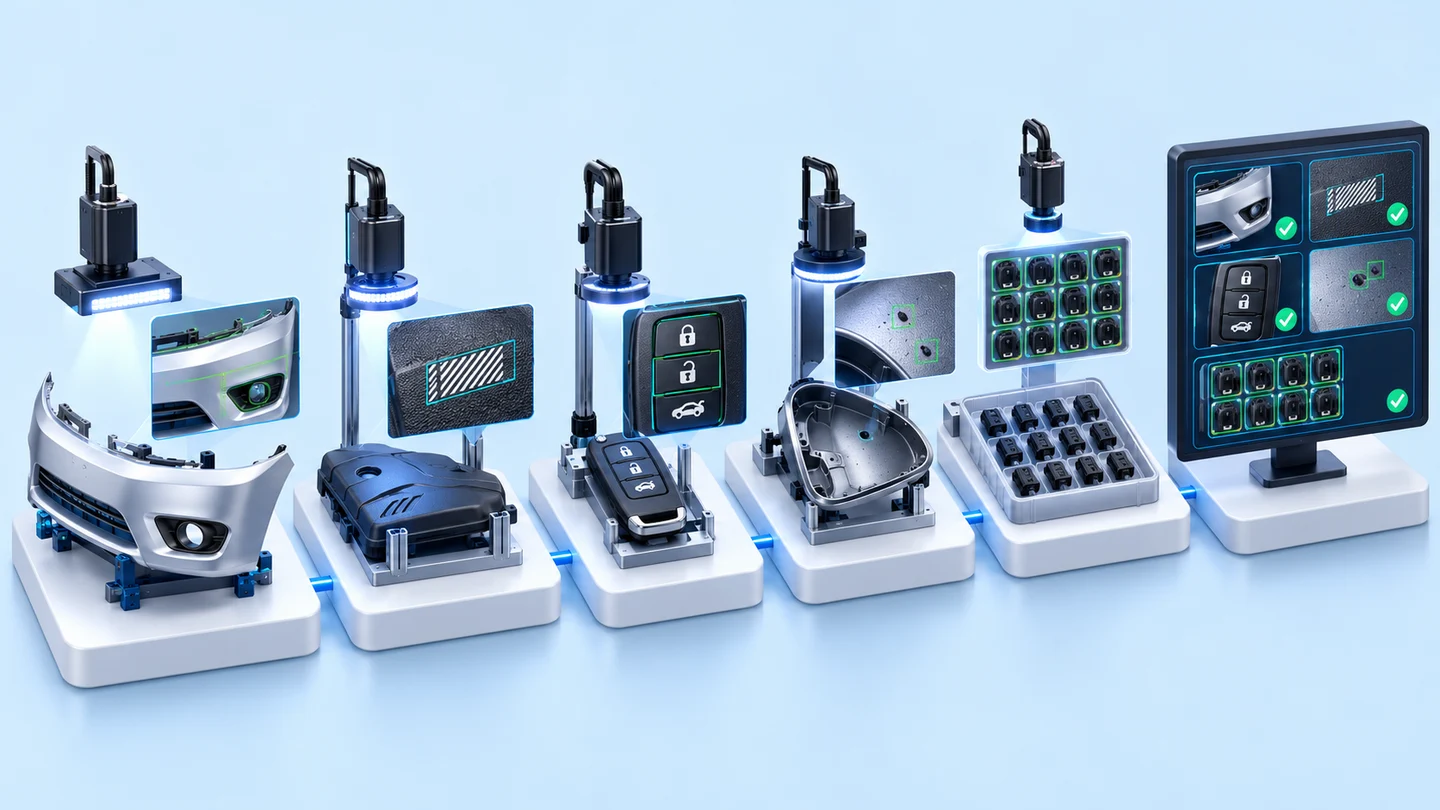
The 5-category Machine Vision demo kit is our internal video library, bringing together examples of camera-based inspection and part counting programs from the company's development and testing work. It is divided into colour and position inspection of automotive parts, print pattern inspection on labels, character inspection on remote control buttons, counting foreign spots on white powder, and part counting. This set of folders was created in the company data archive in May 2017.
- Development and testing workAutomotive parts, labels, remote control buttons, white powder, workpieces
- Machine Vision programImage processing
- Video of the program runningFiles found in 4 categories
- Video Demo ProgramInternal demo media library, 5 job categories
- Industry
- General manufacturing
- Scope of work
- Video Demo Program folder split into 5 job categories: 3 inspection categories (colour and position of automotive parts, print patterns on labels, characters on remote control buttons) and 2 counting categories (foreign spots on white powder, part quantity). Video files found in 4 categories, and 3 categories come from work that has a separate case on this website.
Summary
- Our Machine Vision demo kit is divided into 5 job categories: colour and position inspection of automotive parts, print pattern inspection on labels, character inspection on remote control buttons, counting foreign spots on white powder, and part counting.
- This kit is demonstration material for capabilities we have developed, compiled from Machine Vision program development and testing work.
- The Video Demo Program folder was created in the company data archive in May 2017. Video files were found in 4 categories, while no files have yet been found for the white powder spot counting category.
- Work in 3 categories comes from work that has a separate case on this website: the prototype camera for airbag component inspection, the white powder spot counting work and the camera-based part counting work.
- The videos are only examples of how the programs work. Real work must be tested with good and defective parts from your factory before a project starts.
The on-site brief
Factory managers and engineers who have not yet used Machine Vision (camera systems and programs that inspect parts automatically) find it hard to assess how a camera could inspect or count their parts. Explanations in documents or slides alone do not show how the system takes in an image and what result it gives.
What we did
We compiled videos showing how the Machine Vision programs developed and tested by the company work, organised them into a Video Demo Program folder split into 5 job categories, and stored them in the company data archive together with presentation slides and company introduction documents.
Test results with real workpieces
This demo kit folder was created in the company data archive in May 2017. Video files were found in 4 categories, while no files have yet been found for the white powder spot counting category, and 3 categories come from work that has a separate case on this website.
How the brief came about
This demo kit is a video library showing our Machine Vision programs as they inspect and count parts, divided into 5 job categories. Each Machine Vision job depends on the part, the lighting and how the part is placed, so explanations on slides alone struggle to show how the system takes in an image and what result it gives.
We organised the videos into separate folders by job type, and the videos in some categories come from work that has a separate case on this website.
What is Machine Vision?
Machine Vision uses cameras, lighting and an image processing program to inspect or count parts from images, for example checking whether a part is in the correct position, whether printed characters are complete, or how many parts there are, and then passes the result to people or a control system for further work.
Limitations of this demo kit
This demo kit shows examples of how the programs work, not measured test results. The limitations you should know before using it as a reference are as follows.
- The description of each category on this page is based on folder and file names, so we do not state specifications or inspection results for each category.
- For the category counting foreign spots on white powder, no video files have yet been found in the folder. Details of this work are in a separate case.
- This page does not show the videos yet, because the footage must first be checked to confirm it contains no parts, signs or brand names that cannot be disclosed.
- The videos come from development and testing work. The parts, lighting and line speed in your factory may differ from those in the videos.
How is this demo kit divided into job categories?
The demo kit is divided into 5 categories by job type: 3 inspection categories and 2 counting categories. Inspection is split into colour and position inspection, print pattern inspection and character inspection. Counting is split into spot counting on material surfaces and part counting.
- 1
Develop and test the program on each type of job
The file names found cover the airbag component inspection station test set, label work, remote control button work and part counting work.
- 2
Record video while the program runs
We keep videos of the program inspecting or counting parts as files, separated by job type.
- 3
Organise into a Video Demo Program folder
We organised the videos into folders split into 5 job categories and stored them in the company data archive together with presentation slides and company introduction documents.
What the demo kit contains
The demo kit has folders for 5 job categories, and video files were found in 4 categories. This table summarises which categories have video files and which have source work with a separate case on this website.
Job categories in the Machine Vision demo kit
| Job category | Video files | Source work with a separate case |
|---|---|---|
| Colour and position inspection of automotive parts | Found (from the airbag component inspection station test set) | Prototype Camera for Airbag Assembly Inspection |
| Print pattern inspection on labels | Found | No source work found |
| Character inspection on remote control buttons | Found | No source work found |
| Counting foreign spots on white powder | Not yet found | Program counting black spots on white powder trays from camera images |
| Part counting | Found | Camera-based part counting on a vibrating track (Machine Vision Counter) |
What the data archive can confirm
What the data archive can confirm is that our Video Demo Program folder was created in May 2017 and is divided into 5 job categories.
Of the 5 job categories, we found video files in 4, and 3 categories come from work that has a separate case on this website. For the status of that work, such as whether it is a prototype or has been delivered, please see the case for each piece of work.
What we learned
Organising this demo kit offers 3 principles for using video as an example of Machine Vision work.
- Examples should be separated by job type, because colour and position inspection, character reading and counting use different images and criteria.
- A demo video is not a test result. The video shows that the program works with one set of parts. Confirming that it can be used for your work requires testing with good and defective parts from your factory, and counting how many defective parts were caught out of those actually present.
- Videos from real work must be checked before use outside the company. In this kit, some folder and file names contain names that cannot be disclosed, so we are not showing the videos until the parts, signs and brand names in the footage have all been checked.
How this approach can apply to your work
You can use the categories in this kit as a starting point: check the table below to see which category your inspection or counting work is closest to, then send us sample parts for assessment. What needs adjusting is the lighting, camera position and pass or fail criteria when your parts or line differ from the source work.
Choose the category closest to your work
| If your work is | Closest category | Needs adapting when |
|---|---|---|
| Checking that components are all assembled and in the correct position | Colour and position inspection of automotive parts | Parts with a different shape or colour require lighting and camera position to be tested again. |
| Inspecting print patterns or characters on parts | Print pattern inspection on labels, or character inspection on remote control buttons | If part surfaces reflect light differently or the typefaces differ, new criteria must be set. |
| Counting defect spots on material surfaces | Counting foreign spots on white powder | If the background colour or spot size differs, testing with real samples is needed first. |
| Part counting | Part counting | If parts are stacked or fed quickly, the feeding method must be reviewed first. |
- Prepare sample parts, both good and defective.
- Define clearly what you want the system to inspect or count, and what the pass or fail criteria are.
- Specify where the inspection results must be sent, for example a screen, a signal light or the line's control system.
- Assembly sequence inspection may be able to use an off-the-shelf camera, while specialised inspection such as part position or characters usually requires a system designed around the part.
Read more
- Case: Prototype Camera for Airbag Assembly Inspection
- Case: Program counting black spots on white powder trays from camera images
- Case: Camera-based part counting on a vibrating track (Machine Vision Counter)
- Custom inspection and control system development service
- AI / IoT consulting and system design service
- Article on choosing an AI inspection camera: off-the-shelf Task Cam or custom-built Machine Vision
- Article: Vision Inspection, part quality inspection with AI
- Article: Vision Counting, part counting with AI
Technology used
Frequently Asked Questions
What work does this demo kit include?
It has 5 job categories: colour and position inspection of automotive parts, print pattern inspection on labels, character inspection on remote control buttons, counting foreign spots on white powder, and part counting. Video files were found in 4 categories, while no files have yet been found for the white powder spot counting category.
Can I ask to see the demo videos?
This page does not publish the videos yet, because the publication rights for the footage must be checked first. If your work is close to any category, you can send us sample parts for assessment.
What is the status of the source work for each category?
Work in 3 categories has a separate case on this website: the prototype camera for airbag component inspection, the white powder spot counting work and the camera-based part counting work. Each case states the status of its work. For the label print pattern inspection category and the remote control button character inspection category, no source work has yet been found.
If my factory's work does not match these 5 categories, can it be done?
We can assess it. The videos are only examples. Every Machine Vision job must be judged from the actual parts and site conditions. Prepare sample parts, both good and defective, along with pass or fail criteria, and send them to us for assessment.
What are the price and timeline for developing a real system?
There is no standard price. Price and timeline depend on the parts and the scope of work. We can assess them after seeing the parts or surveying the site. Please contact us to request a quotation.